Can I set Presets for favorite Sirius stations?

RobS10

Member
New '22 ORP and learning the fancy dancy stereo. I have my favorite AM/FM broadcast radio presets programmed, but haven't seen a way to program the satellite stations. Is it possible?
 
Register to hide this ad
Same way you set the Fm stations. Tune to desired station, press and hold desired preset slot.


Sent from my iPhone using Tapatalk
 
Same way you set the Fm stations. Tune to desired station, press and hold desired preset slot.


Sent from my iPhone using Tapatalk

Thanks. I assumed it was possible, but didn't notice the Presets on the Sirius screen. I also assumed I would get a 1 year trial of Toyota Connect with Remote Start with my ORP, so was a little skeptical. I'll look at the manual again :D.
 
Same way you set the Fm stations. Tune to desired station, press and hold desired preset slot.


Sent from my iPhone using Tapatalk
Worked perfectly. I figured tapping the Presets button would revert to the radio, but it didn't. Thanks!
 
Radio Stations

Hold the button to preset the station. Then you can go to "audio/presets" for a list of your presets. It will list AM and FM as well as satellite stations. You can use the directional arrows to show more stations.
 
Is there a way to just flip through the Sirius channels via the steering wheel controls? If I am on Sirius source and try to do that with the next track button it flips the screen to the preset screen that has a mix of FM/AM/Sirius presets. I just want to browse through Sirius stations in order.

I don't know if there is a way to do that from the steering wheel. It does work using the Tuning knob on the head unit. As far as I know, there is no station
Seek function on the steering wheel.
 
A little off topic but related: I don’t subscribe to Sirius XM. Is there a way to remove Sirius from the rotation on the steering wheel mode button?
 
Is there a way to just flip through the Sirius channels via the steering wheel controls? If I am on Sirius source and try to do that with the next track button it flips the screen to the preset screen that has a mix of FM/AM/Sirius presets. I just want to browse through Sirius stations in order.

On the left side of the steering wheel, use the left/right arrows rather than the up/down arrows for scrolling through the SiriusXM stations.

That one caveat, at least on my 19 ORP, is that it only scrolls through the same genre of stations, i.e. if you are on the Garth channel, you’ll only scroll through the country stations, Alt Nation only gets you the rock channels, etc.

 
On the left side of the steering wheel, use the left/right arrows rather than the up/down arrows for scrolling through the SiriusXM stations.

That one caveat, at least on my 19 ORP, is that it only scrolls through the same genre of stations, i.e. if you are on the Garth channel, you’ll only scroll through the country stations, Alt Nation only gets you the rock channels, etc.

Aren't the Left/Right arrow controller volume Up/Down?
 
For me, that’s correct. It’s volume control which I don’t understand. Toyota should have done volume: up/down and track change: left/right. No clue why they decided to switch universal controls to something completely opposite.

I have a separate volume control rocker button
 
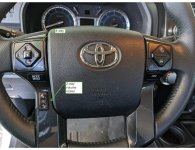
Ah yours is like this?
f8f524ae098a606961db30a264f9b2bf.jpg

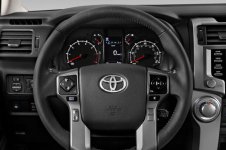
My bad...I just assumed the steering wheel buttons haven't changed in a while. This is what ours looks like...
 

Attachments

  • 2022_toyota_4runner_steeringwheel.jpg
    2022_toyota_4runner_steeringwheel.jpg
    54.9 KB · Views: 217
Is there a way to UNSET preset stations from Sirius/XM?

I let the promo 3 month subscription lapse; I don't use/like Sirius/XM enough to actually pay for it. I had a few channels preset/saved, but now whenever I accidentally thumb through all the FM and AM stations I saved and get to an XM preset, it locks me into the XM promo channel...and will not let me get out of it. I need to go into the radio menu, go to the source settings, and manually change the source from XM back to AM or FM in order to get back to regular radio.

I'd rather just delete all the XM presets and avoid that, but I'm not seeing a way how...
 
My bad...I just assumed the steering wheel buttons haven't changed in a while. This is what ours looks like...

So what does the rocker on the left side do if it's not for volume?

I don't have Carplay or Google Auto, that came out in 2020, I believe.
 

Members online

Forum statistics

Threads
278,316
Messages
3,554,120
Members
248,016
Latest member
Advally Service

Trending content

Back
Top