Post pics???

Register to hide this ad
Did a search and couldn't find instructions. How do you post a pic on this forum?

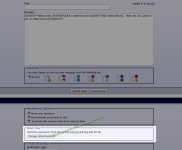
Here's how I upload photo directly from my computer:

hit the "manage attachments" button shown in the first capture below.

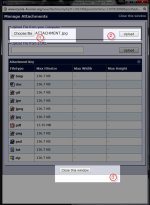
in the second capture:
1 - press this button to find your attachment
2 - once it is found, select it. press "upload"
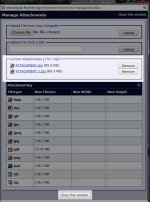
...continue this until all of your attachments have been uploaded (see third capture, the uploaded attachments will populate a list
3 - press "close this window" to go back to the text editor. If you successfully uploaded your images, they should appear when you press "preview post"
 

Attachments

  • ATTACHMENT.jpg
    ATTACHMENT.jpg
    85.5 KB · Views: 119
  • ATTACHMENT 2.jpg
    ATTACHMENT 2.jpg
    85.3 KB · Views: 114
  • ATTACHMENT 3.jpg
    ATTACHMENT 3.jpg
    89.9 KB · Views: 113
Here's how I upload photo directly from my computer:

hit the "manage attachments" button shown in the first capture below.

in the second capture:
1 - press this button to find your attachment
2 - once it is found, select it. press "upload"
...continue this until all of your attachments have been uploaded (see third capture, the uploaded attachments will populate a list
3 - press "close this window" to go back to the text editor. If you successfully uploaded your images, they should appear when you press "preview post"

Tried this. Just get error. Is there a file size restriction??
 

Members online

Forum statistics

Threads
278,307
Messages
3,554,049
Members
248,016
Latest member
Advally Service

Trending content

Back
Top