No problem, glad I was able to help.
Ill be honest, sometimes it feels like a chore or homework, especially before a big trip, but it's importation to do it, and stay relevant with your own equipment. I consider it a tool, and knowing how to use the tool is important without external aids.
Speaking from experience, I am a HUGE fan of actually knowing how to program my radio in the field, without a computer, using the front panel. I make a habit of knowing how to use my primary radios without manual, and without software. (VM-V71a, Yaesu VX-7R, and all my 2m Yaesu mobiles)
The Kenwood is amazingly intuitive to program using the front panel, and once you do it a few times its easy to throw in a couple extra repeaters while sitting in the drivers seat. Most of the time I just open iPhone repeater book while I still have cellular data, screen shot all the repeaters within 50-100 miles, then go off-road. When I have time, like when at camp, I try various stations and input/save them to memory if they pan out. That's how I build MY list and inventory of repeaters. Most everything in my radios memory I have used, or know works...
That said, for my "master list / bulk memory management" I do use a piece of software. It allows you to quickly important, organize, and move things around. Very useful when needing to update multiple radios...
I have Chirp, I also have other software I use for Yaesu and other brand radios...
BUT for my Kenwood radio, I don't use anything other than the included / free software that is available for download from Kenwood.
AMATEUR RADIO PRODUCTS SOFTWARE DOWNLOADS / KENWOOD
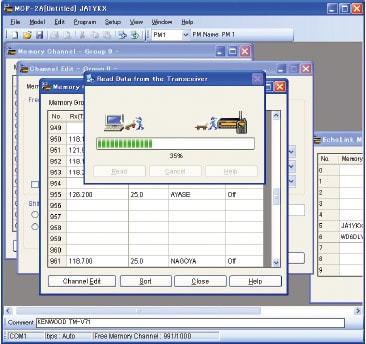
The Kenwood software has radio specific controls and its the best option... so use that.
Just for convenience, I do keep a long programming cable plugged into the radio and available from the passenger seat... I could at any time just sit inside the truck with a laptop and do more advanced tasks, but as mentioned above, I most of the time use the front panel when in the field.
I've found them for a lot less, but this is the programming cable... pretty generic item.
https://www.amazon.com/Hosa-DBK-110-...s=Hosa+DBK-110
Hope that helps.