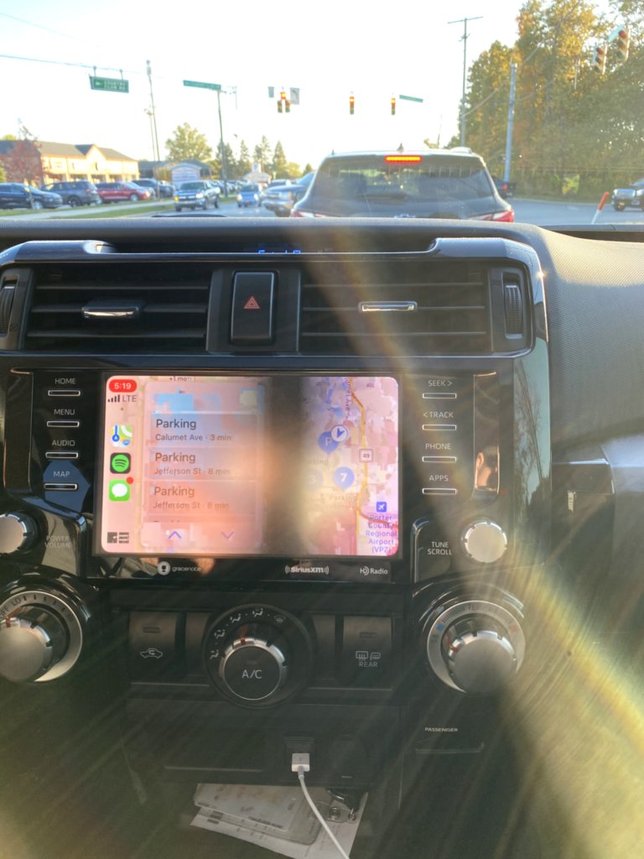
2020 4Runner: Anyone have any issues with the multimedia system?

mrt6644

Member
I just got a 2020 TRD Off Road Prem. It comes with the bigger screen multimedia system, Alexa, car play, connected services.
I am having mixed issues with the whole unit.
No Entune apps show up on the screen, and I'm not sure if this is normal? Does Alexa replace that?
Alexa only seems to respond when the car is off, acc on.
The music source changes depending if Alexa overrides it.

Car Play seems to be working normally.

Also, despite what the salesman told me, the remote start/app functions do not come on this model./
Apparently, these app/remote services are only available on the TRD Pro and Limited models.
The Toyota site is very vague on this. You have to look at the pdf brochure or online specs to see what each trim comes with.
 
Register to hide this ad
If you're using Android Auto then the Entune stuff seems to disable except for a couple of things that are only available when you're parked.

I'm not an Alexa user but I can say that the Google Assistant works just as you'd expect it to when you have Android Auto running. I plug my phone in, hit the "Menu" button, then touch "Android Auto". It will start the last running nav app (or depending on if you had music playing when you turned the car off from Google Music). I was using Maps but then started using Waze. It opens right to ways and it's off and going. In the bottom corner there is a bell and assistant icon. The bell is notifications that can be played back as audio and the assistant is a manual way as opposed to "Hey Google".

Overall I'm pretty satisfied. Pretty much the reason I went for a 2020 instead of a '19. The price to keep the nav updated is not cheap. I know it's silly to complain about but in our '13 Odyssey it is completely out of date and is sometimes confused when we're on roads that have been added since we purchased it. Some will reply that "it's nice to have it when you don't have cell signal and you're off road." My reply there is "that's what Gaia is for :)" I just need to see if Gaia supports Android Auto.

If you need some pics or have some questions I can wonder out to the car and double check but it all seems pretty easy to me.
 
Monstarmike I hope you're still out there. I do have simple, i hope, question on my system. 2021 Off-roan Premium.
I connect my android smartphone via cable.
Tap android auto and I can then click on Waze. Nice.
I can even click on my Podcast player and select which one.
BUT I don't see a music player?
Do you know of a way that I could actually see/use the music player
I use on my smartphone?
Thanks for any clues.
 
I just got a 2020 TRD Off Road Prem. It comes with the bigger screen multimedia system, Alexa, car play, connected services.
I am having mixed issues with the whole unit.
No Entune apps show up on the screen, and I'm not sure if this is normal? Does Alexa replace that?
Alexa only seems to respond when the car is off, acc on.
The music source changes depending if Alexa overrides it.

Car Play seems to be working normally.

Also, despite what the salesman told me, the remote start/app functions do not come on this model./
Apparently, these app/remote services are only available on the TRD Pro and Limited models.
The Toyota site is very vague on this. You have to look at the pdf brochure or online specs to see what each trim comes with.

The remote start thing is done with the key fob and I thought you had to have the JBL system for it to be functional.

My Entune app on my iPhone was deleted after they said it was no longer supported

Alexa is Android trash and I dont use it but Siri works very well. I have a little review of the system in my latest travels.

5296 Miles in 14 Days


.
 
My salesperson also ...implied... that remote start was included in the TRD ORP I was buying. That was a nice surprise.

My big issues are with Carplay. It has randomly called people in my favorites list, and the screen looks like it dropped some acid after I've been on the phone for a while. (attached)

The dealer allegedly can't reproduce this, though, so they refuse to do anything other than update it.

sRvoxVZFQ52znQ4wvMWQXQ
 
My salesperson also ...implied... that remote start was included in the TRD ORP I was buying. That was a nice surprise.

My big issues are with Carplay. It has randomly called people in my favorites list, and the screen looks like it dropped some acid after I've been on the phone for a while. (attached)

The dealer allegedly can't reproduce this, though, so they refuse to do anything other than update it.

sRvoxVZFQ52znQ4wvMWQXQ

The display got weird for me a few times when I was out in the sticks and the cell phone coverage wasn't that great
 
My problem is I can't get setup. I've gone through plugging in the access code several times. Have an account on Toyota Owners.
Hit the SOS button and talked to 2 people. One supposedly got it all fixed but about 20 days later the phone App still says setup takes upto 24hrs.
The next SOS guy tells me everything looks good on his end which means I need to call the 800 number. Of course nobody answers after 40 minutes on-hold.

Remote start via key fob feature went away after the 1st SOS conversation.
About all I get is some notification I've left a door open or some other silly thing. That part is annoying. I have to close the hatch after letting my dog out or I'll get a reminder from Big Toyota.

EDIT:
I forgot to mention, I can't listen to Voicemail via the JBL speakers. Galaxy S10+.
 
Last edited:
My problem is I can't get setup. I've gone through plugging in the access code several times. Have an account on Toyota Owners.
Hit the SOS button and talked to 2 people. One supposedly got it all fixed but about 20 days later the phone App still says setup takes upto 24hrs.
The next SOS guy tells me everything looks good on his end which means I need to call the 800 number. Of course nobody answers after 40 minutes on-hold.

Remote start via key fob feature went away after the 1st SOS conversation.
About all I get is some notification I've left a door open or some other silly thing. That part is annoying. I have to close the hatch after letting my dog out or I'll get a reminder from Big Toyota.[

Did you see this?
privacy psa.
 
You would need the JBL radio for auto start. Easy work around is the accesorides or 12v solutions. I am still waiting for my accesorides to ship so I cannot comment on the install. I just have my phone connected via USB for android auto. You can just Google command for music via YouTube. You can also just speak for Google maps Nav. Make sure to use a good USB cable as some will randomly drop connection. Android auto will not work via wireless or Bluetooth. Hope this helps.
 
My problem is I can't get setup. I've gone through plugging in the access code several times. Have an account on Toyota Owners.
Hit the SOS button and talked to 2 people. One supposedly got it all fixed but about 20 days later the phone App still says setup takes upto 24hrs.
The next SOS guy tells me everything looks good on his end which means I need to call the 800 number. Of course nobody answers after 40 minutes on-hold.

Remote start via key fob feature went away after the 1st SOS conversation.
About all I get is some notification I've left a door open or some other silly thing. That part is annoying. I have to close the hatch after letting my dog out or I'll get a reminder from Big Toyota.

EDIT:
I forgot to mention, I can't listen to Voicemail via the JBL speakers. Galaxy S10+.

i know this sounds silly, but have you tried logging out of the app and then back in? That fixed the "takes up to 24 hours to activate" issue for me.
 
i know this sounds silly, but have you tried logging out of the app and then back in? That fixed the "takes up to 24 hours to activate" issue for me.

Yes and also refreshed the status.
When I brought it up to the Dealer they made a call and I was instructed to disconnect the battery for 30 mins. That didn't help at all.

I forget what I did over the internet or phone that improved the situation. Just a step closer.

Maybe I'll try the battery disconnect again since there's some change/improvement since the Dealer discussion.
 
Other than the nav feature in Android Auto I found it really annoying. I have a phone mount so I use my phone for navigation when I need it. I uninstalled Android Auto. Didn't see a need for it. If I want to stream music I got Pandora for that. The 4runner will read my texts, etc. I recommend 12v Solutions for the remote start. I got one and the install was pretty straight forward. Customer service was really good as well. They walked me through the fob programming.
 
Yes and also refreshed the status.
When I brought it up to the Dealer they made a call and I was instructed to disconnect the battery for 30 mins. That didn't help at all.

I forget what I did over the internet or phone that improved the situation. Just a step closer.

Maybe I'll try the battery disconnect again since there's some change/improvement since the Dealer discussion.

Sorry, that's all i got. That's what the friendly people on the end of the SOS button had me do when it freaked out after I renewed the service.
 
My salesperson also ...implied... that remote start was included in the TRD ORP I was buying. That was a nice surprise.

My big issues are with Carplay. It has randomly called people in my favorites list, and the screen looks like it dropped some acid after I've been on the phone for a while. (attached)

The dealer allegedly can't reproduce this, though, so they refuse to do anything other than update it.

sRvoxVZFQ52znQ4wvMWQXQ

Next time your screen drops acid, take a video, that should work with your dealership.
When I had headunit issues on my previous 2014, I took a video........that was good enough for them!
 
My salesperson also ...implied... that remote start was included in the TRD ORP I was buying. That was a nice surprise.

My big issues are with Carplay. It has randomly called people in my favorites list, and the screen looks like it dropped some acid after I've been on the phone for a while. (attached)

The dealer allegedly can't reproduce this, though, so they refuse to do anything other than update it.

sRvoxVZFQ52znQ4wvMWQXQ

This also has happened a few times with Apple Carplay for me. Seems to be triggered by being on a phone call and running a navigation app (Google Maps) at the same time. I have seen others describe the issue while using Waze. I believe it has only really happened if I follow this sequence:

1. Current active phone call outside of vehicle
2. Start vehicle, do not terminate phone call, plug into apple carplay, phone call eventually transfers over
3. Continue with active phone call, enter google maps destination and start route guidance
4. eventually experience this acid-trip screen after a little while

I don't think the issue resolves until I turn off the car and start it again. Unplugging/plugging in phone cable doesn't seem to work.

I do not think I'm running the most updated HU software when I compare the version numbers on my system to those posted on other threads. The dealer has not updated it, I have not specifically requested it, and the over-the-air update system says no update is required. I have my last "free" service in a few thousand miles and will see if they can update it then.
 
The Sirius app konks out for me. It forgets my preferred channels and recents.
I can cure this by starting the app on my iPhone and then they appear in CarPlay.

Texting and using Apple Maps some times makes the directions stop functioning. I tap on the map icon and then it will restart with the correct directions

One thing I do like about CarPlay is that I can set a direction and then do another search say for “Burger King” or Gas stations and it doesn’t loose the original directions.
 

Members online

Forum statistics

Threads
278,312
Messages
3,554,089
Members
248,016
Latest member
Advally Service

Trending content

Back
Top