Can't add service record

korborh

New member
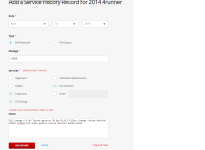
When I try to add a service history from the toyota owners service history page, the record does not get added saying "Unable to save Vehicle details. Please try later"

I filled the form completely and the site wont take it. Is anybody else facing this issue?
 

Attachments

  • Untitled.png
    Untitled.png
    41.6 KB · Views: 941
Register to hide this ad
Have been trying since a few days now. Different computers, browsers etc. So wondering if others seeing the same issue as I am.
 
It's not you. I had the same problem a few days ago, then forgot to go back. Guess I will wait a few days and hope their webmaster fixes it.

I will try to add the old entries next time I do maintenance because I will probably forget to try again.
 
Toyota's website is, frankly, a piece of shit.

I have that exact problem sometimes. Best I can figure, if you check multiple boxes, it won't save. Try just checking one box and detailing the other items in the notes; or inputting multiple entries, one for each check box.

My wife's Prius, the dealer ****ed up the odometer entry during her last free service and now the website reads 100,000 miles more than the car actually has. We can't correct it ourselves because it keeps defaulting to the wrong reading, and Toyota won't correct it without the dealer's input. It's not a big deal, but it's a freaking aggravation. If Carfax gets a hold of that before the dealer fixes it (and they haven't yet) then they will list an 'odometer discrepancy'.

 
Meefzah, I tried several combinations and still does not work. With 1 checked, multiple checked etc.
The site is poorly designed, though the last time I added the record it worked fine. I guess I will wait a bit to see if this gets fixed.

I am avoiding going to the stealership for any work to avoid "techs" screwing up which they do very often of even simple tasks.
 
I started using that site when I bought my 4Runner, it lost all my records somewhere around 50k miles. I still use it but do not depend on it. I keep a handwritten notebook in the glove box with every service that I perform.

Just like I have done with every other vehicle I have owned.
 
When I try to add a service history from the toyota owners service history page, the record does not get added saying "Unable to save Vehicle details. Please try later"

I filled the form completely and the site wont take it. Is anybody else facing this issue?

Although I can't speak for TMS, I work for an agency that supports the owners site. I will forward this thread to the appropriate people.

This is my first post but not the last, I actually picked up my '16 T4R TEP yesterday with 1 mile on the odometer...been lurking here for a while but thought I could try to help a fellow owner out.
 
I am also keeping record of everything but digitally on a spreadsheet with embedded pictures of receipts. I was using the toyota site just to keep it available to toyota/dealership should it ever be needed for reference. Looks like the site/record history is not very reliable.
 
Yeah, I don't bother with that website. I keep an excel spreadsheet for all my vehicle maintenance/mileage and keep all receipts in a folder in my safe.
 
Current mileage is set to 14,000 and I am adding the maintenance at 13955.
But then again page is giving a nonsensical error message, so its broken.
 
Looks like a good fail safe way to do it. Do you keep receipts for oil, filters etc.?

Actually I do, but only up until the warranty expires. I keep the receipts in a file in my office along with oil analysis reports and other vehicle related information.

Now that my extended warranty has expired on the 4Runner, I am not as anal about keeping every receipt.
 
Answer to Can't Add a Service Record

Having the same problem, then tried viewing all service records for the vehicle. Then went to add a record and it worked fine. I've been able to replicate the problem and solution over time. I think the add a service record function on the "short view" just plain doesn't work and needs to be pointed to the one on the "view all records". I did notice that they were slightly different, one being the date format on the broken method is month-year-day, while on the one that does work month-day-year, which makes more sense anyways. I agree with others, pretty crappy website overall but I'm using it because both of my toyotas (RAV4s by the way) were bought used and the previous owner's records (both were dealer maintained) were there so I thought I'd just keep my records there too.
 
I just tried to use it yesterday, but it didn't work. I'll give your solution a try.

Edit: It worked today.
 
Last edited:

Members online

No members online now.

Forum statistics

Threads
278,309
Messages
3,554,071
Members
248,016
Latest member
Advally Service

Trending content

Back
Top