
Etune and HVAC knob questions

nyvram

New member
First, when playing via bluetooth etune displays the album artwork, artist, song title and album name. Awesome. Love seeing the album art along with the song info. However if I take a phone call or switch to FM or any other input and switch back, all of that disappears and I get a generic bluetooth icon and blank fields for the music. The fix? I get to my destination and turn the car off. When I get back in, it all comes back until I actually try to do anything with my radio. Anyone else have this issue? I'm using an android phone and since I don't have navigation, there is no firmware update available for my etune. Is this just a known issue or is anyone else having this problem?

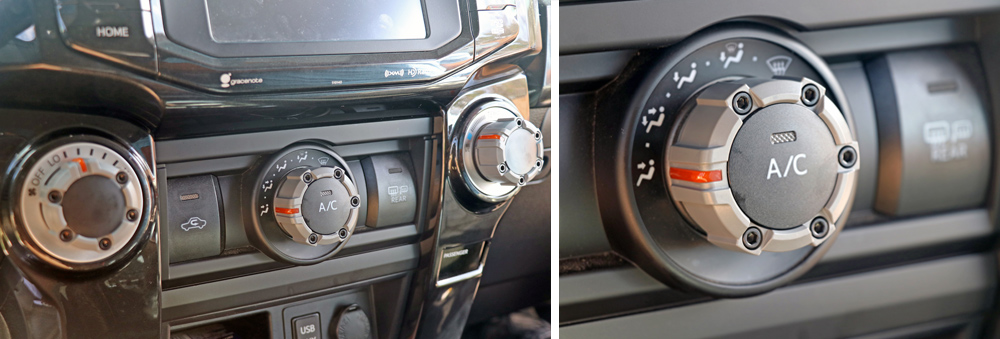
Second, my HVAC knob has the usual suspects: floor, floor/vents, vents, vents/defrost...but a little "." between each one. I just realized I can click the knob into these no-man zones. What is going on here? Why are there 'in between' settings and will my 4runner explode if I accidently click on one by mistake?
ajt_custom_climate_control_knobs_5th_gen_4runner_05.jpg
 
Register to hide this ad


Second, my HVAC knob has the usual suspects: floor, floor/vents, vents, vents/defrost...but a little "." between each one. I just realized I can click the knob into these no-man zones. What is going on here? Why are there 'in between' settings and will my 4runner explode if I accidently click on one by mistake?

ajt_custom_climate_control_knobs_5th_gen_4runner_05.jpg


The dots are just half way between each symbol. Allows some air blending.
 
As for your settings on Entune, if I get what you’re asking, just hit the home button on the lower left. If you’ve set up what you want to see in the home setting, it will show back up when you hit it.

For instance, if I get a text message and I play it in Entune, it just hangs there in the messaging app instead of reverting back to the former screen. So I hit the home button and it goes back to how I have the home screen set up.

I am aware of the album art display, but believe you have to be in the audio mode for it to display. The album art does nothing for me, so I keep my Entune in home screen mode, split between presets for phone numbers, what’s playing (few radio stations in my neck of the sagebrush and all suck, so I play all my music from the more than 1,000 songs I have on my phone) and the third pane showing navigation.
 
As for your settings on Entune, if I get what you’re asking, just hit the home button on the lower left. If you’ve set up what you want to see in the home setting, it will show back up when you hit it.

For instance, if I get a text message and I play it in Entune, it just hangs there in the messaging app instead of reverting back to the former screen. So I hit the home button and it goes back to how I have the home screen set up.

I am aware of the album art display, but believe you have to be in the audio mode for it to display. The album art does nothing for me, so I keep my Entune in home screen mode, split between presets for phone numbers, what’s playing (few radio stations in my neck of the sagebrush and all suck, so I play all my music from the more than 1,000 songs I have on my phone) and the third pane showing navigation.

this screen:

xmmeHEF.png


i have about 20,000 albums hosted on my plex server that I stream when i'm driving and often people riding with me want to know what we're listening to so its super lame when this info appears only as long as i'm careful to never switch out of 'bluetooth' input mode to FM or any other input. when i come back, everything you see on the screen is gone even though the music plays fine. as long as i never stray from bluetooth it will display art & song info from any album i'm playing. i accidently switch inputs..POOF gone forever.

it never comes back no matter what you do until i power off the vehicle and start it up again.

i was hoping someone on here knew about this and had a way to 'jiggle the toilet handle' and get this info to reappear without having to switch the car off.
 
Last edited:
… when this info appears only as long as i'm careful to never switch out of 'bluetooth' input mode to FM or any other input. when i come back, everything you see on the screen is gone even though the music plays fine. as long as i never stray from bluetooth it will display art & song info from any album i'm playing. i accidently switch inputs..POOF gone forever.

it never comes back no matter what you do until i power off the vehicle and start it up again.

I was sitting in my T4R yesterday waiting for my wife when I thought about your question, so tried playing around to see if I could find an answer to your question.

In Audio mode (same screen as your photo shows), I’d switch back and forth between FM and Bluetooth. Each time my screen would revert back and show what it did prior to the switch in input.

So, I really don’t have an answer to your original question. Sorry. :noidea:
 
Last edited:
I was sitting in my T4R yesterday waiting for my wife when I thought about your question, so tried playing around to see if I could find an answer to your question.

In Audio mode (same screen as your photo shows), I’d switch back and forth between FM and Bluetooth. Each time my screen would revert back and show what it did prior to the switch in input.

So, I really don’t have an answer to your original question. Sorry. :noidea:

interesting! so that leads me to believe its plexamp that may be the culprit. hadn't even thought of that. i'll try streaming from pandora or youtube music or something and see what happens. it might be the application on your phone that is pushing the music to bluetooth rather than the head unit itself.
 
Your device being the culprit sounds plausible. Since I bought a new Android phone last year, I notice that often the song information showing on screen is incorrect. I estimate the incorrect info to be about 50% of the time). Entune will be showing a different artist, song title and a different genre than what’s playing. Checking my phone, in all cases the phone is displaying the correct song info, but Entune is not. So apparently the phone is where the problem lies and isn’t communicating well with Entune. Or there is an incompatability issue with the newer version of Android and the 2018 version of Entune. When I set up Entune with my old phone, Entune always displayed the correct song/album. I’ve tried unpairing and pairing the two numerous times to see if it improves the problem without success.
 
Last edited:

Members online

No members online now.

Forum statistics

Threads
278,316
Messages
3,554,111
Members
248,016
Latest member
Advally Service

Trending content

Back
Top