How the heck do you get a Youtube video to show the preview image in our posts???

Register to hide this ad
Like this?


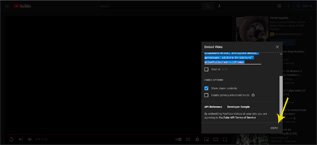
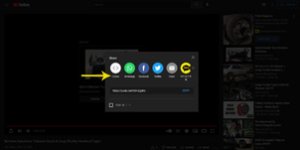
Youtube video -> Share -> Embed, copy, paste code in post (not sure why theres so much space above)

HTML:
<iframe width="560" height="315" src="https://www.youtube.com/embed/HK9-IZjpIHc" title="YouTube video player" frameborder="0" allow="accelerometer; autoplay; clipboard-write; encrypted-media; gyroscope; picture-in-picture" allowfullscreen></iframe>
 
When you click on the share button for a video, click on "Embed" and then copy and paste that into your post.
 
Like this?


Youtube video -> Share -> Embed, copy, paste code in post (not sure why theres so much space above)

HTML:
<iframe width="560" height="315" src="https://www.youtube.com/embed/HK9-IZjpIHc" title="YouTube video player" frameborder="0" allow="accelerometer; autoplay; clipboard-write; encrypted-media; gyroscope; picture-in-picture" allowfullscreen></iframe>

YES!! Been trying to do this for years. I think it's the forum software glitch as other forums do it just from pasting the link. So, you have to be on youtube first, then click share, then embed from youtube?
 
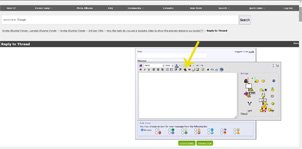
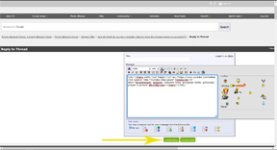
On YT vid, click share. Embed window will pop up, click copy. On T4R fourm, click reply. Click the link icon. Link window will pop up, paste the YT code. Hit submit if your done.


Attachments

  • Untitled-1.jpg
    Untitled-1.jpg
    28.2 KB · Views: 140
  • Untitled-3.jpg
    Untitled-3.jpg
    29.5 KB · Views: 142
  • Untitled-2.jpg
    Untitled-2.jpg
    28.1 KB · Views: 148
  • Untitled-5.jpg
    Untitled-5.jpg
    37.1 KB · Views: 126
YES!! Been trying to do this for years. I think it's the forum software glitch as other forums do it just from pasting the link. So, you have to be on youtube first, then click share, then embed from youtube?

Yes thats correct.
 

Members online

Forum statistics

Threads
278,443
Messages
3,551,262
Members
248,151
Latest member
Mike Sargent

Trending content

Back
Top