More 4Runner Apple CarPlay Weirdness

RichinRidgewood

New member
I have a 2020 SR5 Premium and an iPhone 11 ProMax w/ATT

I cannot find the option or button on how to search Apple Music on the infotainment system when I'm in the truck either driving or parked. How do you do this? Is it possible? I can do it on the phone no problem.

"Hey Siri" is "on" on the iPhone but it does not work when I say "Hey Siri". I cannot find how to enable this in the truck. From reading on the internet I know that "Hey Siri Play the Grateful Dead ...." is supposed to search Music and bring up selections. Siri works in other vehicles including in my wife’s 2018 Acura TLX SHAWD w/Tech Pkg. Any suggestions on how to do this in the 4R?

CarPlay, when using Apple Maps, will often drop the directions if you start Voice to Text texting with Siri. It does it whether I'm using the internet connection in the truck or the internet connection on the phone. That crap is inexcusable on a released version of software. I don't know if it's a Toyota issue or an Apple issue.

Im getting a buttload of mail about switching insurance now. "You are a safe driver". Obviously the truck is telling Toyota corp. whats going on and they are selling it to whom ever has the cash.

Other than that everything is great facepalm.
 
Last edited:
Register to hide this ad
So if you hold the button on the steering wheel that has the face on it you will get Siri. You have to push it and hold it. If you tap it will get the Toyota in-car attendant. The in-car attendant has a few screens of weirdness. I’m sure it works but I just haven’t tried it. It’s very easy now to text and to receive texts and to use Apple Music by using this button and Siri. It also seems that now Apple CarPlay doesn’t have a delay in it when trying to get to SiriusXM favorites etc. I’ll pay attention to this more when I continue to use Apple CarPlay and Siri because this may have eliminated the issues that I’ve been having between texting, directions and losing the directions.
 
I have a 2020 SR5 Premium and an iPhone 11 ProMax w/ATT

I cannot find the option or button on how to search Apple Music on the infotainment system when I'm in the truck either driving or parked. How do you do this? Is it possible? I can do it on the phone no problem.

"Hey Siri" is "on" on the iPhone but it does not work when I say "Hey Siri". I cannot find how to enable this in the truck. From reading on the internet I know that "Hey Siri Play the Grateful Dead ...." is supposed to search Music and bring up selections. Siri works in other vehicles including in my wife’s 2018 Acura TLX SHAWD w/Tech Pkg. Any suggestions on how to do this in the 4R?

CarPlay, when using Apple Maps, will often drop the directions if you start Voice to Text texting with Siri. It does it whether I'm using the internet connection in the truck or the internet connection on the phone. That crap is inexcusable on a released version of software. I don't know if it's a Toyota issue or an Apple issue.

Im getting a buttload of mail about switching insurance now. "You are a safe driver". Obviously the truck is telling Toyota corp. whats going on and they are selling it to whom ever has the cash.

Other than that everything is great facepalm.

Hey man, please forgive the stupid questions:

First, how are you connecting your phone to the vehicle? It is my understanding that CarPlay only works when connecting via USB, and specifically only the leftmost USB port below the entertainment center. Can you confirm Thats how your connecting?

If youre connected via USB, you should just have an option to select CarPlay on your screen in the vehicle. Once you select CarPlay, you should then have your suite of CarPlay options.

Another thing I noticed with my vehicle: when I had my phone registered as a Bluetooth device, it sometimes behaves really weirdly even when I’m connected via USB. I decided to just delete my phone as a Bluetooth device and ONLY use usb to reduce any confusion on the part of the head unit. Have you tried deleting your phone as a Bluetooth device?

Regarding that app and your driving habits, you can opt out of that from app on your phone. Thats not CarPlay, thats the Toyota app.

If youre connecting over Bluetooth, or somehow just not launching CarPlay, your only way to operate maps and get turn by turn directions, as well as browse Apple Music would still most easily be done directly on the phone.
 
Last edited:
Hey man, please forgive the stupid questions:

First, how are you connecting your phone to the vehicle? It is my understanding that CarPlay only works when connecting via USB, and specifically only the leftmost USB port below the entertainment center. Can you confirm Thats how your connecting?

If youre connected via USB, you should just have an option to select CarPlay on your screen in the vehicle. Once you select CarPlay, you should then have your suite of CarPlay options.

Another thing I noticed with my vehicle: when I had my phone registered as a Bluetooth device, it sometimes behaves really weirdly even when I’m connected via USB. I decided to just delete my phone as a Bluetooth device and ONLY use usb to reduce any confusion on the part of the head unit. Have you tried deleting your phone as a Bluetooth device?

Regarding that app and your driving habits, you can opt out of that from app on your phone. Thats not CarPlay, thats the Toyota app.

If youre connecting over Bluetooth, or somehow just not launching CarPlay, your only way to operate maps and get turn by turn directions, as well as browse Apple Music would still most easily be done directly on the phone.

Thank you

I will check this out when I’m in the truck and post what i find.
 
I keep my usb plug in all of the time. When I plug it into my phone my iPhone Apple play comes on right away for my music. I have no issues with my 2020 Pro.
 
I am always using the USB connection however I will turn off my Bluetooth on the phone to be sure its not connecting/trying to connect that way also.
 
I deleted my iPhone Bluetooth in the truck and so far it hasn’t dropped the directions when texting when using Apple CarPlay so far thats good.
 
I'll be honest, not sure if I can help you but maybe I can post my problem here and save a thread. I always have to manually set the input on the system to Bluetooth to play the sound on my iPhone. Meaning I hop into the 4runner, I play a video on my phone, and it's clearly connected to the system. But I have to manually hit audio and then select bluetooth.

Of course, when I plug into Apple CarPlay then bluetooth doesn't matter.

Any fix for this?
 
I deleted my iPhone Bluetooth in the truck and so far it hasn’t dropped the directions when texting when using Apple CarPlay so far thats good.

Ok, also just to confirm: the USB port youre using is the one located in the lower-left corner of the dash/entertainment center, correct?


When I connect to the vehicle via USB, my screen pretty much nearly immediately just reads “CarPlay” on the phone. Is this your experience?
 
Ok, also just to confirm: the USB port youre using is the one located in the lower-left corner of the dash/entertainment center, correct?


When I connect to the vehicle via USB, my screen pretty much nearly immediately just reads “CarPlay” on the phone. Is this your experience?

SR5 Premium only has one on the lower right lower

Yes
 
You could try updating the en-tune system. Go on Toyota USA and create an account. Somewhere in that website you can find software updates and install the updates via USB jump drive. I just updated my system today on our 2020 ORP.

Apparently you can perform these updates over the air too, but i don't know if it works or not. The software update was 470 megabytes.

The details on the update state it was for better en-tune and apple play stability.
 
You could try updating the en-tune system. Go on Toyota USA and create an account. Somewhere in that website you can find software updates and install the updates via USB jump drive. I just updated my system today on our 2020 ORP.

Apparently you can perform these updates over the air too, but i don't know if it works or not. The software update was 470 megabytes.

The details on the update state it was for better en-tune and apple play stability.

The infotainment system has updated a few times since I have owned the vehicle. I believe recently, within the last 3 months, it has asked to install updates twice when I first connect my iPhone and start the truck. I dont know what the changes were however I do have to hit “Install” for it to go.
 
I'll be honest, not sure if I can help you but maybe I can post my problem here and save a thread. I always have to manually set the input on the system to Bluetooth to play the sound on my iPhone. Meaning I hop into the 4runner, I play a video on my phone, and it's clearly connected to the system. But I have to manually hit audio and then select bluetooth.

Of course, when I plug into Apple CarPlay then bluetooth doesn't matter.

Any fix for this?

Thanks.
Awhile ago I wanted to play an internet Jazz station that was playing on my iPhone and I had to control it with my iPhone and I didnt get the “cover art” on my infotainment system. I think I gave up trying to figure out how to control it with my infotainment system because I found I could use SiriusXM and have a better selection of the music I liked. Sirius is so cheap now Ill keep it. Before I was considering dumping it.

There is some music on archive.org I would like to pipe into the truck some day and be able to control it with the infotainment system however I’ll work on that some other time.
 
Thanks.
Awhile ago I wanted to play an internet Jazz station that was playing on my iPhone and I had to control it with my iPhone and I didnt get the “cover art” on my infotainment system. I think I gave up trying to figure out how to control it with my infotainment system because I found I could use SiriusXM and have a better selection of the music I liked. Sirius is so cheap now Ill keep it. Before I was considering dumping it.

There is some music on archive.org I would like to pipe into the truck some day and be able to control it with the infotainment system however I’ll work on that some other time.


Man I wish I could be more helpful here. It sounds like the phone is not firing up CarPlay when you’re connecting. On your phone you may want to try going to settings/general/CarPlay. Ensure your 4Runner is listed there as you should be able to tap on customize and see what CarPlay apps are enabled. Maybe music was toggled off? You can also delete your car from here and start over, which you may want to consider.
 
Man I wish I could be more helpful here. It sounds like the phone is not firing up CarPlay when you’re connecting. On your phone you may want to try going to settings/general/CarPlay. Ensure your 4Runner is listed there as you should be able to tap on customize and see what CarPlay apps are enabled. Maybe music was toggled off? You can also delete your car from here and start over, which you may want to consider.

CarPlay is definitely operating. The apps that I expect to see are there in the CarPlay infotainment screens.

It might be just me that I cannot see how to properly play something off, for example, archive.org without using my iPhone to control it.

More importantly is stopping the directions from dropping out while texting and listening to SiriusXM. Ill see if deleting the iPhone in the bluetooth in the truck has solved the issue.
 
Last edited:
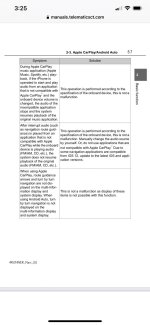
Here are a few things out of the 4R owners manual
 

Attachments

  • 031A72C6-35D5-4A4E-BC1D-DA9959EE6622_1_101_o.jpg
    031A72C6-35D5-4A4E-BC1D-DA9959EE6622_1_101_o.jpg
    133.3 KB · Views: 617
Last edited:
Since deleting the truck from Bluetooth, Apple CarPlay has brought up the SiriusXM “Favorites” and “Recents” up quicker it seems. In the past it would take awhile. I haven’t had the directions get dropped when texting since either.

I will say this, using the button on the steering wheel is a lot less distracting than trying to use the touch screen when driving. Siri can do most of what I want just by asking. Weather report, Music selections, Messaging, phone calls etc.

I even say “Thank you Siri” after getting what I wanted just to see what “she” replies and that’s fun.
 
CarPlay Map App voice volume won't adjust

I just got a new 2024 Limited. I can't find anyway to adjust the CarPlay volume while getting Map App guidance directions. Same thing with Waze App. Other threads mention adjusting the volume while the CarPlay voice is speaking (my old Nissan worked that way for Radio vs Navigation).
Nothing I try has worked. I've tried adjusting volume on the iPhone, adjusting volume while the voice is speaking, looked for adjustments on the iPhone Settings, and I looked for adjustments in the 4Runner screen setup. Any ideas?
 

Members online

Forum statistics

Threads
278,309
Messages
3,554,075
Members
248,016
Latest member
Advally Service

Trending content

Back
Top