New BlackVue Dash Cam

4RunnerBen

New member
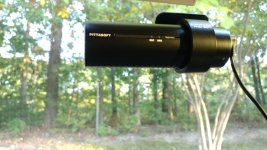
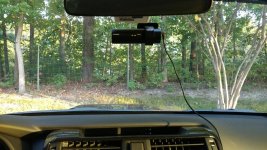
After a couple of close calls, I decided to get a dash cam. Hopefully it'll cover my butt in the even that someone rams me while texting. I decided to go with the BlackVue DR750S-1CH. I'll post a link to it below.

https://www.blackvue.com/dr750s-1ch/

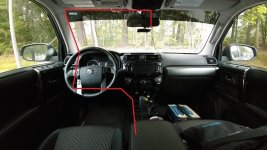
It comes with a very long cigarette lighter adapter for power. Is there a way I can route this cable as seen in the 1st pic? I don't want to go setting in A pillar air bags off. I'll see if I can upload some footage from a very close call that I had this morning as well.
 

Attachments

  • 4Runner dash cam.jpg
    4Runner dash cam.jpg
    119.1 KB · Views: 2,718
  • Dash Cam 1.jpg
    Dash Cam 1.jpg
    133.9 KB · Views: 1,367
  • Dash Cam 2.jpg
    Dash Cam 2.jpg
    145.4 KB · Views: 1,402
Register to hide this ad
Id like to see the video output from that when you get it installed. Ive been thinking about one of the dual channel versions.

Also, if that is the cloud version, check your security settings. The default allows other people to see your location, listen to your audio/video.
 
don't forget to change your privacy settings, by default anyone can see your camera stream and where you are
 
Thanks for the heads up! This is the cloud version with GPS. I'll update the firmware today. The downloadable app on PC and for Android/iPhone are awesome. They let you see all kinds of features like GPS and G-force. When I pull the flash card to do the update, i'll upload the video from this morning.
 
I was able to route the cable through the A-pillar as in your first pic, you can wedge it under it against the windshield, however once you get to the bottom, there really is nowhere to go. At that point it would have just been easier to remove the cover from the beginning anyways. The airbag logo thing pops down (from the top on a hinge at the bottom)and then its just a 10mm bolt and some clips from popping off. This thread has pictures you can follow: http://www.toyota-4runner.org/5th-gen-t4rs/167210-2014-driver-side-pillar-trim-removal.html Just make sure you take a second to gently make sure the airbag is in place when you reattach the cover.
 
I installed this same camera in my truck about a month ago. Video quality is awesome. I used this to wire it...

https://www.amazon.com/gp/product/B07BCWX2MM/ref=oh_aui_search_detailpage?ie=UTF8&psc=1

It plugs into your OBD port under the dash - super easy. It also has a switch on the end that enables you to switch between when the camera is powered on - Normal or Parked mode (which will continue recording until your battery discharges below 12 V). Anyway, just my 2 cents.
 
I wired it on the passenger A pillar. If you have a trim removal tool, you can wedge it in. I ran it that way down the side very stealth like. Very clean install. Message me if you want pics.


Sent from my iPhone using Tapatalk
 
I had no clue that OBD harness even existed! I'm going to try that out instead of purchasing that battery backup solution from Blackvue.
 
I installed this same camera in my truck about a month ago. Video quality is awesome. I used this to wire it...

https://www.amazon.com/gp/product/B07BCWX2MM/ref=oh_aui_search_detailpage?ie=UTF8&psc=1

It plugs into your OBD port under the dash - super easy. It also has a switch on the end that enables you to switch between when the camera is powered on - Normal or Parked mode (which will continue recording until your battery discharges below 12 V). Anyway, just my 2 cents.

I use this same cable in my GS350. It works very well and you do not have to remove any panels to wire up your camera. They make one for certain USB plug type models as well.
 
I installed a 900s 2-CH a couple of months ago.

You don't have to worry about setting-off the A-pillar airbag if you just pull the plastic away. I routed my power on the passenger side and just unbolted the passenger side A-pillar grip a bit to be able to easily pull the plastic away slightly to tuck my cable easier for a better result. This is the hardest part, the rest is just lifting and tucking. These vehicles are dreams to install these things, so easy even I can do it.

I routed mine down the passenger door moulding, under the glovebox at the back of the foot well and then ran it under the passenger side center console plastic to the right side pass 12v plug. I never have passengers so it is well out of the way. There is a bunch of places you can bundle and attach extra cable under the glove box too, just don't obstruct the HVAC vent.

My recommendation is to route it over on the passenger side. Edit: Unless you do the OBD solution which is so nice.

I installed this same camera in my truck about a month ago. Video quality is awesome. I used this to wire it...

https://www.amazon.com/gp/product/B07BCWX2MM/ref=oh_aui_search_detailpage?ie=UTF8&psc=1

It plugs into your OBD port under the dash - super easy. It also has a switch on the end that enables you to switch between when the camera is powered on - Normal or Parked mode (which will continue recording until your battery discharges below 12 V). Anyway, just my 2 cents.

That. Is. Sweet. May consider using Parking Mode myself now...
 
Last edited:
I ran min across the roof, down the pillar, under the dash, and to the plug, on the passenger's side. The wire pushed easily into plastic mold and is hidden away.

There is someone on this forum that had a great write up how to route it, I used his instructions. Cannot find the thread right now.
 
Been considering the same dash cam, is this an upload issue that downgraded the quality? Or is it optimistic to expect these things to pick up license plate numbers?
 
Been considering the same dash cam, is this an upload issue that downgraded the quality? Or is it optimistic to expect these things to pick up license plate numbers?

Video quality is great but from my experience, even with the 4K front, seeing plate numbers in anything but fairly ideal conditions should not be expected.
 
Awesome replies! Thank you for linking your installs. That'll help me a ton. I can only see license plates at certain angles. I'm not bothered too much about that, though. I just want to make sure that I have footage of any incident. I'm thinking about getting one for the rear as well.
 

Members online

Forum statistics

Threads
278,311
Messages
3,554,082
Members
248,016
Latest member
Advally Service

Trending content

Back
Top