Pixel 6 phone dropping Bluetooth calls

yota1976

New member
Does anyone here have a Google Pixel 6 phone? For some odd reason, when paired with my 2019 TRD Off-road, the phone calls disconnect from the vehicle at about 2 minutes of being connected and talking. The phone still has the ongoing call, but the vehicle disconnects. Me and my wife got new phones about 5 days ago. She got the Pixel 6 Pro, I got the Pixel 6. I paired hers to my 4runner and it doesn't lose connection, but mine continues to. I read online where people with these phones have had this problem with other Toyota vehicles. I was curious what anyone on here has done to maybe help this problem without doing a factory reset on the phone?
 
Register to hide this ad
Pixel

I think all phones have problems with all cars/trucks. Bluetooth is lossy and a shitty technology. Rant over.

Anecdotal story: I have a Pixel 1, 3, 5. They all work fine. As long as you're not having your phone pair to headphones AND the car/truck.

Also, make sure all of your apps are updated.

Best of luck!
 
I had this happen to me with my new iPhone 13 PM. There was a thread here a couple weeks ago and there were a couple other Android/Pixel users reporting the same thing. Nobody could figure it out. Mine seems to be stable now however after a recent iOS update although I have no idea if it's related.
 
No, I don't have anything else paired to the phone's bluetooth. I use a USB-C to 3.5 jack adapter for earbuds. I guess I'll keep checking for a system update to fix the problem. Thanks for the input.
 
I've had issues with calls in my 4runner since day one with the Pixel 6 XL. The January security update was supposed to fix this issue, but I haven't tried it yet.

There's a reddit thread where others are reporting the same thing, but have a manual fix to toggle on/off a setting:
"Enabling the "Disable Bluetooth A2DP hardware offload" option in developer options fixed all my issues."

To get the developer options to show, go to settings, about phone, then tap on build number around 10 times. Go back to settings, then system, then you should see developer options listed.
 
Mine just started happening this past week. 2018 TRD ORP with an Iphone 12. Connects the call initially and cuts out about 5 minutes into the phone call. I'm on the road a lot for work and make business calls while behind the wheel. It sounds to me that this is a Toyota problem and not a phone issue.
 
I've had issues with calls in my 4runner since day one with the Pixel 6 XL. The January security update was supposed to fix this issue, but I haven't tried it yet.

There's a reddit thread where others are reporting the same thing, but have a manual fix to toggle on/off a setting:
"Enabling the "Disable Bluetooth A2DP hardware offload" option in developer options fixed all my issues."

To get the developer options to show, go to settings, about phone, then tap on build number around 10 times. Go back to settings, then system, then you should see developer options listed.

I am trying this now. I'll report back this evening to tell how it went.
 
I tried it, didn't help

Bummer, I was hoping the security update and this could fix it. I have yet to successfully make or take a call longer than 30 seconds since I got the phone. It's changed my habit of driving/calling, where I just use Google Assistant to text instead.
 
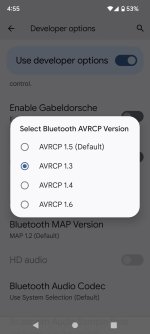
Ok everyone... I think I finally fixed it. Under developer options, I changed this default setting to the one you see selected in this pic. I called my wife and we spoke for over 7 minutes and it never dropped. I'll try a longer call tomorrow when I get off work and see how it does then, but I believe it's fixed. Please feel free to try this and see if it helps you.
 

Attachments

  • Screenshot_20220129-165555.jpg
    Screenshot_20220129-165555.jpg
    111.4 KB · Views: 846
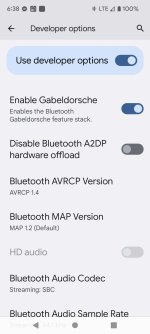
Well, that setting didn't work too good on the 2nd call I made. It dropped out. A friend of mine showed me some conversations online where they tried a different one. They used the 1.4 with another setting turned on, called Gabeldorsche stack. I had a 30 minute phone call on that setting this morning, never dropped out.
 

Attachments

  • Screenshot_20220131-063844.jpg
    Screenshot_20220131-063844.jpg
    120.7 KB · Views: 883
Interesting solution, I have a Pixel 5 and have had zero issues, but all I hear about the Pixel 6 is how buggy it is and how it constantly drops calls.
 
Interesting solution, I have a Pixel 5 and have had zero issues, but all I hear about the Pixel 6 is how buggy it is and how it constantly drops calls.

Actually, that's really been the only problem I've had with it so far. But I think it's fixed, finally. Had another successful call this evening, 17 minutes long and never dropped out.
 
Stock setup(i.e. non-developer options) is still broken on the pixel 6 pro after February security update..

My buddy tried those developer settings and he said it did not fix the issue for him but verifying what combination he tried.
 
My wife's Pixel 6 is pairing poorly with her 2016 4runr. Calls connect then quickly drop. The car works fine with all other phones we have tried with.

Does anyone here have a Google Pixel 6 phone? For some odd reason, when paired with my 2019 TRD Off-road, the phone calls disconnect from the vehicle at about 2 minutes of being connected and talking. The phone still has the ongoing call, but the vehicle disconnects. Me and my wife got new phones about 5 days ago. She got the Pixel 6 Pro, I got the Pixel 6. I paired hers to my 4runner and it doesn't lose connection, but mine continues to. I read online where people with these phones have had this problem with other Toyota vehicles. I was curious what anyone on here has done to maybe help this problem without doing a factory reset on the phone?
 
Stock setup(i.e. non-developer options) is still broken on the pixel 6 pro after February security update..

My buddy tried those developer settings and he said it did not fix the issue for him but verifying what combination he tried.

Still broken after April update:gun4:
 
I was on the Android Central Pixel 6/Pro boards quite a bit in January doing pre-purchase research on the Pixel 6/Pro. read lots of horror stories from folks who had nagging problems with the fingerprint reader and Call Signal/Network/WiFi/Bluetooth connection problems. But there were a good many that had NO problems. I have had mine for two weeks now and it has worked flawlessly with our 2022 4Runner's BT system. However, the buggy fingerprint reader rarely works right :(.
 
Is every call dropping? Are only certain TYPES of calls dropping? I ask that because there is a known issue among Google Pixels that don’t respond correctly when calling into an automated greeting system and being placed in queue with music on hold.

Sounds crazy but this is because of an incompatibility with the phones to process a=sendonly then resume media with a=sendrecv when the agent comes on the line.


Sent from my iPhone using Tapatalk
 
I was on the Android Central Pixel 6/Pro boards quite a bit in January doing pre-purchase research on the Pixel 6/Pro. read lots of horror stories from folks who had nagging problems with the fingerprint reader and Call Signal/Network/WiFi/Bluetooth connection problems. But there were a good many that had NO problems. I have had mine for two weeks now and it has worked flawlessly with our 2022 4Runner's BT system. However, the buggy fingerprint reader rarely works right :(.

Interesting but guessing the new infotainment system with carplay/andriod auto has a different BT Version,aka newer, so it works fine.

Is every call dropping? Are only certain TYPES of calls dropping? I ask that because there is a known issue among Google Pixels that don’t respond correctly when calling into an automated greeting system and being placed in queue with music on hold.

Sounds crazy but this is because of an incompatibility with the phones to process a=sendonly then resume media with a=sendrecv when the agent comes on the line.


Sent from my iPhone using Tapatalk

All calls for me after 30 seconds /1minute drop
 
Interesting but guessing the new infotainment system with carplay/andriod auto has a different BT Version,aka newer, so it works fine.
Could be. But wonder what's different about your wife's Pro that it works, as mine is also a Pro.
Probably a shot in the dark, but does the head unit in yours do any OTA updates? I'm assuming you've deleted your phone on the 4Runner and deleted it in your phone, and started from scratch
 

Members online

No members online now.

Forum statistics

Threads
278,309
Messages
3,554,071
Members
248,016
Latest member
Advally Service

Trending content

Back
Top