You can post pictures by attachment or by photobucket url
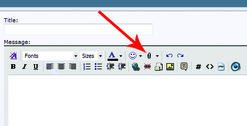
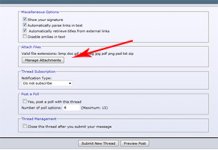
For the attachment, there's a small paperclip on above where you write your message in a post or reply, or there is a 'manage attachments' button in the additional options below your message. (See attachment below)
For urls from photobucket or anywhere on the internet,
If you have it hosted on a web hosting site, then you'll need to copy the IMG code url and paste it in your reply. If the picture you want to post isn't from a web hosting site, you can right click the image and select "copy image location", then paste that in to the 'insert image' button
Thanks Tom, will try the attachment method here to see if it will work for me.
Not for me but could be because I am on a Chrome Book. Normally when I click to insert a pic it opens my pictures in my computer and I can pick the one I want to insert.
Thanks spawn. I am rather technology challenged and live in a complete dead zone where cellular signal is concerned. All communications comes from poor phone lines only able to support useless dial up or from satellite for TV and internet. I have no clue if taptalk will even work here but I know for sure that twitter and a lot of the other smart phone apps don't.