Rudy97
New member
Hello everyone!
I've been gathering the pieces for this build for quite some time. It's not fully operational just yet, but everyday I learn a little more and get a little closer. I'll break down the parts I've used as well as a capabilities listing and the issues I am currently running into. The main goal of this build was to have an affordable entertainment that could do turn by turn navigation by cached maps, trail mapping via cached topographical maps, read engine codes and monitor output of the OBDII, play mp3's and movies, provide auto switching for backup camera and allow additional cameras to act as "rock cameras", and use software defined radio to listen to and RECORD using the factory antenna in more wavelengths than just AM/FM (think shortwave, CB, FRS, etc).
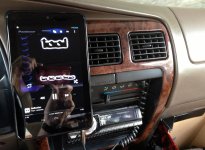
Here's a picture of it up and running!

To start... the parts
The computer: Hummingboard i2ex (Hummingboard - Powerful Linux Single Board Computer)
The screen: 7" Lilliput 669GL-70NP/C/T-HB-RV HDMI (Amazon.com: Preassembled Black Double Din LCD Frame with 7" Lilliput 669GL-70NP/C/T-HB-RV HDMI DVI High Brightness: Computers & Accessories)
The Operating System Android 4.4.4 KitKat (found here! SolidRun Community ? View topic - [ROM][17 Nov] AOSPBox-i R1.2 - Android KitKat 4.4.4 )
OBDII Bluetooth Adapter: Mini ELM327 V1.5 OBD2 OBD-II Bluetooth (Amazon.com: D-CLICK TM High QualitySuper Mini ELM327 V1.5 OBD2 OBD-II Bluetooth CAN-BUS Auto Diagnostic Tool for Windows XP, OSX ,Vista, Win7,Win8 and Android: Computers & Accessories)
Bluetooth Adapter: SANOXY® USB Bluetooth Wireless Adapter (Amazon.com: SANOXY® USB Bluetooth Wireless Adapter for HP, Gateway, eMachine, Dell or ANY Laptop/PC Running Windows 98, 98SE, ME, 200, XP, Vista & WINDOWS 7: Computers & Accessories)
Storage device:128gb SSD (Amazon.com: MyDigitalSSD 128GB PocketVault SuperSpeed USB 3.0 Portable External Solid State Storage Drive SSD (128GB): Computers & Accessories)
GPS: GlobalSat BU-353-S4 USB GPS Receiver (Amazon.com: GlobalSat BU-353-S4 USB GPS Receiver (Black): GPS & Navigation)
In addition to these items I had to purchase a few special items to enable the stereo to work (such as an extension to the antenna cable, and a new wiring harness that I could cut up and make an extension out of)
The OBDII monitoring will be done through Android's Torque Pro app and the media center will be controlled by XBMC (renamed to KODI recently)
The hardware went together easy enough, however the software side has been giving me issues.
Current issues I am having:
Okay, so it's more or less just a pretty screen right now since it doesn't recognize much, but I think it has a lot of potential! If anyone knows how to compile Android kernels or knows of someone who might be able to help I would be much appreciated. I'm just trying to learn as I go!
Here's a quick video showing the first boot while in the 4Runner!

I've been gathering the pieces for this build for quite some time. It's not fully operational just yet, but everyday I learn a little more and get a little closer. I'll break down the parts I've used as well as a capabilities listing and the issues I am currently running into. The main goal of this build was to have an affordable entertainment that could do turn by turn navigation by cached maps, trail mapping via cached topographical maps, read engine codes and monitor output of the OBDII, play mp3's and movies, provide auto switching for backup camera and allow additional cameras to act as "rock cameras", and use software defined radio to listen to and RECORD using the factory antenna in more wavelengths than just AM/FM (think shortwave, CB, FRS, etc).
Here's a picture of it up and running!

To start... the parts
The computer: Hummingboard i2ex (Hummingboard - Powerful Linux Single Board Computer)
The screen: 7" Lilliput 669GL-70NP/C/T-HB-RV HDMI (Amazon.com: Preassembled Black Double Din LCD Frame with 7" Lilliput 669GL-70NP/C/T-HB-RV HDMI DVI High Brightness: Computers & Accessories)
The Operating System Android 4.4.4 KitKat (found here! SolidRun Community ? View topic - [ROM][17 Nov] AOSPBox-i R1.2 - Android KitKat 4.4.4 )
OBDII Bluetooth Adapter: Mini ELM327 V1.5 OBD2 OBD-II Bluetooth (Amazon.com: D-CLICK TM High QualitySuper Mini ELM327 V1.5 OBD2 OBD-II Bluetooth CAN-BUS Auto Diagnostic Tool for Windows XP, OSX ,Vista, Win7,Win8 and Android: Computers & Accessories)
Bluetooth Adapter: SANOXY® USB Bluetooth Wireless Adapter (Amazon.com: SANOXY® USB Bluetooth Wireless Adapter for HP, Gateway, eMachine, Dell or ANY Laptop/PC Running Windows 98, 98SE, ME, 200, XP, Vista & WINDOWS 7: Computers & Accessories)
Storage device:128gb SSD (Amazon.com: MyDigitalSSD 128GB PocketVault SuperSpeed USB 3.0 Portable External Solid State Storage Drive SSD (128GB): Computers & Accessories)
GPS: GlobalSat BU-353-S4 USB GPS Receiver (Amazon.com: GlobalSat BU-353-S4 USB GPS Receiver (Black): GPS & Navigation)
In addition to these items I had to purchase a few special items to enable the stereo to work (such as an extension to the antenna cable, and a new wiring harness that I could cut up and make an extension out of)
The OBDII monitoring will be done through Android's Torque Pro app and the media center will be controlled by XBMC (renamed to KODI recently)
The hardware went together easy enough, however the software side has been giving me issues.
Current issues I am having:
- Touch screen calibration is off (x-y axis are flipped), but I have done some research and narrowed the issue down to a specific config file in the android kernel and am in the process of trying to patch it.
The bluetooth isn't recognized, there are linux drivers so I am sure I can get it to work. It should be a similar fix to as the touch screen.
The GPS receiver isn't recognized. Same issue.
The analog (3.5mm) audio output is over modulated in KODI and does not output audio from the home screen.
Okay, so it's more or less just a pretty screen right now since it doesn't recognize much, but I think it has a lot of potential! If anyone knows how to compile Android kernels or knows of someone who might be able to help I would be much appreciated. I'm just trying to learn as I go!
Here's a quick video showing the first boot while in the 4Runner!