Synology DS1515+

NoDak

Senior Member
well its getting long in the tooth and starting to have issues, so I decided when they paid out my vacation from my old company I was going to take some of that money and replace the old home server (windows home server v1) with a new one.

been researching a lot the past few months and it came down to qnap or synology. in the end I went with the synology since the software side was better than the hardware side with qnap being the opposite.

ended up with a


newegg : Synology DS1515+ Network Storage - Newegg.com

synology : https://www.synology.com/en-us/products/DS1515+

hdd compat listing : https://www.synology.com/en-us/compatibility/hd/DS1515+


re-using some drives from the old server (1tb and 2tb) and added 2 x 3tb drives to bring me to 6tb of usable storage. since the old home server had a big overhead, this new server should cut down on the wasted space and open up a lot more features across the board for the whole family and son at college who can access it from there if he needs to.

should be arriving this week, so I will be busy this weekend backing up the old server and configuration on Saturday, with sunday transfer day.

will give my initial impressions and do a 1st week review and a 1st month review.
 
Last edited:
Register to hide this ad
well its not quite a week but a lot has happened since Friday in regards to the DS1515+. I started this process once I got home from my 2nd part time 2days a week job at 11:30 pm Friday (which I also worked a 6am to 5pm shift at my normal job). needless to say by 5am Saturday morning I was toast and went to bed. I will try to jot this down according to the way I went thru the process.

  1. I did a backup of my WHS v1 server to an external 4tb hdd
  2. while that was going, I removed the 2 new 3tb hdd I bought to go along with the 1tb and 2tb I already had
  3. installed 1tb in drive bay 1, 2tb into 2, 3tb into 3 & 4
  4. pulled the cover off the DS1515+ to install a 2gb sodimm stick to up the memory to 4gb. I had a few spare sodimms laying around so I tested if they would work. the 4gb ram stick didn't work but a 2gb did. I imagine the 4gb stick would work, but I would have to remove the factory 2gb to even test if it would work. the big issue with this, you have to remove the motherboard to access slot 1 memory, which I wasn't in the mood to do.
  5. by this time the backup had finished so fired up the unit and let it go. I had only installed the single 1tb drive since I was mixing/matching different hdd sizes and by reading up on the forums and elsewhere, I should just do 1 at a time.
  6. since the os is not actually installed in a PROMM, you have to download the OS image from either Synology.com or from the cd and initialize it from another computer.
  7. takes about 5-10 minutes to install the OS and start the process. during the process you can start the hdd raid setup and get them going. doesn't take long to get that first hdd to usable status to start saving data to it.
  8. then I added the 2tb drive, this is when the process starts to take forever since you have two options when you add another hdd. yes/no to verify the hdd is good to use. saying yes will entail long hours to do a check of the raid when you add another hdd
  9. to add to step 8, if you are using SHR raid, you can add any size hdd to the raid array as long as its equal/bigger than the biggest hdd in the array at the time you add the new hdd. this also goes with my process stated above of adding 1 at a time (more on this later)
  10. this didn't take quite as long as I thought so I added the double 3tb drives and opted to do the error check, went to bed after I started this.
  11. next morning (Saturday) I went back and the system was nowhere near even 20% after 6hrs. did more research online via the forums and realized I needed to start over.
  12. blew out the raid and started over. this time I installed hdd into all 5 bays, 640gb, 1tb, 2tb, 3tb, 3tb and started the system up. started the whole process over that I started at step 7
  13. this time the process went a lot faster of creating the raid and verifying. started the error check and let that go
  14. side benefit of this was I had almost 6tb of usable space to use immediately. so I started moving data from the 4tb external backup to the new server. this took most of Saturday to accomplish since the system is bogged down with verifying the raid in the background while being used for everything else.
  15. also to add to step 14, I installed VPN, Media server, photo server, music server, synology version of anti virus (other is mcafee, shudder) and tried out DNS, Proxy, Directory server, and a few others. in the end I removed most of those except the media server (DLNA still need that). killed DNS, proxy, directory server since i really don't need this currently (too much overhead at this time). I may re-address this later down the road
  16. created users for the warden, daughter, son.
  17. turned on the home folder service so each can have there own home folder, set rights, access to different aspects of the server, etc. this took a few hours as I was going slow (reading and due to all the other stuff going on in the background on the server)
  18. annoyed that the server is so slow, found out the media server is making thumbnails/etc of the 21k pictures I transferred, 120 movies, 4000+ mp3's. this was running at the same time as I was doing the drive error check and other things so you can imagine why the process went into Monday
  19. during the slow time I did more research into the raid 5, 6, SHR & SHR2 formats.
  20. after much research, I've come to the biggest sticking point of this unit. 5 bays is not enough, period.
  21. if your doing small hdd in this unit and doing raid 5/SHR and are not concern 1 iota of your data then this 5 bay is perfect.
  22. if you care for even one file on your hdd, then you will need to run either raid 6 or SHR2. the only issue is deciding what format, raid 6 means you need all hdd the same size, SHR2 will use any mix of sizes but will default tot he smallest hdd for storage as the baseline.
  23. the advantage of SHR/SHR2 is that if your setup meets the raid 5/6 format it will default to that format within SHR/SHR2. if you deviate outside of the raid 5/6 format the hybrid setup takes over and implements a hybrid raid 5/6 within the SHR/SHR2.
  24. and now comes the BIG reason I am returning my DS1515+ and ordering a DS1815+.
  25. in order to implement SHR2/Raid 6, you need to have as a minimum 4 hdd as two are used for failover. the biggest issue with a single hdd failure in a big storage setup, during the rebuild, the drives will get hammered and usually that means that a drive may fail during this process, hence the double drive failure protection of Raid 6/SHR2. if you use raid 5/SHR then if you have the above scenario, your screwed and just lost all your data
  26. well in a 5 bay server, that only leaves you with 3 bays for storage compared to 6 bays in the DS1815+. so if your running 5 x 3tb drives, 3 drives are used as storage (9tb) and 2 drives are used for failovers (6tb) to rebuild the array.
  27. in the DS1815+ (which by the way is only $180 more than the DS1515+ for 3 xtra bays) using 6 x 3tb hdd, I get 4 x 3tb of storage and 2 x 3tb for failover with 2 bays open
  28. now if I want I can set those 2 open bays as hot spares so if one/two of the other 6 hdd fail the system will automatically use the hot spare to rebuild without me being around
  29. you can do that in the 5 bay but your limited to only 2 usable hdd for data, 2 for failover and 1 hot spare bay.
  30. since I am a premier newegg account I can get this DS1515+ sent back for free and no restocking fee (which by the way is 15% - $126)
  31. already ordered and being packed and I added 4 more 3tb drive to bring me up to 6 x 3tb of storage (actual is 4 x 3tb)
in the end, the software & hardware are the same between the DS1515+ and DS1815+, just difference of 3 bays for hdd. but ultimately those 3 bays make a huge difference in short/long term usage of this from fail safe/reliability stand point for your data.

so my recommendation, don't get the DS1515+ jump straight to the DS1815+ if you care about your data 1 bit.
 
Last edited:
well got the new DS1815+ in, installed the 4 x 3tb drives, copied data over from the DS1515+, removed the 2 x 3tb and installed 1 as hot spare and adding the other to the volume.

edit : in the end I will have just over 8tb of storage, with 2 disk failure backup and a hot spare to auto rebuild the raid in case 1 hdd dies out of the 5 drives. if I am away or on vacation or whatever the hot spare will save me so the warden & kids don't have to mess with it.

but when I have time, I will add another hdd for data and another for a hot spare to bring it up to 6 hdd for data, 2 hot spares.

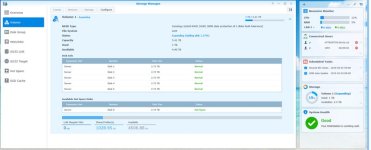
screenshot of the new setup. don't mind the quality, I had to cropped it down from 1920 x 1080.

.
 

Attachments

  • Server Disk Drives Cropped.jpg
    Server Disk Drives Cropped.jpg
    39.7 KB · Views: 119
Last edited:
Having two Hot Spares on a 8 drive system seems like ridiculous overkill.

Since you already said you are running 6 drives in RAID 6 then you have double fault protection.

I don't think the two HS are needed. If you really need the level of protection provided by R6 (4+2) with an additional 2 Hot Spares then you shouldn't be using a CONSUMER CLASS NAS device.

With traditional R6 (6+2) using all 8 drives it would take 3 failures to have Data Loss (DL).

I would think that the following are more likely to occur than 3 (out of 8) consecutive failures:
* source power failure
* power supply failure
* software data corruption
* other software bugs
* house burning down
* home break in and theft of NAS

If starting from scratch I would run 8x2TB drives and fill the NAS.

I assume you will be paying close attention to this device, it is your personal NAS. You will get emails, go home and swap the drive. The chance of both drives failing (no DL) and then a 3rd driving failing out of 8 total drives is extremely unlikely.

If you are concerned about the time to order a drive and have it shipped then just buy an extra drive now and keep it in stand by. Either way I'd suggest using all 8 drives.

BTW that NAS's performance is going to be heavily dependent on IOPs per disk. Your performance is disk bound. That will likely be the main limiting factor.

Think about it like this:

Since you are only running a single RAID set, 8x2TB (6+2) RAID_6 will give you 50% more drive IOPs than 6x2TB (4+2) RAID_6 and 2 HS.

That is because the RAID set will have 6 active non-parity drives instead of 4. This is a huge difference.

50% higher performance FYI ! (That's the theoretical number at least)
 
Last edited:
edit : in the end I will have just over 8tb of storage, with 2 disk failure backup and a hot spare to auto rebuild the raid in case 1 hdd dies out of the 5 drives.

Like I said before, return those drives and buy (8) 2TB drives for far higher performance and BTW more usable capacity. In fact you would have 12TB usable.
 
Last edited:
thanks for your insight and views from another perspective. i will still have to research more into that aspect overall. at least i moved away from the single drive failure model to a 2 drive failure model.

right now I haven't decided that far in the future yet. right now I am leaning toward 7+1 HS. with this setup, i can always expand up to 18 drives with this base 8 bay model if i go out and buy 1 or 2 5 bay expansions.

as of now, with 3x2.73tb as usable space, I am content since I am running about double the space I had before this new nas.

time will tell if I tinker around and start running more of the add on packages such as client backup server, mail server, dns server, proxy server, ldap server, vpn server or just use it as a media/storage server and be lazy.

i will see but i am slow on the change part when it comes to my storage server. hell i was still using a WHS v1 up until just last week and that was release back in 2007 and updates was discontinued back in 2011.

but i have to say, whs v1 did its job for 8 years without one incident or failure during all that time, as least for me.
 
Like I said before, return those drives and buy (8) 2TB drives for far higher performance and BTW more usable capacity. In fact you would have 12TB usable.

right now the limiting factor is that i don't have a link aggregation network setup to take advantage of more performance of the nas. i max out at roughly 112mb transfer over eth0 since i only have 1 cable running to it.

the nas has the ability but everything else in my network doesn't, so i will have to look into a wireless router that supports that so i can get better transfers from my wired computers (main desktop and my 4 tuner tv computer).

the only bad part is that running 2tb costs about $45 per TB vs the 3tb drives cost about $38 per TB.

until i get a few more months of power on hours on these new drives, i will keep the hot spare for now in case one dies within the first 90 days. after that i will probably move the hot spare into the master volume.

edit : forgot to add, i could run jumbo frames to get more out of the network, but i have too many dumb wireless clients that have fits with them, like the treadmill, and some dumb smart TV's.
 

Members online

Forum statistics

Threads
278,307
Messages
3,554,054
Members
248,016
Latest member
Advally Service

Trending content

Back
Top