Uploading photos to T4R

infamousRNR

Senior Member
Anyone having issues uploading files on the forum?

Ever since that hack, I get a “upload of file failed” message.

I’ve tried it on different computers and now on different phones to no avail...

It’s been almost a month now of numerous attempts
 
Register to hide this ad
Overly large pics will fail upload. You can reduce pixel dimension maybe to about 800 wide, any bigger than that is not necessary. Quick/easy in microsoft paint, view pic, hit open tab, hit paint, then resize tab, select pixel dimension, takes seconds to do.
Can resize on phone also, just knock the size down, uses to much memory.
Maybe they had auto-resizing on forum before.
 
Last edited:
There appears to be a 2MB hard limit on attaching photos to the forum. The forum automatically reduces the size when you upload but now it strict that it won't resize if the file is too large.

I started using Google's Snapseed app. If to use it then go to settings, exports, select change res and quality for exports. Select 1366 res and 80% jpeg. Now back in the main app you can open the pic you want to resize and export pic (not save as) then the pic will appear in a folder for Snapseed. It is very easy to do from your phone and super quick.
 
I just upload to a 3rd party site, like flickr or imgur, and then insert the image as a link. No size limits and it's much easier to do fast.
 
Anyone know how long this restriction has been in place? Makes it hard to upload any photos from mobile, since they're not resized. Isn't there a way to simply automate the resize upon upload?
 
Anyone know how long this restriction has been in place? Makes it hard to upload any photos from mobile, since they're not resized. Isn't there a way to simply automate the resize upon upload?

Try emailing the pic to yourself. It’ll either automatically resize it or ask what size pic you want to attach. I think most emails are this way with iPhones.
 
The size limit has always been there. The problem is that phones are taking larger and larger photos as storage capacities and camera technology increases.
 
I just upload them from my laptop at work using the paperclip icon on the message Reply toolbar. I reduce the dimensions to no greater than 1000 pixels in either direction and never have an issue.

P.S. I was thinking someone should make a T-Shirt of this in the RUN DMC logo style. Only a select few would get it.
 

Attachments

  • IMG_7242.jpg
    IMG_7242.jpg
    66.6 KB · Views: 583
Last edited:
Well what do you know - there is a site for everything including 'RUN DMC LOGO Generator' - LOL

Too bad I can't seem to set it to red letters on a black background. This site wants you to install a sketchy browser extension so I'll pass on the advanced features.
 

Attachments

  • RUNPWR.jpg
    RUNPWR.jpg
    25.2 KB · Views: 557
Last edited:
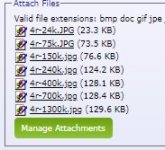
I messed around last night to see what would load...
Anything over 75k and forum software shrinks it to fit.
 

Attachments

  • file sizes.JPG
    file sizes.JPG
    15.2 KB · Views: 521
I never had a problem and didn’t even know there was one. I’m uploading on my IPhone X and my iPad 11 pro with no problems. The desk top is my wife’s, so I don’t even wanna go there if something is out of place. My wife uses the desk top for her Masters program. Good luck to all that is having problems


Sent from my iPad using Tapatalk
 
Looks like uploading pics using the 'paper clip' icon works......

Oops, I thought this was the B-Body Mopar forum
 

Attachments

  • Mopar.jpg
    Mopar.jpg
    128.2 KB · Views: 203

Members online

Forum statistics

Threads
278,316
Messages
3,554,111
Members
248,016
Latest member
Advally Service

Trending content

Back
Top