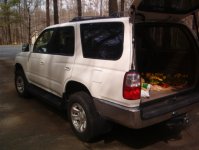
As the subject stated, I am new and need some help on how to place pictures of my 03 Nautural White 4runner on the site. I have found lots of information on the site that has helped me with upgrades, and would like to share to show other users how the upgrade may look on there 4runner. So far my list of mods includes a complete redo of the stereo system, consisting of a alpine deck, XM, overhead video, with a dvd player installed in the small compartment in the glove box. JL audio speakers throughout, and Coustic amps. Exterior mods include Silverstar headlights, Spoiler from Spoiler Depot, 20 inch Zinik alloys with Falken 265/50/20 tires, and I have changed the silver colored areas of the front and rear bumpers to color match the rest of the car, which I feel makes the 4Runner look 100% better. So anyone that can help me with some info on how to place pictures on postings, I would greatly appreciate it..

New member needs help on how to place pictures on site
- Thread starter jvm051
- Start date