2003 T4R Ltd and iPOD using DICE - Completed

jfeger

New member
Hi All,
I have been searching for the past several days on a clean way to integrate an iPod Nano with the factory head unit (HU). The purpose and requirements for this integration was mostly around safety and ease-of-use for the iPod. The iPod will get used more if we don't have to take our eye off the road to navigate through the Songs, Artists, Playlist, etc. Requirements were easy:

1: Work with the steering wheel control
2: Use the CD-TEXT feature to display info about the current track on the HU

I decided to use the DICE mostly because it was one of only two units I found that supported CD-TEXT for the iPOD.

I used Mr. Castulucci's awesome tutorial for getting access to the back of the HU. Link to that site is: http://www.castulucci.com/projects/carpc/oemnaviaccess/

I want to say thanks to Mr. Castulucci because that tutorial was spot-on, and it was EXACTLY what I did to get to the back of the factory HU.

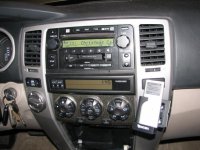
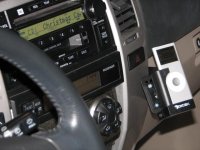
I used a mounting bracket from Bracketron (TOY-202-03) to supply a place to mount the DICE iPOD dock. I mounted the DICE module in the cubby/shelf in the glove box. I had to cut a hole in the back of the cubby to allow for the cables to get in.

I would have no problems writing up a tech tutorial similar to the DICE/FJ I found over on another forum but I am not sure it is needed to be honest. The only major difference was that I removed the negative battery lead prior to starting the work. All the talk about airbag deployment on other forums scared me.

I did panic slightly once I re-applied power to the battery the 'Auto' for the rear window, driver window, and sunroof all were not working. I solved this by rolling each window up/down three times. Sunroof twice. I am not sure what that was all about, I am sure someone on here can explain it. I imagine it's just a matter of the computer catching up.

Attached is a pic of the finished product, pre dusting of the car. I also noticed I snapped them before I put the flip-out door back on.

The screws are silver, they are being switched to black, my wife is talking about actually wrapping the mounting gear with some sort of fabric/leather to hide the screws/and mounting plate.

Anyway, the DICE is performing as expected with some slight weirdness. I am certain it is a matter of learning which 'mode' we have the DICE in though. It supports several options for the steering wheel control, and I get them confused. Once I get some playlists loaded on the iPOD it will be much easier.
 

Attachments

  • 1.jpg
    1.jpg
    38.9 KB · Views: 2,790
Register to hide this ad
Thanks for your detailed descption and pictures.

This is very similar to what I want to do.
Where did you purchase the DICE unit? Cost?
What other adaptors did you find?
Was the DICE the only one that enabled the CD-Text function?
Thanks again for your help.
 
I bought the DICE unit directly from DICE Electronics. I looked it up on their website and then decided to call my order in.

I ordered the DICE interface and the DICE cradle from them. I think the DICE module is ~150 and the cradle was ~60

The bracket I used I ordered directly from Bracketron's website. I think it was ~30-40 bucks.

Overall, it was actually more expensive than the iPOD. :). But its worked out OK.

I do have some flaky bugs with it. Specifically related to starting the car and shutting the car off. Something with the power-on/sync process tends to not work properly and sometimes the iPOD is not recognised by the HU. To correct this I have actually had to shut the vehicle off and restart.

I plan to contact DICE about this. A workaround I have found is to switch mode from CD1 to something else, like AM/FM prior to shutting the vehicle off.

Good luck.
 
jfeger said:
I bought the DICE unit directly from DICE Electronics. I looked it up on their website and then decided to call my order in.

I ordered the DICE interface and the DICE cradle from them. I think the DICE module is ~150 and the cradle was ~60

The bracket I used I ordered directly from Bracketron's website. I think it was ~30-40 bucks.

Overall, it was actually more expensive than the iPOD. :). But its worked out OK.

I do have some flaky bugs with it. Specifically related to starting the car and shutting the car off. Something with the power-on/sync process tends to not work properly and sometimes the iPOD is not recognised by the HU. To correct this I have actually had to shut the vehicle off and restart.

I plan to contact DICE about this. A workaround I have found is to switch mode from CD1 to something else, like AM/FM prior to shutting the vehicle off.

Good luck.

Don't forget that you can "crank" your engine without causing the starter to engage. This allows a "Reset" of the stereo etc. without shutting off the suv. Good luck. I am about to install the dice unit and was hoping they had soved the recognition problems the older ice-links had.


J
 
jacal said:
Don't forget that you can "crank" your engine without causing the starter to engage. This allows a "Reset" of the stereo etc. without shutting off the suv. Good luck. I am about to install the dice unit and was hoping they had soved the recognition problems the older ice-links had.


J

Wow, I never thought about that possibility. Thanks for pointing that out.

As an update to what I have noticed regarding the sync of the unit to the factory HU:

When exiting the vehicle the past several days I have experimented with different shutdown/startup methods to try and reproduce the problem.

The last few times I was simply shutting off the ignition while leaving the HU on 'CD1' and leaving the iPOD docked. When returning to the SUV I would simply crank over to start the engine. Factory HU would power up and say 'CD1 INIT'. The iPOD would power up and start playing the song I left off with.

All seems to work as expected. The difference between what I am doing now and what I experienced initially is that the iPOD 'hold' switch is disengaged. My wife would enable the 'hold' switch when she was transporting the unit, and never disabled it. Perhaps there is something between how the iPOD is powered up/communicates when the hold is engaged. I will keep you all posted, but as of right now it seems to sync/init properly each time, without taking special action such as changing to AM/FM or undocking, etc.


Now if I could only find good audio settings and EQ settings on the iPOD so the sound quality doesnt so 'off'.

I currently have the Bass at 4, Mid and Treble at 3, Rear Fade-5, Surround ON. Seems like the front is still overpowering with a bit much treble. I set the iPOD EQ to 'acoustic' and that has balnced it out a bit, but still not quite as crisp/clear as the original CD. The audio files I am using is a cd-rip at AAC/128
 
jfeger said:
I ordered the DICE interface and the DICE cradle from them. I think the DICE module is ~150 and the cradle was ~60

when you say cradle, do you mean docking station? what is the purpose of the cradle? does it just hold the ipod? and where is the wire to connect it??
 
Iron Clad Lou said:
has anyone else used the DICE setup?

I upgraded from the icelink to the DICE. The DICE unit appears to be excellent. I have both the cable connector for the ipod and the doc (from the prev icelink). They are both just ways to connect the nano. I currently use the cable run up into the front center fold down. I previously used the doc mounted inside the armrest.

I also use the aux-in to the DICE but have an alternator whine that I must solve.


J
 
thanks jacal...

it is my understanding that the DICE unit does NOT need "toyota" playlists....is this correct? can you control the ipod and the steering wheel and stereo all separately w/o flipping a dip switch?
 
Iron Clad Lou said:
thanks jacal...

it is my understanding that the DICE unit does NOT need "toyota" playlists....is this correct? can you control the ipod and the steering wheel and stereo all separately w/o flipping a dip switch?

That is correct. Here is what they have done (it will make more sense when you read their pdf instructions on thier www)
You can control the ipod from either the steering wheel OR direct from the ipod itself. When using steering wheel, you first select CD 1-5, each of which is a different function for track up/down. For example, cd1 allows you to skip/back each track. I use this the most. cd2 puts you in playlist control, then you can skip/back each playlist. cd3 is artist I think, cd4 is album I think. CD5 is your audio source...so cd5 track 1 is input 1 (ipod) and cd5 track 2 is aux input.

I guess then the only dependency is that you must organize your music into some sort of playlists to get usage out of the cd2 mode.

Aux input mode gives gain, treb, and bass settings (plus one I am forgetting)...using the same idea as "cd1 = gain, cd2 = bass" or whatever.

Clear as mud? You get used to it, and I actually think they did a good job. I refuse to use the ipod direct, I leave that for a passenger or when stopped. Just way to distracting and not worth it.


J
 
Iron Clad Lou said:
this works with the single disc JBL, right?

From what I read, yes no prob, but I have not tested it personally.

I know it works with jbl 10-spk no nav, with rear seat audio.

J
 
jacal said:
From what I read, yes no prob, but I have not tested it personally.

I know it works with jbl 10-spk no nav, with rear seat audio.

J

hehe, I hope it does b/c I ordered it! I'm going to run the wire to the little door under the heat/air controls and hide the ipod and connector in there..complete integration..I love it...
 
whee! DICE arrived today...going to install this weekend...I installed the PIE adapter in the wifes CRV last weekend...that was easy...too bad we have to rip the whole damn T4R apart to do this install...
 
Iron Clad Lou said:
whee! DICE arrived today...going to install this weekend...I installed the PIE adapter in the wifes CRV last weekend...that was easy...too bad we have to rip the whole damn T4R apart to do this install...

It's easier than it looks! :beer:
 
wow, with those instructions from Castulucci, that was a piece of cake! I had the whole thing ripped apart in 20 mins...so on to the install....I was able to run the plug from the HU into the glove box w/o drilling...I then ran the wire from the DICE component back through and into the little compartment below the HVAC controls..once again, no drilling...once all back together, I plugged in NANO and now I have crystal clear music! I love how I can switch songs and playlists right from the steering wheel never touching NANO again...it rests quietly in the little compartment...DICE shuts on/off and charges NANO...as for the DICE componenet, I merely attached it with one little screw to the inside of the glovebox...I'm very happy!

ETA: which fuse is for the radio?
 
Last edited:
jfeger said:
I do have some flaky bugs with it. Specifically related to starting the car and shutting the car off. Something with the power-on/sync process tends to not work properly and sometimes the iPOD is not recognised by the HU. To correct this I have actually had to shut the vehicle off and restart.

I plan to contact DICE about this. A workaround I have found is to switch mode from CD1 to something else, like AM/FM prior to shutting the vehicle off.

Good luck.

I too seem to have this problem when the truck sits for a long period of time....short stops while running errands and whatnot are no problem...ipod comes right back on....jacals crank option does work though. I initially thought the prob was when I had a CD in the HU...well, thats not the case...I guess I can try switching to FM prior to shut off...
 

Members online

Forum statistics

Threads
278,309
Messages
3,554,075
Members
248,016
Latest member
Advally Service

Trending content

Back
Top