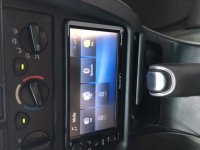
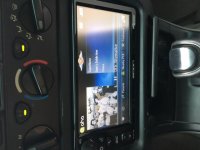
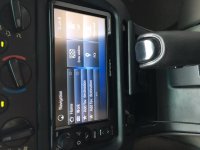
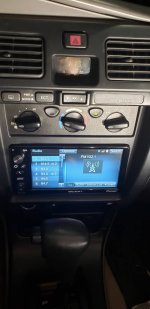
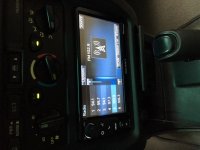
2016 Scion Navagation radio in a 2001 4Runner

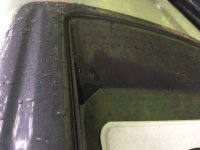
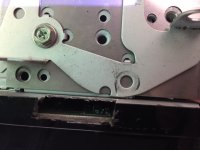
I just installed a radio out of a 2016 Scion FRS into my 2001 4Runner with navigation and a backup camera. The only difficult part of this was I had to trim the radio panel on my 4Runner as the Scion radio was bigger than the stock radio and I had to cut a slot on the back side of the radio faceplate so it would clear the tabs on the dash where the radio panel clips in. I also had to grind off the front of my radio brackets as they hit the back of the faceplate of the radio.
The backup camera came with the correct connectors, plug and play. You just need to find your reverse wire. I found mine under the driver’s side kick panel, it was red/yellow. I have also seen a post about it being behind the instrument cluster, the link is below. I installed the camera on the license plate trim panel.
http://www.toyota-4runner.org/3rd-gen-t4rs/161332-backup-camera-reverse-signal-wire.html
If you get one with the navigation module, you plug up the USB Toyota adaptor to the navigation module, otherwise plug it in the radio. The VSS wire is located behind the glovebox. This is only used for navigation. It is a green/orange wire in the 22 pin connector. Number 6.

The parts I used
PT546-00160 – 2016 Scion Radio. Mine had navigation.
(12) 6mm washers- I used 3 each under the radio bracket at each bolt where the radio bolts to the dash to bring the radio forward. It is deeper than the stock radio and the wiring harness did not have enough room behind the radio. The three washers were 4.8mm. You can also use nylon spacers, but I had these on hand.
PT546-00120-AD – Antenna conversion harness
PT546-74120-MC- Microphone
PT546-00120-CH - 28 pin conversion harness
https://camera-source.com/2016-scion-display-audio-backup-camera-kit.html
A back up camera that works with the stock Scion radio. The Scion radio outputs 5 volts for the camera rather than 12 volts like aftermarket cameras.
Metra 40-GM12 GM Antenna Adapter
Metra 40-UV43 Male to Female Motorola Antenna Cable
Goliton USB female Retention Adapter for Axxess AX-TOYUSB Select Toyota and Lexus- this was for my USB. There is an OEM Toyota UBS adaptor you can use, but this is much less. If you want to use the OEM, here is the part number for it and the USB port for a stock look. This is what I did when I installed a nav radio out of a 2013 Corolla in my 4th gen 4Runner.
86190-0C020 USB-mini jack
PT233-47100-WH USB harness
PT546-00120-US USB conversion wiring
 

Attachments
  • IMG_5039.JPG
    IMG_5039.JPG
    91.5 KB · Views: 1,997
  • IMG_5041.JPG
    IMG_5041.JPG
    86.2 KB · Views: 2,005
  • IMG_5042.JPG
    IMG_5042.JPG
    89 KB · Views: 1,931
  • IMG_5043.JPG
    IMG_5043.JPG
    79.5 KB · Views: 1,912
  • IMG_5044.JPG
    IMG_5044.JPG
    89.4 KB · Views: 1,966
  • IMG_5038.JPG
    IMG_5038.JPG
    82.4 KB · Views: 1,889
  • IMG_5022.JPG
    IMG_5022.JPG
    89.2 KB · Views: 1,884
Last edited:
Register to hide this ad
How much was the additional parts including camera? Do you have any pics on how you ran the wiring to the back for the camera? Im guessing finding the radio will be the hardest part

Thanks
 
The camera was $154. You can find with the link in my post. I know you can get one cheaper, but it made it easy with all the connectors included. The other wiring connectors I bought from McGeorge Toyota.
https://toyotaparts.mcgeorgetoyota.com/
I don't remember how much they were, but you can look them up there.
I ran the camera wiring thru the grey license plate part over to the side of the hatch. From there I ran it up the left side to the top with the aid of a coat hanger. This took time and patience. I then went thru the wiring harness at the top of the hatch that goes to the body. Silcone spray and the coat hanger helped get thru the harness. Made it almost easy! From there I just went to the front using the side of the headliner and finally down the front post. One note here, Toyota uses loctite on the screws for the grab bar or handle. You will probably need a impact screwdriver to get them out. I did. I then replaced them with new screws from the side handles which do not have loctite on them.
 
That's nice. Didn't realize Pioneer made radios for the Scion/Toyota. How big is the screen, 6.2"?


Sent from my iPhone using Tapatalk
 
Thanks, I may see if I can find one of these radios. Currently have a Pioneer but the navi and Bluetooth features would be nice.
 
I have the T1819 Scion in my 97. I Am really tempted to do this since all the instal work is done and the radio size should be the same between the T1819 and the T100071


Sent from my iPhone using Tapatalk
 
Since you have the -00160 in your 3rd gen and the Toyota equivalent of the -00140 in your 4th gen which radio do you like better?

Your 2013 radio was made by Panasonic or pioneer?


Sent from my iPhone using Tapatalk
 
The 00140 has more stuff on it, XM for one, but I guess if I had to choose, I would go with the 00160. It has a nice clean look and I mostly listen to the radio or Bluetooth. I do love the nav on both.
If memory serves me right, the 2013 radio is made by pioneer.
 
The 00140 has more stuff on it, XM for one, but I guess if I had to choose, I would go with the 00160. It has a nice clean look and I mostly listen to the radio or Bluetooth. I do love the nav on both.
If memory serves me right, the 2013 radio is made by pioneer.


A big thanks for getting back to me. There was a -00160 on letgo and Facebook I offered 200 for. He wanted 370. It had the NAV module and cable connecting it to the radio. He wouldn't go below 300.

I can get either radio on carparts.com but must call them and have them check for the emptiness under the radios or not. No luck yet.

I got three vehicles with the T1819 radio. I'm sure I can make those adapter cables with Metra stuff and save my brother 60 dollars.

Your 2013 radio with XM inhouse is tempting. I keep loosing radio stations due to format changes.

Entune needing a VIN from the vehicle it came from was another reason I didn't pull the trigger on the -00160. He got it off eBay and I doubt he knew enough to get the vin.


Sent from my iPhone using Tapatalk
 
Bumping an older thread we recently bought a 2002 4runner and am in the process of swapping to a PT546-00160.

I bought all the adapters than were listed above but I have a problem. It has a factory amp and the plug that comes out of the amp doesn't fit any of the adapters or the new radio.

I can unplug the wires going into the amp and they plug directly into the new radio, it powers on fine and everything works except for the sound. I am getting nothing.

Anyone know of an adapter from the amp to Scion or a possible solution.

Thanks
 
Bumping an older thread we recently bought a 2002 4runner and am in the process of swapping to a PT546-00160.

I bought all the adapters than were listed above but I have a problem. It has a factory amp and the plug that comes out of the amp doesn't fit any of the adapters or the new radio.

I can unplug the wires going into the amp and they plug directly into the new radio, it powers on fine and everything works except for the sound. I am getting nothing.

Anyone know of an adapter from the amp to Scion or a possible solution.

Thanks


Is your radio a JBL? My 97 limited had the amp and removing it and plugging directly into the radio worked.


Sent from my iPhone using Tapatalk
 
Yeah it has the amp. I unplugged the connectors from the amp and plugged them directly into the Scion radio. Everything works except for the sound.

I saw someone had installed one and a few days later the sound stopped on theirs too but they never posted the solution or outcome.

Maybe I got a faulty radio?
 
Yeah it has the amp. I unplugged the connectors from the amp and plugged them directly into the Scion radio. Everything works except for the sound.

I saw someone had installed one and a few days later the sound stopped on theirs too but they never posted the solution or outcome.

Maybe I got a faulty radio?


I know on the newer models if your jbl it’s totally different and not plug and play.

May be your radio is bad.

You tried different sources like a cd and still no sound?

Anything in settings that would mute?

The PDF is pretty big for the radio. But pretty easy to find.


Sent from my iPhone using Tapatalk
 
Well I figured it out. I had everything plugged in but haven't received the antenna adapter yet. Apparently that is important because as soon as I plugged that in too everything worked.

Thanks for the replies. It was getting frustrating haha
 
It's in! Just have to get a backup camera. 20200615_210353_compress29.jpg

Sent from my SM-G960U using Tapatalk
 

Attachments

  • 20200615_210353_compress29.jpg
    20200615_210353_compress29.jpg
    49.9 KB · Views: 306

Members online

No members online now.

Forum statistics

Threads
278,316
Messages
3,554,121
Members
248,016
Latest member
Advally Service

Trending content

Back
Top