
You are using an out of date browser. It may not display this or other websites correctly.
You should upgrade or use an alternative browser.
You should upgrade or use an alternative browser.
5th gen T4R installs
- Thread starter ad3pena
- Start date
Register to hide this ad
MarkWalker
New member
:worthless

adio3x
New member
I still need to figure out how to post pics. I have plenty if you know how let me know please.
You need to join a photo hosting site, such as photobucket. From their you upload the image and than click on the picture. Copy the IMG slot and paste it on your new paste and your pic should be there.

kingpin748
New member
photobucket.com
Although a photo hosting site will work, you really do not need to do that. Take a photo, reduce the size if it is over 1mb, then place it on your desk top. Click on Reply to thread, or quick quote or however you do it to post on a thread. Then scroll down below the screen you are typing on. You will see a option to "Manage Attachments". Click on it. Then a pop up will appear. In that pop up, it wants you to put in a location of your photo. Since yours is on you desk top, hit the "browse" button next to the option of "upload from your computer". After that pop up appears, pick "desktop", look for your photo, click on it and then click "open". The address for the upload will then appear in the first pop up box, then you click "upload", it's next to that browse button mentioned above. You are then good to go. After you hit upload, you may or may not see the photo address in the text of the thread, so go below where you were writing your thread and hit "preview post". The photo you uploaded should show up and you are good to go. (Then hit submit reply if you liked the preview).....good luck and be safe.
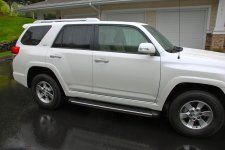
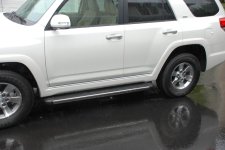
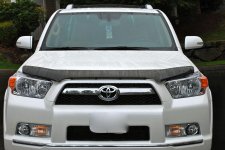
Ok i figured out how to post lets see if it works. If not check out my file.
You did it! Good job. Nice picks. Nice truck.
MarkWalker
New member
Nice job on the 4R, and the pics!! So that is an OEM bug deflector, hum. I have been torn between the OEM and the AVS as well, but that is looking pretty good.

terra4r
New member
Nice job on the 4R, and the pics!! So that is an OEM bug deflector, hum. I have been torn between the OEM and the AVS as well, but that is looking pretty good.
Me too! I need a deflector vs deflector thread. lol
Yup it's an OEM I was looking for the AVS but could not find it. As I said ebay is my parts store for OEM stuff. Thank you guys for help on posting pictures. All I need now is mud and a free afternoon. Anyone live in seattle, wa.
Maybe Seattlemike?

SeattleMike
New member
Maybe...Maybe Seattlemike?
youretheman
New member
Re: Running board
HI Ad3pena,
Awesome running boards! and thanks for sharing, have a question re: Running board, Went to ebay also for OEM ones, Ave. price aroung 290++ USD. OEM were advertised that they will not fit with OEM Mud guards. is this true for most of the other running boards?
Thanks
YTM
Bos, Ma
HI Ad3pena,
Awesome running boards! and thanks for sharing, have a question re: Running board, Went to ebay also for OEM ones, Ave. price aroung 290++ USD. OEM were advertised that they will not fit with OEM Mud guards. is this true for most of the other running boards?
Thanks
YTM
Bos, Ma

ad3pena
New member
HI Ad3pena,
Awesome running boards! and thanks for sharing, have a question re: Running board, Went to ebay also for OEM ones, Ave. price aroung 290++ USD. OEM were advertised that they will not fit with OEM Mud guards. is this true for most of the other running boards?
Thanks
YTM
Bos, Ma
I do not know but there looks like there will be plenty of room for the boards and mud guards. I would have to take a closer look. I'm also looking into installing the OEM guards as well. If I do the install I post the pics and how it they went on.

