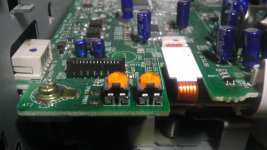
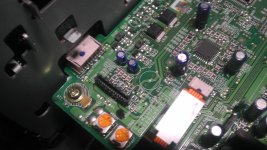
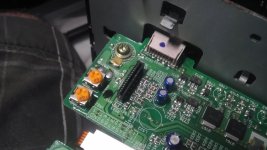
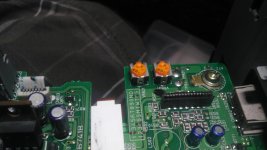
Added an auxiliary input to my factory deck...

fish0281

New member
I listen to a lot of streamed music (Slacker & Pandora primarily) and I did not want to buy an aftermarket head unit because I figured this is close to free and I don't really care for the looks of aftermarket units...

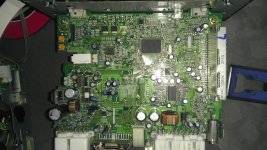
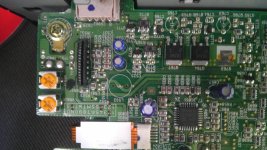
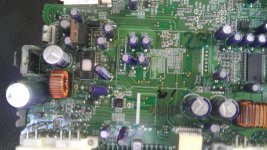
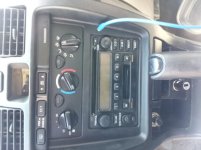
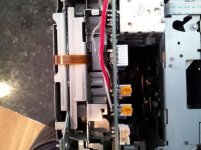
Basically, it goes like this: remove the bezel around the shifter, then the bezel around the radio, take out the radio and remove its metal housing. Then you just need to remove the ribbon going from the tape player's head and solder in a suitable auxillary input unit to the post-amplified circuitry (not where the ribbon connects).

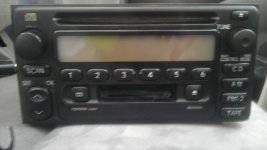
Each model head unit may have somewhat unique configurations, but it should be easy to find the potentiometers and test which connection leads to the audio output... Here are some pics of how I did it with my 2001 model head unit (AD6803).

(Does anyone know how to embed picasa photos to a post?)

https://plus.google.com/photos/104558386343784620523/albums/5729128934414818177

The only thing I purchased was a female 3.5mm connector and a male-male headphone extension cable from Radioshack. Also, a tape needs to be in the tape deck for this to work, but since the head is not connected to the circuit board, the tape's audio output won't be played.

I still have some feedback noise (ground) if I charge my phone while playing music and I would recommend using a covered ground wire from the 3.5mm female to the head unit. All in all, the sound quality is great and it's a super easy mod!
 

Attachments

  • 20120407_142837.jpg
    20120407_142837.jpg
    38.6 KB · Views: 18,198
  • 20120407_122220.jpg
    20120407_122220.jpg
    43.1 KB · Views: 12,004
Register to hide this ad
I listen to a lot of streamed music (Slacker & Pandora primarily) and I did not want to buy an aftermarket head unit because I figured this is close to free and I don't really care for the looks of aftermarket units...

Basically, it goes like this: remove the bezel around the shifter, then the bezel around the radio, take out the radio and remove its metal housing. Then you just need to remove the ribbon going from the tape player's head and solder in a suitable auxillary input unit to the post-amplified circuitry (not where the ribbon connects).

Each model head unit may have somewhat unique configurations, but it should be easy to find the potentiometers and test which connection leads to the audio output... Here are some pics of how I did it with my 2001 model head unit (AD6803).

(Does anyone know how to embed picasa photos to a post?)

https://plus.google.com/photos/104558386343784620523/albums/5729128934414818177

The only thing I purchased was a female 3.5mm connector and a male-male headphone extension cable from Radioshack. Also, a tape needs to be in the tape deck for this to work, but since the head is not connected to the circuit board, the tape's audio output won't be played.

I still have some feedback noise (ground) if I charge my phone while playing music and I would recommend using a covered ground wire from the 3.5mm female to the head unit.All in all, the sound quality is great and it's a super easy mod!
Very nice, Hows the sound quality?


it is great
 
I too am impressed, great way to add an input to the stock deck. But obviously if your looking for sound improvement, an aftermarket deck is the way to go. Still greatly impressed, wouldn't have thought of that. :thumb3:
 
Thanks guys, I was pretty pleased with myself when I finally got it working! Gotta have my music. :cheers:

I too am impressed, great way to add an input to the stock deck. But obviously if your looking for sound improvement, an aftermarket deck is the way to go. Still greatly impressed, wouldn't have thought of that. :thumb3:

Sound quality is on par with the CD player and is very clean; the audio signal is going straight to the factory amp w/o conversions so there's not really any losses. IMHO, I think the best way to improve audio quality would first be speakers and swap the factory amp for a higher power one, but I think the factory head unit has as much "quality" as any other unit... just needs more power! (I'm no audiophile though)


I forgot to mention that I am using a tape converter thingy to trick the radio to stay in "Tape" mode - I just removed the head from the cassette so there's no extra wires dangling from the dash.
 
Awesome mod! I'm in Denver and I may have to attempt to bribe you to give me a hand with this before I go on a road trip to CA. Cheers.
 
Awesome mod! I'm in Denver and I may have to attempt to bribe you to give me a hand with this before I go on a road trip to CA. Cheers.


It'd definitely be a nice mod to have for a long road trip like that! I live in the city (Highlands area), so let me know if you need a hand getting it hooked up...
 
fish0281,

Had a question. I have a 2000 Toyota Echo with pretty much the same head unit, just has a different circuit board but the face looks the same. The model number is 86120-2B680. I was able to find the potentiometers, connect L and R but when I try and ground it it cuts all audio. And when L and R are just connected there is a lot of interference. Seeing if you had any input on the matter. [I'll try and attach some pics.
 

Attachments

  • IMAG0295.jpg
    IMAG0295.jpg
    129.7 KB · Views: 13,245
  • IMAG0288.jpg
    IMAG0288.jpg
    147.3 KB · Views: 12,755
  • IMAG0291.jpg
    IMAG0291.jpg
    141.9 KB · Views: 11,822
  • IMAG0294.jpg
    IMAG0294.jpg
    141.2 KB · Views: 12,179
Last edited:
if I remember correctly, I had to ground it to one of the potentiometers ground pin. have you tried a body ground?
 
Yea, just tried the body ground. I'm only again able to get sound to one of the speakers. When both L and R are connected I lose music. I understand my stereo is not exactly like yours but its got the same face. The connections should be the same, just the circuit board looks different.
 

Attachments

  • IMAG0304.jpg
    IMAG0304.jpg
    126.7 KB · Views: 13,445
  • IMAG0305.jpg
    IMAG0305.jpg
    138.3 KB · Views: 11,525
  • IMAG0306.jpg
    IMAG0306.jpg
    125.8 KB · Views: 11,436
  • IMAG0307.jpg
    IMAG0307.jpg
    129.3 KB · Views: 11,491
have you tried grounding each side to each pot?
also, make sure you have the actual tape head disconnected by un plugging the small ribbon (try with &w/o grounding)

after that, i'm a bit lost & out of ideas...
 
Hey again fish0281,

Thanks for your quick reply. So for some reason I was unable to get the music to play thru the cassette deck mod. Kept trying the pots and grounding to everything. So in the end, I tried running the music thru the CD player, which actually worked. Just found the R, L, and a ground on the CD player itself and soldered the wires directly to the CD unit. The only thing is that the CD music still plays in the background, but only when you turn the aux music (my phone in this case) all the way down. But when the music is playing at normal volume it seems to cut the CD music all out, can't even hear it. Another thing I've noticed is that the aux music will play into the radio when radio is pressed, but it's definitely not a problem. Just got to know which is playing and when.

One thing tho...
While testing my aux music it sounded great, but upon closer inspection I noticed something: I tried my balance, heard left and right just fine. But then I tested out my fader and found that the middle (or F0 or R0, between the front and back) was fine, the front speakers were fine, but the rear speakers sounded very low and almost tinny. I wasn't sure if I had perhaps done something to the head unit to interfere with the rear speakers, or maybe had blown them out while testing the audio. Seeing if you had any input on the matter.

Thanks again.
 
Wow, I'm at a complete loss. Your stereo sounds totally wonky. You could always burn a blank cd (silent audio of sorts) to keep down any interference.

As far as the fader thing, I haven't a clue. One thing that may be different about my deck vs yours is that the 4Runner has an external amplifier so I think maybe it keeps the audio channels bundled differently or something. Very bazarre. It sounds like you're doing a good job of troubleshooting and trying all scenarios out though, so that's good. Wish I had more solid answers for you!
 
Yea, it's a little odd. Strange that the two stereo units perform very differently even though they look really similar.

The CD music playing in the background isn't really such an issue. The aux input seems to drown out the CD upon connection to my phone. But I'll look into burning a CD with blank tracks and compare. My next project is gonna be installing a bluetooth receiver somewhere hidden, maybe in one of the compartments on the side of the stereo and a switch to switch between Aux and Bluetooth inputs.
 
According to the tutorials I managed to find on stereo removal, for my '01 SR5, I have to pull the 4wd shifter knob and console to remove the bezel; did you not have to do this? Can someone explain how to remove the stereo for me or link to a proper tutorial please? :hiding:
 
Yep, you have to at least pop it loose. I think there are 2 screws at one end, but everything else literally snaps in and out. Unless you have the older style dash, then I think there are some screws hidden behind the hvac controls (?). I just kinda started tuggin on stuff and if it didn't snap out, then I started looking for screws.

Try a search for "3rd 4runner radio removal" --> Let me google that for you :hatsoff:
 
Last edited:
Yep, you have to at least pop it loose. I think there are 2 screws at one end, but everything else literally snaps in and out. Unless you have the older style dash, then I think there are some screws hidden behind the hvac controls (?). I just kinda started tuggin on stuff and if it didn't snap out, then I started looking for screws.

Try a search for "3rd 4runner radio removal" --> Let me google that for you :hatsoff:

lol thanks I was just confused by the OP ommitting removal of the center console, as I was going to do this tomorrow... contradicted everything I had read.
 

Members online

Forum statistics

Threads
278,312
Messages
3,554,089
Members
248,016
Latest member
Advally Service

Trending content

Back
Top