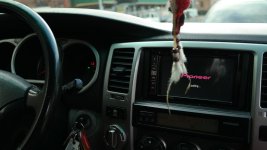
Android Auto in a 4th Gen?

buckeye87

New member
Just had my new Pioneer AVIC-8100NEX installed and fired up Android Auto for the first time. Any 4th gen guys try this out already? Tip/tricks I should know about? Fwiw, this is a replacement for the JBL unit in my 05 Limited V8
 
Register to hide this ad
Download the updated firmware from pioneer. then update i heart radio and spotify on your phone for aa compatibility.
 
I'm interested in hearing your thoughts on the Nex and Android auto. I am planning on getting the 4100nex for use with my Android phone.
 
Just got the nex for Apple CarPlay. I found I'm using the stock Bluetooth of the stereo more than CarPlay. CarPlay works great and it awesome for maps but Bluetooth is just easier. Not sure if android is similar or not.
 
I'm interested in hearing your thoughts on the Nex and Android auto. I am planning on getting the 4100nex for use with my Android phone.

So far it is good. Great for google maps. Still waiting for Pandora integration. You have to be plugged in via usb for it to work.
 
The maps have been great so far, both on the AA side and the integrated navi. I use Google Play all access as my primary music service and so far my only complaints are not being able to use the explore feature while using AA and the speed at which it takes to load a song after using voice controls.

Overall, really glad that I made the jump so far. Sound quality is much better. Still trying to figure out the pioneer apps tho
 
Just had my new Pioneer AVIC-8100NEX installed and fired up Android Auto for the first time. Any 4th gen guys try this out already? Tip/tricks I should know about? Fwiw, this is a replacement for the JBL unit in my 05 Limited V8

I, too, have an 05 Ltd V8 w/ the JBL and I'm looking at the 8100 (also an Austinite, ironically). Did you need to purchase anything in addition to the box unit to make it play nicely w/ the JBL system and steering wheel controls?
 
I dicked it up and cut the wiring harness the first time around. Evidently there is a wiring harness adapter that allows the 8100 to play nicely with the JBL. I just got pissed and took it to a pro (TXR on Burnet, he did the full install with back up camera for like 180). You also need a separate unit that will provide support for steering wheel controls. I think they are universal
 
Last edited:
Subscribed..
I have been trying to decide which unit to upgrade to also. I love the idea of auto play and not having to update maps. The thing i worry is data usage, I know we can burn up data fast using the GPS. The other thing is when I was in Colorado last summer I rarely had service on my phone so my GPS didn't work anyway. I have been looking at the Jensen VX7020 for the price and it has a standalone GPS. The one thing I have a question about is since the 4R dash lights are on all the time would that cause a new head unit be in night time mode all the time? I really want one that easy to see in the day.
 
Subscribed..
I have been trying to decide which unit to upgrade to also. I love the idea of auto play and not having to update maps. The thing i worry is data usage, I know we can burn up data fast using the GPS. The other thing is when I was in Colorado last summer I rarely had service on my phone so my GPS didn't work anyway. I have been looking at the Jensen VX7020 for the price and it has a standalone GPS. The one thing I have a question about is since the 4R dash lights are on all the time would that cause a new head unit be in night time mode all the time? I really want one that easy to see in the day.

The Pioneer has its own Nav system as well if you don't feel like using Google Maps. As for Google Maps...if you know where you'll be going, you can load map sections directly to your phone that you can use offline.
 
The Pioneer has its own Nav system as well if you don't feel like using Google Maps. As for Google Maps...if you know where you'll be going, you can load map sections directly to your phone that you can use offline.

I thought the stand alone GPS had to be bought separately with the Pioneer units. Ill have to check on it again. Thanks
 
I thought the stand alone GPS had to be bought separately with the Pioneer units. Ill have to check on it again. Thanks

Bringing this back from the dead, but wanted to update with an answer. The 4100 is an add-on GPS unit, while the 7100/8100 have it built-in.
 
As someone else who's been considering this option. Regarding the fears of data usage. As long as you don't download satellite imagery, you should be fine...I think I read that AA doesn't even give you that option. A quick Google should reveal user experience with data requirements for Maps...I think it's under 10MB/hr for most road trips.

And to make life even better, Google recently updated Maps with offline navigation mode. Plan your trip on Wifi and Maps will cache the necessary map data locally for 30 days.

Very close to pulling the trigger on this myself, but concerned by Crutchfield's claim that motorized faces don't work with the 4Runner, at least on Limited w/JBL.

 
You need this to retain your factory JBL amplifed SYSTEM. PAC TATO and to use your steering wheel buttons use this PAC SWI-RC Steering Wheel Control Adapter.
 
In certain models the navigational maps are built in there will be a button indicating MAP ,I have the NEX5100 BUT HAVE TO GET USED TO USING THIS MAP got sedan to Tom Tom they use a different it's for maps TOM TOM also has a free download of the US as well as free navigation on your Android phone for thexample first 50 miles I believe thereafter the cost is 16 dolars
 
Last edited:
my install ned 5100 steering option and sirrius optional box added
 

Attachments

  • SAM_1365.jpg
    SAM_1365.jpg
    124.2 KB · Views: 479
Last edited:
Very close to pulling the trigger on this myself, but concerned by Crutchfield's claim that motorized faces don't work with the 4Runner, at least on Limited w/JBL.

I've gone over some of the docs on Crutchfield and they have some bad info on there. They can't seem to grasp that the JBL Nav came in many different flavors. For example, the 05 Nav radio was different than the 03/04 and 06, making all of those not-so-subtle differences extremely important to the installer.

The one that works best for the 03-04 Limited is the Best kits BKTOYK961:

BestKits

Which will look like this, but may need minor modding:

http://www.toyota-4runner.org/engin...ted-4runner-w-aftermarket-nav-double-din.html
 
As someone else who's been considering this option. Regarding the fears of data usage. As long as you don't download satellite imagery, you should be fine...I think I read that AA doesn't even give you that option. A quick Google should reveal user experience with data requirements for Maps...I think it's under 10MB/hr for most road trips.

And to make life even better, Google recently updated Maps with offline navigation mode. Plan your trip on Wifi and Maps will cache the necessary map data locally for 30 days.

Very close to pulling the trigger on this myself, but concerned by Crutchfield's claim that motorized faces don't work with the 4Runner, at least on Limited w/JBL.

Wanted to come back with an update after recently installing a 4100NEX in my 05. The motorized tilt works fine for the post part, but at extreme angles it does rub against my plastic housing kit (went w/ the Scosche model). Thankfully, those angles will never be used since it makes no logical sense to ever have it facing 45 degrees up. Also, removing the faceplate is cake, but putting it back on sometimes requires a bit of finagling. Otherwise, no issues with it.
 

Members online

Forum statistics

Threads
278,307
Messages
3,554,054
Members
248,016
Latest member
Advally Service

Trending content

Back
Top