
You are using an out of date browser. It may not display this or other websites correctly.
You should upgrade or use an alternative browser.
You should upgrade or use an alternative browser.
Apple iOS 7...looks very nice!
- Thread starter Thai
- Start date


aha2988
New member
how long did it take to download for you guys? I've been trying a few hours now and I keep getting an estimate download time of 40-70 hours, WTF????
oh well
make sure your on wifi or plugged into a computer with itunes is your best bet

CookieRoe
Senior Member
Took me 20 minutes. I downloaded last night.
I don't like the interface much. It no longer has the streamlined interface that I associate with Apple products. It feels cartoony to me.
On the flip side, I do like a lot of the new features they've added.
Yeah, I'm not feeling it either. But, Its cool for now b/c its new to me.
make sure your on wifi or plugged into a computer with itunes is your best bet
Yeah, figured that out. I had to reset my router, downloaded iOS7 in 20 min. My intial download failed. I tried downloading from LTE (you can't) and again (3 times) via iTunes. I kept canceling when the ETA downloading time was in hours.

emelianenkov
New member
My music won't play....
aha2988
New member
I'm still trying to get used to it. Seems okay so far. Only thing I've found I don't like is the calendar display. I liked the way it showed your scheduled items in order on the bottom of that day.
just use the notification center that you pull down from the top, it lists all the events for that day in order if you use your phone as a day planner even easier than using the calender app.

Mytoy4
New member
just use the notification center that you pull down from the top, it lists all the events for that day in order if you use your phone as a day planner even easier than using the calender app.
That might work - I like to look at least a week out to see what days have things scheduled. Kind of just a reminder, know what I mean?
Edit: Okay, I figured out how to check it for today and tomorrow so that's better anyway.
Last edited:
emelianenkov
New member
Yeah I don't like the calendar either. I like viewing the whole month
aha2988
New member
That might work - I like to look at least a week out to see what days have things scheduled. Kind of just a reminder, know what I mean?
Edit: Okay, I figured out how to check it for today and tomorrow so that's better anyway.
lol
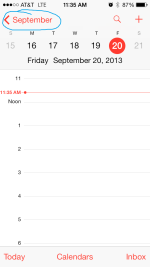
hit the September button to to show the month when the phone is verticle. Also when the screen below is shown you can swipe left to right to go from day to day.
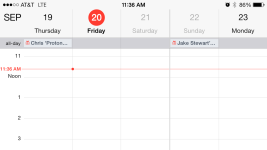
Also from the same screen just rotate the phone sideways and it shows a week out of plans as well you can swipe left to right to advance to other weeks or go back and check something
geez I need to get a life haha
Attachments


Last edited:
aha2988
New member
Anyone not liking it? Because I'm not really feeling it so far. There are cool little things but I find it a little annoying. One thing that has me really annoyed is that if I go into the music player and find by artist, I can't choose a specific album from that artist, it will play all songs from that artist.
I've noticed they've implemented the swipe to go back gesture in more places which is something I really like over hitting the back button in the top left corner all the time.
Not crazy about the changes to the music player. Showing the album art in my artist list means more scrolling to find the right artist and then it combines all the albums into one list which, again, means more scrolling to find the right song. It's more visually pleasing but less efficient.
to play an individual album you can hit the shuffle button next to the artists/albums name
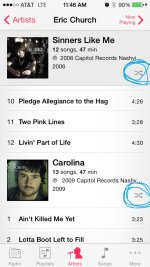
but yeah you can't just listen straight through the individual album
Yea, I updated last night. It's not quite as feminine as I was expecting and like it. It makes my 4s feel faster, though the new keyboard I'm typing on is horrid. I can't type fast, or hardly at all, without it missing keys or lagging or correcting wrong.
And control center is cool, it would be nice if it was easier to drag up. Seem like you have to start off the screen with the drag which is hard with a case.
God typing on this is horrible.
try changing the size of your text it helped me a lot it's in settings under general.
Attachments

Mytoy4
New member
lol
hit the September button to to show the month when the phone is verticle.
View attachment 98279
Also from the same screen just rotate the phone sideways and it shows a week out of plans
View attachment 98280
geez I need to get a life haha
Oh, I know. I can see the whole year, the month or the day. What I meant is in the old calendar set up you could see the whole month, right - under each day you had something scheduled it'd show a dot. You click that day and it'd show kind of like a little notepad at the bottom of the day with the things you had going on. You didn't have to scroll through the day to find them.
Here's what it used to look like when you clicked a specific day

CookieRoe
Senior Member
Yeah I don't like the calendar either. I like viewing the whole month
me too, that's the only way I viewed my schedule. This sucks..................
aha2988
New member
Another question maybe you can help me with.
How do you get your wallpapers to be smaller. On both my iphone5 and my ipad4, it shows the photo so large that it's very unappealing. I can't figure out how to make it smaller so that it fits nicely on one screen.
I haven't found the trick to that one yet it kinda bothered me but I just found a photo that the zoomed in version the phone creates looked good. Might be something they address in an update. I even tried using the new "sqaure" photo feature and no luck it still zooms way in. then when you're asked to scale it, you can only zoom in more lol.
me too, that's the only way I viewed my schedule. This sucks..................
check out my previous post #70, yeah it's not the same as it used to be but it seems simple enough rotate the phone and you get multiple days, tap the month and view the month to see which days have dots. tap the day to see the events. (sorry terri no more list at the bottom of the month.)
Last edited:
Mytoy4
New member
I haven't found the trick to that one yet it kinda bothered me but I just found a photo that the zoomed in version the phone creates looked good.
Well when you find out, let me know. I'll keep messing with it. The one on my iPad is words and I really would like to keep it. Blown up all over the whole screen makes it lose it's value a tad

CookieRoe
Senior Member
Lockscreen in iOS 7 can be bypassed with simple sequence - NBC News.com
Well, that isn't good news.
If you guys look on the compass, you'll see we have have, um, en inclometer, artificial horizon meter, whatever it is (can't get my photobucket to work on iOS7........ yet...........). Pretty cool.
Well, that isn't good news.
If you guys look on the compass, you'll see we have have, um, en inclometer, artificial horizon meter, whatever it is (can't get my photobucket to work on iOS7........ yet...........). Pretty cool.


zacattack20
New member
to play an individual album you can hit the shuffle button next to the artists/albums name
View attachment 98281
but yeah you can't just listen straight through the individual album
The shuffle for me just shuffles all the artist songs, not just for that album. But I found a longer way around. Just pick any song from the album you want and then once it's playing click on the dots and lines icon in the top right corner for the track listing and then select another song on the album(most likely the first song if you want to listen to it through) and then it will play only those songs on the album.
Mytoy4
New member
I haven't found the trick to that one yet it kinda bothered me but I just found a photo that the zoomed in version the phone creates looked good.
I found a workaround and it works perfect. Take a screenshot of the photo you want in your photo gallery, and than set it as your wallpaper. It doesn't enlarge it.

Similar threads


Forum statistics
Trending content
-

-

-
-
-
Thread 'Fixed: Dead Instrument Cluster in 2003 Toyota 4Runner (Corrosion Issue)'
- TheSpeakGeek
Replies: 9