Dealer Will NOT Program 'Seat Belt Buzzer'

Yea, I know. The key phrase was "that we know of". My thought, however naive it may be, is that it is electronic and when activated, it makes a sound. Thus, if located, it can possibly be switched or disabled. I was hoping Antman would find the unit and take out his hole saw, get to the wiring, indentify the one wire that would not cause it to explode when cut.........etc.etc.

Just a thought. Be safe.

Gotcha. I was actually hinting towards Antman and his skills. I hope I am wrong and there is something to snip, splice, and solder, but when I saw what it took for the GPS Nav hack to work I think that it might just be as complicated.

Let it be known, I have no skills when it comes to wiring/electrical. I kind of get nervous when I see anything with black and red wires or +/-. I've zapped many things to the point where I just let others do the job for me. Maybe one day I'll learn.
 
Gotcha. I was actually hinting towards Antman and his skills. I hope I am wrong and there is something to snip, splice, and solder, but when I saw what it took for the GPS Nav hack to work I think that it might just be as complicated.

Let it be known, I have no skills when it comes to wiring/electrical. I kind of get nervous when I see anything with black and red wires or +/-. I've zapped many things to the point where I just let others do the job for me. Maybe one day I'll learn.

I seem to remember that the buzzer was part of the guage cluster- but maybe I'm wrong.

It annoys me when I'm driving to the launching ramp to retrieve my boat with the hatch open so maybe I'll try to figure it out.

With the buzzer disabled, it would be really easy to drive off with the parking brake slightly engaged, or leave that sunroof open all night though. I appreciate the occasional reminder for these!
 
I did and its not working show me one proof when it works. Real deal cost about thousand
What, exactly isn't working? I'm not selling this, so I can't really guarantee your results, but I bought a cable and it works fine. What kind of proof are you looking for? I could get a screenshot with it connected, but I don't really feel like going outside tonight.

What version of Windows are you running? I have Win7x64 and the supplied drivers do not work. I ended up using a 32bit Windows XP virtual machine running in VMWare Workstation, and that worked.

DSCN0949.JPG

8-9-2012%209-31-29%20PM.jpg
 
i can not believe that dealer declines this service, This is crazy.:rockthrow: When i bought my car they told me to come back next business day and they will run me trough the service department and do "custom settings" for car. When i showd up they gave me list of things to choose from, that i would like to turn ON/OFF, one of my options was to turn that buzzer off. Service guy told me that he would do same thing, because it is annoying. They did everything for free no questions asked. He said next time if i decide to change again it would be $20-$50, don't remember.
:ybrick::ak472::redbrick:
 
Damn do they make a version for Mac? Or just Windows?

Just for windows 32 bit from what I've been reading here and at the tundra forums. But If you've got bootcamp (or VMware/Parallels software) and windows on your Mac you should be able to get it running.

I'll let ya know when mine arrives.
 
The list of options that can be customized is in the back of the owners manual. I doubt Toyota would list it if they could get in trouble for people turning it off.
 
Got mine today. $30 off ebay. Works a charm. Thanks to all who turned me on to this.
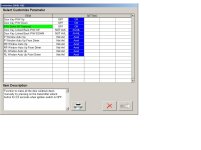
I can't believe there are individual readouts for tire temp and pressure. Sure would be nice to have on the road.
 
Here ya go...
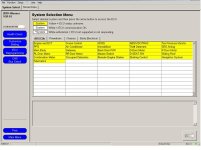
Main Systems Select screen
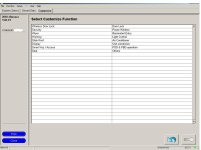
Customize screen
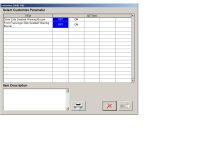
Customize Seat screen
Customize Power Windows Screen
 

Attachments

  • TSSysSelect.jpg
    TSSysSelect.jpg
    93.2 KB · Views: 1,693
  • TSCustmScreen.jpg
    TSCustmScreen.jpg
    69.3 KB · Views: 3,264
  • TCCustmSeatScreen.jpg
    TCCustmSeatScreen.jpg
    46.2 KB · Views: 1,729
  • TCCustmPwrWinScreen.jpg
    TCCustmPwrWinScreen.jpg
    68.2 KB · Views: 3,473
Find another dealer or better yet, go and talk to a tech working there. All they need to do is hook up the Toughbook laptop and run the Techstream software.

I've gotten the liability and a "you will need to set up an appointment" excuse before. Talked to a tech and he just grabbed the computer and helped me change what I wanted.

If your comfortable with computers and hooking up cables, take a look on ebay and search techstream.

Talk to the tech. They care a lot less. Just ask your services rep to help with the programmable changes like lock/unlock after and hopefully the guy will come out with you and go through the list.

Worked for me. Good luck
 
done

asked my service manager...$50 got all the programming I wanted (seatbelt chimes, auto down windows on fob, window control with key, etc).

I was there for the 30k, drive shaft and hazy headlights...all taken care of with minimal frowning.
 

Forum statistics

Threads
278,316
Messages
3,554,110
Members
248,016
Latest member
Advally Service

Trending content

Back
Top