Double DIN HU with USB and Hard Drive

mikeyv

New member
I just wrapped up the first part of my stereo upgrade.
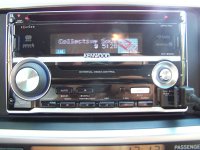
I choose the Kenwood DPX-701 for many reasons, one being the USB input.

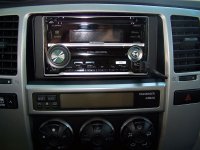
The HU was an easy install requiring no extra trim kit. The HU came with a trim kit that worked well in the 4Runner.
I used a wired PAC Steering Wheel Interface because this unit has a wired remote control wire.

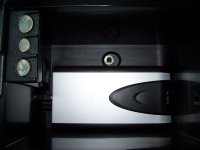
I then bought a hard drive enclosure that worked off 12 volts. I put in a 13GB drive I had and loaded ALL of my MP3s.:D

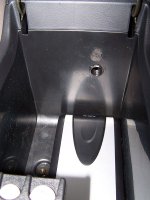
I put the hard drive in the center console. I thought that it might get too hot in there, so I piped in the air conditioner.:biggrin2:
The rear seat AC vents are just behind the center console. I drilled a hole through to the AC duct and glued in a piece of wire loom as a duct.

Check out the pics.
 

Attachments

  • 100_7267_w.jpg
    100_7267_w.jpg
    89.5 KB · Views: 4,404
Register to hide this ad
nice install. is it me or is there a cassette player on that deck?

If there is not cassette, what is the reason for the deck's large size?
 
No cass deck.

I don't know why it's so large.
I also thought, why is the display the same size as a single DIN?
I can still see it, just like a single DIN, but why not make it larger with all the room on the front?

I still think the DPX701 is a great HU. It has alot of nice features.
 
Excellent looking and creative install. I guess you won't have to worry about plugging up the port to use the heater, being in Fla and all.

Interesting unit... I've been waiting to see more HU's with USB ports so I can connect my 250gb HDD to them. I still haven't found one that suits all my needs. Everything looks good on that to me, except since it is a double din size with single din readout, it has NO DVD playback and only a 2-line display for MP3's. I'd love to see 7,8 or even 10 lines of songs when navigating through all my MP3's in the HDD.
 
looks good.....awsome selections.

Thats something I wanted to do, and actually pondered tapping into the AC vents...unfortunately, come winter - I would be blowing hot air which would defeat the purpose.
 
I rarely use my heater in South Florida.
But on the few days a year I do, I plan on sticking a piece of black foam rubber in the tube to block the vent.

Having access to over 3000 songs is awesome.
Most of time I leave it in ramdom.
If I'm not in the mood for a song, I hit track up and instantly it goes to the next ramdom song.

You can have either folder random or entire drive random.
You can select a folder by scrolling through folder names or jump directly to a letter, then into folder names.
 

Attachments

  • 100_7274_w.jpg
    100_7274_w.jpg
    96.1 KB · Views: 1,714
hey that's cool! i wish i could do that too. but i just plug my PSP into a FM transmitter which i hate the static. errr..
 
trd_style said:
hey that's cool! i wish i could do that too. but i just plug my PSP into a FM transmitter which i hate the static. errr..

From my experience you should use a tape deck adaptor if you can instead of the FM transmitter. Much better Audio quality. Just my opinion though. I have both for my iPod and now I only use the FM transmitter as an in car charger.
 
Hey, I came upon this thread while googling for information on some of these new car stereo's w/ built in USB ports. I had read a few sources (Crutchfield reviews) that claimed the Kenwood units don't read folder names - from your posts here that seems untrue. Can you verify?

As an example, say I had a thumbdrive or USB hard drive with the following folders:

ACDC
Bob Marley
Cypress Hill
Dr. Dre
...etc

according to the reviews, the folders would simply be called

FOLDER1
FOLDER2
FOLDER3
FOLDER4
...etc

That's the only thing keeping me from purchasing a Kenwood unit. If you can verify that it would actually read the folder names that's be awesome - maybe even post a sample of how you have your music sorted on your drive?

Thanks!!
 
I would think the player searches/displays ID3 tag info instead of physical folder names?

I too am in the market for a head unit and want something which will allow USB connected hdd..

I know Kenwood uses PhatNoise technology to recognize external media. Additionally I found some USB requirements that Kenwood has on hdd's it connects to.. Specifically, the 15,000 file maximum (AtomicPunk take note) puts me off a bit. Anyone else have thoughts about these requirements? Am I missing something?

mikeyv- could you comment on the the 'ease of use' of searching your connected hdd? does it seem fast enough when scrolling through? Also, did you use the Phatnoise Music Manager to copy songs on to it, or just windows explorer? Thanks!

Lastly, nice setup! kudos on your creativity to route the AC into the console. :)
 
MnRunr said:
Also, did you use the Phatnoise Music Manager to copy songs on to it, or just windows explorer?

Great point MnRunr. That is the #1 reason why I don't have the Omnifi player anymore. The proprietary file swapping/uploading program that came with the unit was THE WORST. Manufacturers, take note: when there are customer support groups / forums with a couple thous members, all dedicated to altering & repairing the sofware, you're not putting out a GOOD product. I'd rather spending my time listening to music than learning how to fix bugs in the software.

I don't believe the Kenwood Kegs /were upgradable either, and 20GB is not enough for me to buy it. I need to utilize at least 60GB of my music to toss down some $$ on a new unit, and the Phatnoise units (were) WAY too much money to upgrade, it was a ripoff when I was looking into them.

Didn't mean to hijack the thread here, just ranting a bit that NOONE has come out with something that would meet "my" needs. Hahahaha.. I think a HU with DVD player with USB port and maybe 5-10 lines of display would sell like crazy, if you ask me.
 
The Kenwood unit does read folder names.
I have my music sorted in folders by artist name, then album name.
The 3 line display is configurable. One setup I wanted that it does not do is to show tag and play time together.
I have it showing:

Song Title / Artist
Folder Name
Time of Day

or

Heavy / Collective Soul
Dosage
4:30pm

Some of my mp3's don't have the tag info, so the top line then shows the track number (in that folder) and the playing time.
I've been going through my list and adding the tags using XP, and right click on the file, then Properties, then edit the tag.

I copied all the files to the HD using windows, not the included software, which I haven't even installed yet.
I have a dedicated PC in the house playing mp3's.
I use Windows 'Off-line' files to sync my mp3's to my laptop, then I use Cobian Backup to copy only changed files to the HD in the truck.

I mostly keep the unit in 'All Folder Random'. When I hit track up it goes to another random song. You can also choose 'Folder Random', there's other modes I haven't tried yet.

To go directly to a folder, it has 2 modes. One goes through the folder of the folder you are in, and the other goes through every folder.
Example:
\Aerosmith
\Aerosmith\Big Ones
\Collective Soul
\Collective Soul\Dosage

Mode 1 goes from \Aerosmith TO \Aerosmith\Big Ones TO \Collective Soul TO \Collective Soul\Dosage...
Mode 2 goes from \Aerosmith TO \Collective Soul...

As far as AC in the console, I choose a drive enclosure that was powered by a 12vdc wall power supply. I cut off the power supply and wired it to the cigarette lighter under the console. When the truck is turned off, the unit and the drive power down. When I turn the key back on the unit keeps playing where it left off. It takes maybe 20 seconds to start playing.

So far...Great unit. I am happy with it. :cool:
 
MnRunr said:
I would think the player searches/displays ID3 tag info instead of physical folder names?

Right, for the songs I'm sure it uses the tags, but most people copy/sort songs into seperate folders by artist and/or album.


I know Kenwood uses PhatNoise technology to recognize external media. Additionally I found some USB requirements that Kenwood has on hdd's it connects to.. Specifically, the 15,000 file maximum (AtomicPunk take note) puts me off a bit. Anyone else have thoughts about these requirements? Am I missing something?


I'll have to look at that phatnoise link. I, too, found that information on the specs, but the 15,000 file limit doesn't really bother me. Yeah, I have more files than that, but I'm more interested in using a 2-4 gig thumb drive. Plus, it could be worse... the Clarion unit, for example, only handles 256 files I believe.

mikeyv - thanks for taking the time to reply! Great to hear that it really does read folder names - I wonder why the reviews on Crutchfield said it didn't. Granted, it was a different unit (the KDC-MP532U), but I'd think that the USB functionality would be the same in all units. Maybe user error? I'll probably try to find someone who has one on display and bring along a drive to test it just in case.

I'm looking at these units for my girlfriend's birthday, so hopefully it works, 'cause I haven't thought of a back-up gift plan yet! :)

(edit) After looking at the phatnoise page, does the unit support browsing by 'voice command' (mCD/ACdrive) - have you tried it and, if so, how well does it work? Also, the phatnoise site talks about playlist support - any information on that? Thanks again!
 
Last edited:
The unit does support ACdrive.
But you have to use the included software and I think convert your mp3's.
I haven't install the software. I just use a drive with mp3's on it.
I also unplug my HD and plug in a flash drive as a simple way to check out some new songs.
 

Members online

Forum statistics

Threads
278,316
Messages
3,554,105
Members
248,016
Latest member
Advally Service

Trending content

Back
Top