Factory nav in sr5?

Ducmonsta

New member
Don't flame me too bad because I've searched and found people doing this on older gen t4rs but not on 5th gens. So has anyone taken the factory nav unit and installed into their sr5 or trail? I want to sell the nav unit to someone, but I don't want to burn the guy. I'm pretty sure Toyota would not have 3 different harnesses in their trucks just for the different radio options. I know the Bluetooth should work but what about the gps? There is no external antenna for the factory nav unit. Is it possibly built in?
I know there isn't a nav "box" in the trunk like the older models.
I know the "shroud" around the head unit will transfer over.
I know the steering wheel controls will work.

Any help would be awesome.
 
Register to hide this ad
I dunno about the harness but my TE has the factory nav so maybe the harness is the same. Dunno if that helps any..
 
Don't flame me too bad because I've searched and found people doing this on older gen t4rs but not on 5th gens. So has anyone taken the factory nav unit and installed into their sr5 or trail? I want to sell the nav unit to someone, but I don't want to burn the guy. I'm pretty sure Toyota would not have 3 different harnesses in their trucks just for the different radio options. I know the Bluetooth should work but what about the gps? There is no external antenna for the factory nav unit. Is it possibly built in?
I know there isn't a nav "box" in the trunk like the older models.
I know the "shroud" around the head unit will transfer over.
I know the steering wheel controls will work.

Any help would be awesome.

Every option package and model has a different wiring harness. When I sold my Nav last year,a guy on here with a SR5 and a guy with a TE/No Nav wanted to buy it and put it in but the wiring harnesses didn't match up.

We took close up pics of the connectors/backs of the stereos and compared. Not even close. When it comes down the assembly line in Japan,whatever model and option package determines the wiring harnesses installed.They don't waste any wiring!

I sold mine on Ebay and asked $1000 or best offer. A guy offered me $700 and I countered with $800 and he bought it.
What the used navs are good for is older models with the JBL do work because they have the JBL harness. Just list it as a GEN 6 Toyota Nav out of a 5th Gen 201? 4Runner. JBL Navs are used in most Toyota's.
 
Last edited:
So, what does all this mean? Is it possible to put in a Nav from another T4R into and SR5? There is a guy in NC that is doing this same thing and I was thinking about getting it for my SR5. I would assume it is since someone bought yours right?
 
Harper- Appreciate the help. That all makes sense.

Tell me if I'm wrong here...there are 3 options with radios in the 4runners...
1-bone stock radio (basic)
2-jbl option without nav
3-jbl option with nav

If this is correct, then anyone with option 2 should be able to use it?
 
Harper- Appreciate the help. That all makes sense.

Tell me if I'm wrong here...there are 3 options with radios in the 4runners...
1-bone stock radio (basic)
2-jbl option without nav
3-jbl option with nav

If this is correct, then anyone with option 2 should be able to use it?
Edit.....There is such a thing as a Limited that has JBL but no nav.

That makes 4 different stereo systems at least in 2010"s . I'm pretty sure(99%) 2011's didn't change.

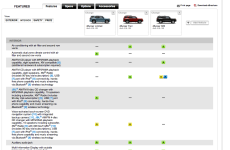
1) AM/FM CD player with MP3/WMA playback capability, eight speakers, XM compatible (additional hardware & subscription required)No steering wheel controls,Bluetooth or USB= base model

2) AM/FM CD player with MP3/WMA playback capability, eight speakers, XM® Radio (includes 90-day trial subscription) , USB port with iPod® connectivity, hands-free phone capability and music streaming via Bluetooth®wireless technology

3) JBL® with NAV(Option Only on Limiteds and TE's) ,AM/FM 6-disc CD changer with MP3/WMA playback capability, 15 speakers including subwoofer, XM® Radio (includes 90-day trial subscription) , USB port with iPod® connectivity, hands-free phone capability and music streaming via Bluetooth® wireless technology

4)JBL without Nav(Only on Limiteds) ,AM/FM 6-disc CD changer with MP3/WMA playback capability, 15 speakers including subwoofer, XM® Radio (includes 90-day trial subscription) , USB port with iPod® connectivity, hands-free phone capability and music streaming via Bluetooth® wireless technology

SR5's come with #1 or #2 depending on options/packages .Not wired for the JBL nav.,and that was confirmed with another member that wanted to buy my JBL Nav. It would cost big bucks to rewire it. Better to just get aftermarket ,like Pioneer, Kenwood ,ect..

TE's come with #2 or #3 ...If it didn't come with the #3 JBL Nav then it's not wired for it. That was confirmed with another member that wanted to buy my JBL Nav. and he had #2 stereo.

Limiteds come with #3 or #4 . Not sure if the wiring harness is a match.

 
Last edited:
harper...the limiteds have the option of a JBL non-NAV and JBL NAV... Here in my area, I've seen both versions. As for the harness being the same...?????? not sure.
 

Attachments

  • Picture 5.png
    Picture 5.png
    135 KB · Views: 508
Last edited:
harper...the limiteds have the option of a JBL non-NAV and JBL NAV... Here in my area, I've seen both version. As for the harness being the same...?????? not sure.

You are correct! Learn something new every day.I'll edit and make that #4!:hiding:
Anybody on here have dash pics of their Limited with JBL without Nav ?

That also explains why it was around a $1500 upgrade on the Limiteds where it was around a $2500 upgrade for the TE.

So Ducmonsta ,you might be able to sell your JBL Nav to somebody that has Limited with JBL but without Nav.,if the wiring harness matches up.
I don't even know if that was an option down here as Limiteds come pretty loaded up around here.At least the ones I've seen. Here Limiteds and TE's had to have Nav or it would have had to be special ordered.
 
Last edited:

Members online

No members online now.

Forum statistics

Threads
278,306
Messages
3,554,045
Members
248,016
Latest member
Advally Service

Trending content

Back
Top