You are using an out of date browser. It may not display this or other websites correctly.
You should upgrade or use an alternative browser.
You should upgrade or use an alternative browser.
Help me to post pictures please
- Thread starter 007Runner
- Start date
Register to hide this ad

Uneek
Super Moderator
Here's a thread on how to post pics.
This is how I post pics:
Goto Photobucket.com and create an account, if you don't have one.
Locate your pictures on your computer and upload them to the Photobucket.
Each picture will have links for posting, the very last link with the IMG Code is the one you need. Just copy that link/code and pasted in your post here. The picture will show up when members pull up the thread. If you change the picture or the file name, then it will not link properly for display here.
This is how I post pics:
Goto Photobucket.com and create an account, if you don't have one.
Locate your pictures on your computer and upload them to the Photobucket.
Each picture will have links for posting, the very last link with the IMG Code is the one you need. Just copy that link/code and pasted in your post here. The picture will show up when members pull up the thread. If you change the picture or the file name, then it will not link properly for display here.
Falls said:Its about time that thing is getting here.....
Enjoy it !!!
I cant help with pics since I cant figure it out either.
Very funny, but I don't have it yet. It is still at port. They applied the window sticker, and I have a full Vin number. Just waiting for a car carrier. At this point I am willing to go pick it up myself.
Uneek
Super Moderator
007Runner said:Very funny, but I don't have it yet. It is still at port. They applied the window sticker, and I have a full Vin number. Just waiting for a car carrier. At this point I am willing to go pick it up myself.
I'm glad it's finally here after the wait. It'll be worth it.
I've been that anxious too, port is about 45 minutes from my dealer. But at that time my rep and I were both leaving for vacation at the same time, so I had to wait until I got back. Fortunately, no one took the vehicle for a test drive.
Well when I get my 4Runner don't tell me:worthless I tried. Nobody offered.007Runner said:I went to photo bucket and still can't get things to work. My brain is overwhelmed with the navigation and owners manual. I can send pictures to a person's email address if they would not mind posting the pictures for me.
Hello 007,
Here's how I've done it:
first, save the pic on your hard drive, in My Pictures.
second, press the button for a new thread, then go to where it says "attach file", go over to the right and push the "browse button".
Then find your photo in your My Pictures. Open it and the # for the pic should be in the blank space to the left of the browse button.
Push submit button at the bottom and you should have then created a new thread with a photo.
I'm going to try it here.
JP
Here's how I've done it:
first, save the pic on your hard drive, in My Pictures.
second, press the button for a new thread, then go to where it says "attach file", go over to the right and push the "browse button".
Then find your photo in your My Pictures. Open it and the # for the pic should be in the blank space to the left of the browse button.
Push submit button at the bottom and you should have then created a new thread with a photo.
I'm going to try it here.
JP
Attachments
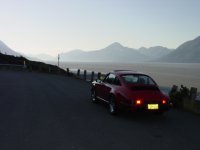
I have a 5 mega pixel camera and it says the file is too big. There is no way I am going to start messing around with the camera adjustments. Any other choice, tried getting this to work for 45 min now, I am done. I give up there will not be any pics to post. I had it with photo bucket. I give up on the picture thing. Just too frustrated to put any more time into this.


rook
New member
Image resizer
If your pics are too large, download and install this tool:
http://download.microsoft.com/download/whistler/Install/2/WXP/EN-US/ImageResizerPowertoySetup.exe
you can upload the resized image from your hard drive using the attach file function
If your pics are too large, download and install this tool:
http://download.microsoft.com/download/whistler/Install/2/WXP/EN-US/ImageResizerPowertoySetup.exe
you can upload the resized image from your hard drive using the attach file function
007Runner said:I use Picasa2 for pictures. No resizing program there that I am aware of. I will just email those pictures for now. Should only be 3 more days. Yet the dealer still has not given me an exact date!
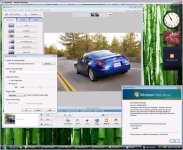
Picasa2 will resize photos when sending via e-mail or exporting. You need to get your photos into an album and then select File - Export Picture to Folder. Then you can select what size you want it to resize to. Around 800x600 should be enough to let you post your pics here without external hosting.
Here is a picture of Picasa2 running an export on my vista test machine.
(resized)