
Kenwood DNX5120 Navigation

gsdpwd

New member
So here is my question to the 4runner Audio Gods...

I just purchased the Kenwood DNX5120. If I were to purchase something like this...

http://cgi.ebay.com/NIB-TVIEW-6-BLA...94847QQcmdZViewItemQQ_trksidZp1713.m153.l1262

Could I hook them up to play a DVD in the rear while I have the Navigation on in the front? Anyone have any ideas?

For those with Kids, Dora The Explorer is a god send on trips to be able to play this in the rear for my daughter would be worth all the money in the world.

Thanks again for all of your help.
 
Register to hide this ad
I think you might be able too.. I have this headunit two and I know 100% it has dual zone sound (you could have two audio sources one front and one back) so you could listen to radio alongside nav voice prompts up front and the back could be tuned to a dvd. I dont know about dual video out but I think you can. Sorry for the un-straight forward description, Ill check it out.
 
Thanks Cape4runner... I don't care if the same video plays on the two rear monitors, but I am too fairly certain you can do it two. I would imagine you would just have to split the two rear monitors with a spliter then into the headunit. Thanks again for your help.
 
gsdpwd said:
Thanks Cape4runner... I don't care if the same video plays on the two rear monitors, but I am too fairly certain you can do it two. I would imagine you would just have to split the two rear monitors with a spliter then into the headunit. Thanks again for your help.

I just ordered the same headunit. I don't have it yet, but please let me know if you find the answer to your question. I'd love to know, as well.
 
I installed the HU in my dash yesterday. It looks and works awesome.

Right after the install, I flashed the latest firmware for both the nav and the HU itself. The HU firmware was *just* released (2/26/2009) and is now version 2.4.0. The Garmin firmware is currently 2.6.0. I flashed the main HU firmware first, then the Garmin.

I was able to adjust the backlighting to perfectly match the dash lighting color and I'm really happy with it. I also installed a Sirius SC-C1 using the required cable from Kenwood. I put the unit directly below the HU. It's now zip-tied on top of the wire bundle that runs through that area, and directly behind the HVAC controls. First I tried to squeeze the SC-C1 behind the glovebox, but space is tight there and the glovebox wouldn't close. I ran the USB cable to the glove box.

I have not installed a PAC SWI-JACK yet - but I may order one if I decide that not having steering wheel controls is bothersome.
 
brucemoose2 said:
I installed the HU in my dash yesterday. It looks and works awesome.

Right after the install, I flashed the latest firmware for both the nav and the HU itself. The HU firmware was *just* released (2/26/2009) and is now version 2.4.0. The Garmin firmware is currently 2.6.0. I flashed the main HU firmware first, then the Garmin.

I was able to adjust the backlighting to perfectly match the dash lighting color and I'm really happy with it. I also installed a Sirius SC-C1 using the required cable from Kenwood. I put the unit directly below the HU. It's now zip-tied on top of the wire bundle that runs through that area, and directly behind the HVAC controls. First I tried to squeeze the SC-C1 behind the glovebox, but space is tight there and the glovebox wouldn't close. I ran the USB cable to the glove box.

I have not installed a PAC SWI-JACK yet - but I may order one if I decide that not having steering wheel controls is bothersome.

:worthless:
 
MAC4Runner said:
:worthless:

Jeez - aren't we impatient? :) I'll take some pictures once it's dark outside. If you're interested in getting one of these, there are some great deals to be had since they're on closeout pretty much everywhere. I got mine from Crutchfield because they include the dash trim kit, harness, and great customer service. But it's a bit cheaper elsewhere if price is your only concern. The DNX5140 is the replacement model, but I'm not sure what it offers besides a significantly larger price tag.
 
Last edited:
brucemoose2 said:
Jeez - aren't we impatient? :) I'll take some pictures once it's dark outside. If you're interested in getting one of these, there are some great deals to be had since they're on closeout pretty much everywhere. I got mine from Crutchfield because the include the dash trim kit, harness, and great customer service. But it's a bit cheaper elsewhere if price is your only concern. The DNX5140 is the replacement model, but I'm not sure what it offers besides a significantly larger price tag.

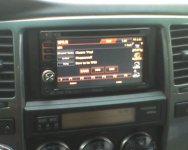
Looking forward to the pics. :D
 
Moose...
I have a couple questions...where did you ground the wire that is supposed to go to the parking brake? Also did you install a rear view camera? If so did you run the purple wire all the way to your tail light or is there a quicker/shorter place to connect this up front? I didnt check but maybe a fuse for the reverse lights?? Thanks for your help.

:D
 
gsdpwd said:
Moose...
I have a couple questions...where did you ground the wire that is supposed to go to the parking brake? Also did you install a rear view camera? If so did you run the purple wire all the way to your tail light or is there a quicker/shorter place to connect this up front? I didnt check but maybe a fuse for the reverse lights?? Thanks for your help.

:D

Well you can either wire it properly to the parking brake switch, or wire it the "easy" (but maybe not legal) way and just connect it (the light green wire in the Kenwood harness) to the black wire in the Kenwood harness (ground) and connect both of those to the ground pin in the Toyota factory harness.

Since I ordered from Crutchfield, I used an adapter harness that plugs into the factory harness. Before I got anywhere near the car, I soldered and wrapped all of the appropriate wires in the Kenwood harness to the adapter harness. It turns out that the wires are color matched very well, so it's not hard to do correctly - but check the radio installation manual and adapter harness spec sheet anyway. Incidentally, I took the "easy" way mentioned above. That meant that I didn't need to splice any wires in the factory harness, at all. That also means that my passenger can use all of the GPS features while we're driving.

I did not install a backup camera in my 4Runner, but you're probably going to need to splice wires for that... I have a wiring diagram for 06-07 4Runners that shows a Red w/ Yellow stripe wire in a connector somewhere under the dash as being the guy that you want. It should be coming out of the Park/Neutral Position Switch into a female connector under the dash. The male connector is the side that runs toward the lights in the back.

PS. The reverse light fuse won't work because it's powered all of the time. The switch to turn the lights on is "downstream" from the fuse.

PPS. I know I promised pictures... it was raining here last night and I didn't feel like getting wet to take them. Keep waiting please...
 
Last edited:
Thanks, for your help moose...

One other question, I had read that some had put the gps antenna ontop of the air duct that is behind the radio. Is this where you installed it or did you put it some place else. I am going to finish my install today after work, so I appreciate your insight. Also I will check for that wire you spoke of for the reverse, I just havent really looked too hard yet. Thanks again for your help.
 
gsdpwd said:
Thanks, for your help moose...

One other question, I had read that some had put the gps antenna ontop of the air duct that is behind the radio. Is this where you installed it or did you put it some place else. I am going to finish my install today after work, so I appreciate your insight. Also I will check for that wire you spoke of for the reverse, I just havent really looked too hard yet. Thanks again for your help.

I installed the antenna on the dash. I removed the A-pillar cover and routed the wire under the steering column and into the area between the A-pillar and dash. Then I tucked the wire between the windshield and dash and ran it to the center of the windshield, over the defroster vent and onto the dash pad. You could possibly put it elsewhere, but this should provide the best reception. There is a small flexible metal "sticker" included in the bag with all of the manuals - mine was stuck between some pages. That sticker is supposed to be used to give you a place to stick the magentized antenna on the dash and I used it for exactly that purpose.
 
Easy

gsdpwd said:
Thanks, for your help moose...

One other question, I had read that some had put the gps antenna ontop of the air duct that is behind the radio. Is this where you installed it or did you put it some place else. I am going to finish my install today after work, so I appreciate your insight. Also I will check for that wire you spoke of for the reverse, I just havent really looked too hard yet. Thanks again for your help.

Keep it clean and put it in the dash. I have posted quite a bit under the "best 2 din screen" thread so I wont repost that stuff but if you stick the metal sticker on the top of the deck toward the back and put the antenna there, there is no insulation or anything, just the plastic dash. I get full signal everywhere so far.
 
Last edited:
Re: Easy

Ducman said:
Keep it clean and put it in the dash. I have posted quite a bit under the "best 2 din screen" thread so I wont repost that stuff but if you stick the metal sticker on the top of the deck toward the back and put the antenna there, there is no insulation or anything, just the plastic dash. I get full signal everywhere so far.

Hmm, thanks for sharing your experience. I might try that!
 
Cell phone camera picture attached...
 

Attachments

  • img041.jpg
    img041.jpg
    29.1 KB · Views: 1,944
Ok...I installed my headunit last night. It went well. I put the gps antenna ontop of the air duct that is right behind the radio. I used the supplied metal sticky square stuck that to the duct and the antenna to that. My gps gets excellent reception there.

As for the back up camera. I found the reverse wire very easily so I didn't have to run it to the rear of the vehicle. The wire can be found in a 16 pin connector which is plugged into the fuse box by your left knee if in the drivers seat. It will be the RED/YELLOW wire in the #10 slot. I just connected my reverse wire there and it works great.

Today after work, I am going to actually install the camera.

I also installed the update for the headunit. It worked fine. I got an error when I tried to update the Garmin software so I have to look at that, and do a little more research. So thanks to all who have helped along the way.
 
Oh, I forgot. I also installed the steering wheel controls and the PAC adaptor to keep the jbl amplifier(fornow). The steering wheel controls were a little tricky to get programmed but after I figured out what I was doing it went well. The directions for the steering wheel controls suck. So if anyone has any questions I can help with that.

Over all, at this point I think for the money this is a great headunit. The screen is very clear and with the JBL system hooked up I watched alittle bit of BLACKHAWK DOWN and it sounds great. It has really good sound staging with the JBL system.
 
gsdpwd said:
Ok...I installed my headunit last night. It went well. I put the gps antenna ontop of the air duct that is right behind the radio. I used the supplied metal sticky square stuck that to the duct and the antenna to that. My gps gets excellent reception there.

Cool, I'll try relocating mine there!

gsdpwd said:

As for the back up camera. I found the reverse wire very easily so I didn't have to run it to the rear of the vehicle. The wire can be found in a 16 pin connector which is plugged into the fuse box by your left knee if in the drivers seat. It will be the RED/YELLOW wire in the #10 slot. I just connected my reverse wire there and it works great.

Glad I could help with that.

Hope you straighten out the Garmin update issue. Are you applying firmware or new map data? For firmware, I had to create a CD with only a garmin directory containing the extracted update. There was nothing else on the disc. I originally tried putting both the main software and the Garmin software on the same disc, but the NAV software wouldn't recognize the update.
 
File

Don't forget to whip up a custom boot screen guys. :cool:

<img src="attachment.php?s=&postid=392845" border="0" alt="" vspace="8" hspace="4">


You made a good decision guys, I swear this deck was the best kept secret (now its discontinued).

I've had mine for a few weeks now and love it.

An absolute steal considering its only been out a year and it was double the price just 4-5 months ago.
 
Last edited:
Re: File

Ducman said:
Don't forget to whip up a custom boot screen guys. :cool:

<img src="attachment.php?s=&postid=392845" border="0" alt="" vspace="8" hspace="4">


Cool! How about sharing your boot image?
 

Members online

Forum statistics

Threads
278,310
Messages
3,554,077
Members
248,016
Latest member
Advally Service

Trending content

Back
Top