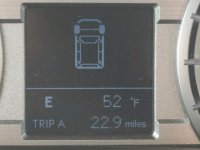
pstan13 New member May 5, 2019 #1 What does this mean? It came on yesterday, but I can't find it in the manual. Attachments Display.jpg 89.3 KB · Views: 2,765
R Redsoxx1918 New member May 6, 2019 #2 pstan13 said: What does this mean? It came on yesterday, but I can't find it in the manual. Click to expand... It’s there. Page 85. You have to use the table of contents. Sent from my iPhone using Tapatalk
pstan13 said: What does this mean? It came on yesterday, but I can't find it in the manual. Click to expand... It’s there. Page 85. You have to use the table of contents. Sent from my iPhone using Tapatalk
D Dillusion New member May 6, 2019 #4 Means you are missing your rear wheels. Only showing the front.
brownersd Member May 10, 2019 #5 Dillusion said: Means you are missing your rear wheels. Only showing the front. Click to expand... You guys are a tough bunch....:spit::spit::spit::spit:
Dillusion said: Means you are missing your rear wheels. Only showing the front. Click to expand... You guys are a tough bunch....:spit::spit::spit::spit:
tomb_rnr New member May 14, 2019 #7 You probably hit the display button located on the steering wheel which switched it to that view.
OstaraHTX New member May 15, 2019 #8 I like this view when running trails, show the angle of the steering wheel.
P Phyzman New member May 16, 2019 #9 Why did you post this in the 6th Gen forum? Sixth Gens do not yet exist. If you are from the future and do own a 6th Gen and the info display looks like that, abandon all hope. Otherwise post in the correct forum if you hope for a meaningful answer.
Why did you post this in the 6th Gen forum? Sixth Gens do not yet exist. If you are from the future and do own a 6th Gen and the info display looks like that, abandon all hope. Otherwise post in the correct forum if you hope for a meaningful answer.