Navi for my First Gen

s2kpuddydad

New member
Navi for my First Gen CLARION NX409 DVD/Navi

I have been looking for some time now for the right DVD/navi setup for me, and my 88 T4R. I went with a
CLARION NX409 2-DIN DVD/GPS/NAVIGATION system:)

I will post pics of the unit and the install over the next few days, I will also give the best revue I can about the systems functions and how I like/or not like it.

I will also be installing a Cobra 19 CB radio at the same time as the DVD/Navi

My 4Runner is my DD and is not off roaded, I use it for work and to get around. I also own a 2002 Honda S2000, my play toy:lookout:

This is a before pic of my dash and the Sony HU that came with my truck.

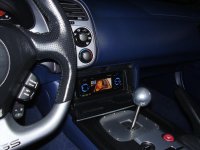
I am also posting a pic of my S2k JVC DVD/CD setup
 

Attachments
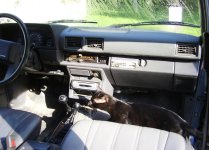
  • 88 4runner first pics 7.jpg
    88 4runner first pics 7.jpg
    129.7 KB · Views: 6,182
  • SYSTEM INSTALL DVD 7.jpg
    SYSTEM INSTALL DVD 7.jpg
    131.6 KB · Views: 1,848
Last edited:
Register to hide this ad
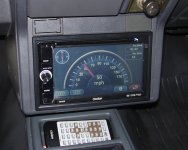
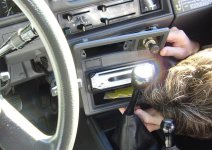
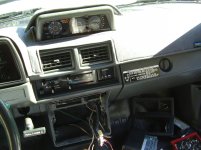
I started the install today and discovered that the factory radio brackets are missing:( I bought a replacement set off Ebay, I hope to have them in a few days. The unit looks to install very easy into the factory radio location with no modifications needed. I may go-ahead and install it temporarily why I wait for the replacement brackets get here.
 

Attachments

  • GPS DVD install 1.jpg
    GPS DVD install 1.jpg
    136.8 KB · Views: 1,593
  • GPS DVD install 2.jpg
    GPS DVD install 2.jpg
    130 KB · Views: 1,714
I got to test out the navi today, I had to pick up a new exhaust for my S2000 that was about 3 hours away from home.
I never used or owned a navigation system before so, this is my first experience with something like this. I did not read the book much at all I just started pushing the touch screen and found my way to putting in a destination. The system is pretty easy to figure out and it talks to you when it is time to turn or merge onto another road. I found my way to where I was going by just relying on the navi to get me to the area I needed to go. From that point, I gave a call to the place and got directions. I am sure that the system could have taken me right to the door step but, the sub division is new and not in my systems map bank.
The female voice was ok and business like. When the radio or CD is playing it will mute to allow the voice to give direction then, resume radio/CD playing again. The feature this system has is vast and some I will most likely never use.
As for the sound from this system, radio and CD alike is GREAT!! The CD has a 24 bit processor, the sound is crystal clear and crisp. The radio plays nice and gets signal in even rural areas.
 

Attachments

  • GPS DVD install 3.jpg
    GPS DVD install 3.jpg
    133.5 KB · Views: 1,815
Last edited:
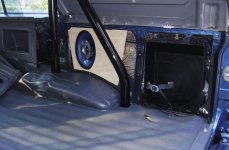
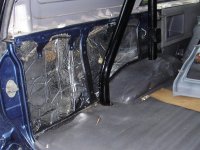
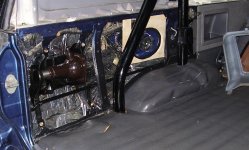
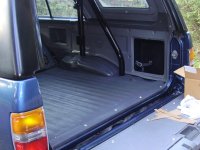
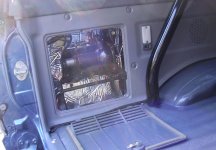
I used a set of middle of the road Pioneer 6X9 quad axle speakers in the rear of the truck. The factory openings are only 5" round so, what I did was to be sure that the 2 tweeters and mid range speakers were right at the factory speaker expanded opening. The tweeters are 1" each and the midrange is 2" The 6X9 speaker is set 1" back away from the opening so there is plenty of air space for the woofer to push sound without obstruction. The speakers have a nice rich sound and the bass response with all the insulation behind the speakers is very good.
Up front is a set of 4” carbon fiber Memphis Audio components with a pretty large cross over. These speakers are in the moderate to high end class range of speakers. I used these up front because I wanted something that would perform well at only a 4” size.

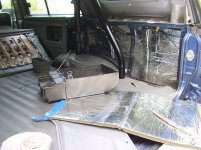
I added some sound dampening used a light weight, Mylar faced & backed, high density foam product inside the bed sides. Once all that was installed I made a new speaker mount for the right and left side 6x9 Pioneer speaker.
After fitting the speaker into place I reinstalled the newly painted factory panel and trim using all stainless steel fasteners....
 
Here is a few pics of the speaker install:)
 

Attachments

  • Back interior restro 4.jpg
    Back interior restro 4.jpg
    133.5 KB · Views: 6,822
  • Back interior restro 3.jpg
    Back interior restro 3.jpg
    137.8 KB · Views: 2,687
  • Back interior restro 6.jpg
    Back interior restro 6.jpg
    136.8 KB · Views: 1,573
  • Back interior restro 7.jpg
    Back interior restro 7.jpg
    141.3 KB · Views: 3,046
  • Back interior restro 5.jpg
    Back interior restro 5.jpg
    131.7 KB · Views: 3,185
  • Back interior restro 9.jpg
    Back interior restro 9.jpg
    134.1 KB · Views: 4,974
Last edited:

Members online

Forum statistics

Threads
278,310
Messages
3,554,079
Members
248,016
Latest member
Advally Service

Trending content

Back
Top