Newbie questions (touchscreen brightness; mute microphone)

jhmoore

New member
Hello all,

A couple new owner questions that I haven't figured out yet--hoping someone can help. 2018 4Runner TRD Offroad

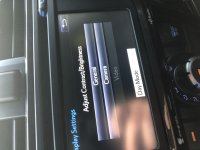
1. Brightness on the touchscreen. At night, when I turn on my headlights (because for some damn reason they don't turn themselves on!!), the touchscreen does not dim. When I turn the wheel to dim the panel lights, the touchscreen does not dim. It's freaking bright. Is there some setting somewhere to make the touchscreen dim when headlights are on or ambient light is low??? I have found a way to manually dim and brighten the touchscreen, but I'd really rather not drive into a tree while trying to adjust this manually through the menu system every evening/morning.

2. Talking on my cell phone through the audio system. I'm on a conference call and want to mute my microphone except when I'm talking. Is there a button for that? The mute button on the steering wheel does not seem to do that... I think that it mutes it so that I can't hear them, but I want to be able to hear them but not have them hear me. Is this possible without using the microphone mute on my iPhone?

Thanks!
 
Register to hide this ad
I wanted to yell at you if you didn't RTFM but since you did......i'll put some thought into it so I can yell at you for not doing the same

At least I brought your post to the top!

When I am on speaker phone I always use the mute button on the touchscreen and it does what you want, never used the steering wheel controls, if you have not tried it may be worth a shot

and for the dash, $10 says you have day mode turned on
 

Attachments

  • Daylight.jpg
    Daylight.jpg
    118 KB · Views: 685
When I am on speaker phone I always use the mute button on the touchscreen

Hmmm... confused. I've LOOKED for a mute button on the touchscreen and haven't found one. Do we all have the same touchscreen system? Is yours the same as on a 2018 TRDORP? I'll go have another look...


and for the dash, $10 says you have day mode turned on

I think that I do. But when I toggle it the other way (the manual process I referenced in the OP), it's too damn dim to read in daytime. Is there a setting that makes it respond to your lights on or an ambient light reading??

Thanks!
 
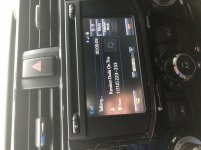
This is what mine looks like when I make a call

OK, I have serious gremlins going on here! I just sat in the driveway and called the house, and yes, I have that mute button on the screen. So that's part of the way there... it's a pretty small button to be looking for dozens of times during a phone call, so it'd be great if there was a button that did that.

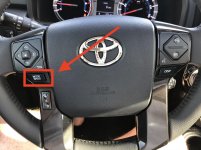
I can't get the MUTE button on the steering wheel (photo) to do anything. It definitely doesn't do what I want. But I've tried pressing it during calls and can't tell what it's doing, if anything. Anybody??
 

Attachments

  • 4Runner-steering-wheel_2386.jpg
    4Runner-steering-wheel_2386.jpg
    137 KB · Views: 1,174
$10 says you have day mode turned on

Gremlins, part 2:

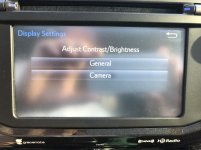
I've used that Daylight checkbox under Setup > Display Settings that you shared a photo of. But right now today I cannot get that setting to show. All I have is what's in the photo below. No Daylight checkbox. I've tried with the lights on and off. Where'd it go?????

It's daylight now... does that option only show up when it is dark outside? If so, then the damn thing knows what the ambient light is, so why doesn't it dim the touchscreen???
 

Attachments

  • 4Runner_Display-Settings_2387.jpg
    4Runner_Display-Settings_2387.jpg
    132.7 KB · Views: 711
1. Brightness on the touchscreen. At night, when I turn on my headlights (because for some damn reason they don't turn themselves on!!), the touchscreen does not dim. When I turn the wheel to dim the panel lights, the touchscreen does not dim. It's freaking bright. Is there some setting somewhere to make the touchscreen dim when headlights are on or ambient light is low??? I have found a way to manually dim and brighten the touchscreen, but I'd really rather not drive into a tree while trying to adjust this manually through the menu system every evening/morning.

SOLVED: Adjust your dimmer switch (on the left). Scroll up and you will feel a click to MAX brightness. It will be day mode no matter what. Slide it down just below the click, and you will have the auto night mode.
 
I can’t help with the mute button on the steering wheel, I don’t really care about this functionality. But I can confirm that the button you pointed to earlier will change modes if pressed and will mute the speakers if pressed and held. I don’t know if it mutes your mic too but it doesn’t matter if it also mutes the speakers. Engineers solution may be best, and only at this point.

I think I can help with the touchscreen brightness. Suggestion, sitting in a parking lot.
1. Turn on the car, keep the headlights off.
2. Set brightness of the General screen to your liking (this is daytime mode). Can’t see any reason you wouldn’t want this maxed brightness.
3. Hit ok or back or whatever it is when you’re done. Now your back at the General and Camera screen.
4. Turn on your lights. This changes it to night mode.
5. Set your brightness. (You’re now setting the night setting). Set as low as you like. This is good to do at night as you can get a better feeling of how dim it can be and you still see the screen well. I have mine set pretty low to keep my night vision as unaffected as possible.
6. Hit ok or back o me whatever it is to set it. Go back to your home screen.
7. Turn the lights off and on and you should now see the brightness switch between your preferred levels.

That worked for me. Hope it works for you too. Ymmv as I have the TRDP and it does have auto lights. But this method worked for me, manually turning off the lights and then turning them on. When everything was set, I set it back to auto and it now changes with the headlights.
 
Last edited:
[MENTION=199860]PapaRappa[/MENTION] -- that was perfect (along with someone's suggestion to turn the dash brightness dial to just *under* the top click). Works great now. Thanks!
 

Members online

Forum statistics

Threads
278,316
Messages
3,554,120
Members
248,016
Latest member
Advally Service

Trending content

Back
Top