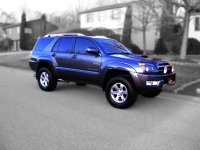
lawwailok said:did some CS2 and HDR effect, the car came out kind of fake, like a diecast, but overall i love the way it looks. comments are welcomed.
![]()
eskimochaos said:How do you do HDR effect, getting into CS2/3 and was wondering.
Do you need a tripod?
Thanks!
lawwailok said:there's a program called "photomatix pro 3" which mainly for HDR effect.
in my pic, i used CS2 to gray out and blur out the background first except the car.
then use photomatix to adjust to the color and depth you wanted as the HDR. pretty fun to work on.
no, i didn't use a tripod, since it is a sunny day, i put my D40X into auto mode and the shutter speed is very fast due to the sunlight.
i am trying to make one of this for my 4R soon in front of the house also. (that is my house being built and should be finished in a month).

eskimochaos said:Great, thanks a lot.
Kind of a photoshop newb...how did you separate the car from the background. Im trying the extraction tool but it doesnt do a good job getting the edges, thanks a lot man!
I have total training DVD's I should watch em lol...how did you learn?
lawwailok said:how's this? i blur the background more and also i "TURN ON" the headlights for ya...
contrast and brightness up 10 also.
![]()
Iron Clad Lou said:my attempt in photoshop...
twitchee2 said:How do you get such a clear selection of the car?
you can use that tool but yeah clippy. use layer mask and zoom zoom zoom in tight on the car...go slow. create multiple layers so if you mess up one..delete it do another.cdavi060 said:how do yall cut around the car so smoothly...i tried using the magnet tool but its kinda rough. hellp