Oem nav service screens

ciaz

New member
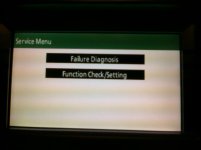
I've found two hidden screens. To access them do the following:

With the car on or in accessory mode, hold DISP while turning the lights on and off three times. This will bring you to the first screen.

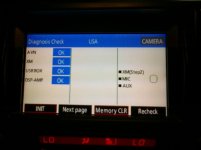
The second one is brought up by doing the same method as above, but holding INFO instead.

I haven't played around with them much yet, but hopefully you guys will be able to dig up some goodies.
 

Attachments
  • CIMG0083 (Medium).jpg
    CIMG0083 (Medium).jpg
    64 KB · Views: 1,880
  • CIMG0084 (Medium).jpg
    CIMG0084 (Medium).jpg
    59.4 KB · Views: 1,874
Last edited:
Register to hide this ad
I've found two hidden screens. To access them do the following:

With the car on or in accessory mode, hold DISP while turning the lights on and off three times. This will bring you to the first screen.

The second one is brought up by doing the same method as above, but holding INFO instead.

I haven't played around with them much yet, but hopefully you guys will be able to dig up some goodies.

LOL. How many different combinations of turning levers and pushing buttons did you have to try before you got something?
 
Played around with the 2 screens, nothing really g-14 classified other than can test the mic, all the push and rotory buttons and see all the satalites the gps is connected too.

Fun to know though.
 
Played around with the 2 screens, nothing really g-14 classified other than can test the mic, all the push and rotory buttons and see all the satalites the gps is connected too.

Fun to know though.

You should be able to change the mic sensitivity, although I've been very happy with how my mic hears me.
 
Found this old post and it’s exactly the info I’m looking for, however…

Thanks for the info here. My touchscreen in my 2012 Limited has started glitching. It’s the JBL Nav head unit.

The issue: the screen isn’t registering touches accurately. I.e. touch right of screen and it moves the map left. I want to use the service menu to check diagnostics BUT I have to touch the screen to navigate the menu.

Is there a physical button or knob I can use to select options on the touchscreen?

I’ve tried running a business card under the bezel and found no debris. Screen is clean. The whole things started overnight while it was sitting in the garage.
 

Members online

Forum statistics

Threads
278,310
Messages
3,554,079
Members
248,016
Latest member
Advally Service

Trending content

Back
Top