Parrot CK3000 Evolution Bluetooth

gRunner3

New member
Just installed this in my 2005 Ltd and thought I'd share the experience for anybody else considering doing the same. I bought the CK3000 from Amazon for about $95 including shipping as well as the JBL adapter from http://www.parrotkits.com/ for around $70 with shipping.

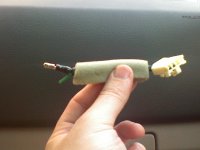
The kit was mostly plug and play, except you have to cut the speaker wires you plan to hook this up to and insert the harness in the middle. I used the center speaker and have attached a picture where I whacked the center speaker cables in half with some scissors (I don't have many tools). Be warned, you have to strip away the foam covering and some black plastic (a little thicker than electrical tape) from the speaker wires to get to them. You then have to attach some bullet connectors on each end of the exposed wires.

The 2 wires coming from the amp go into the harness, and you plug the other end of the harness into the speaker wire that actually goes to the speaker. It wasn't too hard, especially if you know what you are doing, but I really didn't and don't have a good crimping tool which caused the bullet connectors to just fall off a couple of times after I thought I had them on the wires pretty solidly. But I think I finally got them to fit well, and it has been working now for about 3 weeks. I'll attach a few pictures below.
 
Register to hide this ad
My wife had the digital camera, so all these pics were taken with my cell phone. The shine you may see is the center speaker wire (coming from the amp) that has been cut and is now exposed.
 

Attachments

  • 0513070954.jpg
    0513070954.jpg
    79.4 KB · Views: 2,147
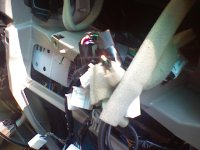
This is the other end of the center speaker wire that actually attaches to the speaker. The top wire in the picture already has one of the bullet connectors on it (plus some tape to better my chances of keeping it on), while the wire in the bottom of the picture hasn't even been stripped yet.
 

Attachments

  • 0513070955.jpg
    0513070955.jpg
    61.4 KB · Views: 1,612
The microphone runs up the inside of the A-pillar and is fixed on the windshield in the top left corner. You can't see any wire, just the microphone.
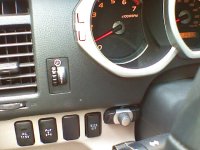
I debated on where to put the control unit. My preference was completely out of sight if the voice commands worked as advertised, (more about that later), but since it didn't and I needed to be able to access the buttons I put it here:
 

Attachments

  • 0516071610a.jpg
    0516071610a.jpg
    93.4 KB · Views: 2,280
The harness is big and bulky. I guess it has to be, but I already have a harness for the VIAS Ipod unit and I was worried that I may not have room behind there to fit everything back in. It was a tight fit, but I managed to get it in there.

The Parrot forums available from the manufacture website aren't very good... the forum moderators which I think are supposed to anwer questions don't really seem to have much of a clue as to how to solve anybody's problems. But if you happen to need (or want to buy) a replacement microphone, this Garman StreetPilot microphone from Radio Shack looks exactly like the Parrot one, including all of the clips and stuff to attach it. I suspect it is the same, but I didn't buy it so I don't know for sure. I did try testing an old computer microphone I had with a 3.5 mm jack and it worked about as good as the Parrot one did... I couldn't tell any difference.

http://www.radioshack.com/product/i...=2032059&s=A-StorePrice-RSK&parentPage=search
 
Finally, if you are on the fence as to buy this or not, I'll give it a quick review.

First, the sound quality in the 4Runner is awesome. I hear the people I'm talking to crystal clear. The volume is easy to adjust but for the most part you really don't need to.

My voice as heard by other people I'm talking to is a different story. At low speeds (less than 45) I am told they hear background noise but can still understand me. At speeds closer to 75 there are times in which I am told my voice cannot be understood. I've tried moving the microphone around but it has nothing to do with it. The unit just picks up a good deal of background noise, which sucks b/c a 4Runner is really a pretty quiet vehicle. One thing I've seen on the Parrot forums is that the phone you use can make a big difference. I have an LG VX8600 used with Verizon's service. My wife has a Motorolla Razr, one of the early ones, and it may have slightly less background noise when used but there is still some noise. My wife has an Acura TL and both of our phones sound quieter when used in her car. They aren't perfect, but it is noticably better (there is probably always going to be a little background noise when using a hands free unit). Anyway, the noise isn't so bad that I am not going to use it, but I may not use it when driving over 70 on the freeway since the background noise is louder then. At 55 or 60 mph I think the other party can tolerate it. You may have a different experience depending on your phone, though.

You are supposed to be able to activate the Parrot unit with just voice commands. Like if you want to call somebody, you say "Telephone" and the kit should ask you "Who do you want to call?". That works OK for me unless the radio is on at a medium or more volume. Then the kit doesn't hear me over the radio, or it just ignores me b/c it can't tell the difference. When somebody calls, you are supposed to be able to say "Telephone" and have it answer the call. I have not been able to get that to work, this is why I had to keep the unit visible so I could manually press the button to answer a call. You can also say "Hang Up" during a call to hang up the phone. That usually works about 85% of the time, and if it fails the first time it will get it the second time. But you probably don't want to say "Hang Up" to somebody you are talking to, so that really isn't that great of a feature in my opinion.

I thought that this unit would announce the caller, either by saying the phone number or reading the name from my phone's address book if it was in there. It doesn't, so I have no idea who is calling unless the phone is out of my pocket and in view. I now wish I had bought the 3100 with the display, but I'm not going to spend another $140 on that. You should also be aware that the Parrot kit itself doesn't really do much... it uses the voice prompts that already exist in your phone. So the actual prompts it gives you to intiate a call or confirm a phone number you dictate to it may vary depending on your phone. My phone understands me pretty well, so I can say "Call Joe" or "Call 123-456-7890" and it seems very good at getting it right. The one exception is sometimes when driving at freeway speeds it may not understand the contact name I tell it. You can always flip the phone open and dial the number yourself and then close the phone.... the call will still happen and you can talk handsfree.

If you are talking to somebody on the Parrot and you shut off your car, be aware that the phone call does not end. If the other party doesn't hang up, the call will still be live on your phone, even if the flip is closed. You can also manually transfer the call to just your phone by pressing the green button before you shut the car off.

Overall I'd give it 7 out of 10. The freeway thing is a drawback but I don't know if it is just my phone or not. My wife's TL is still probably just a 9 out of 10, so I guess this thing isn't too bad. I don't like to yap on the phone a whole lot, anyway, so it is more just an occaisional use item then something I depend on daily.
 

Members online

Forum statistics

Threads
278,305
Messages
3,554,044
Members
248,016
Latest member
Advally Service

Trending content

Back
Top