**Photography Talk**

I haven't really had any time to shoot lately, so here are a couple I took around the house this weekend.

This first one has some noise and isn't perfect but I like it a lot. If anyone has any tips about how I could have improved it, I'd greatly appreciate the input.

The moon last night
9117323670_8681b82543_b.jpg

D5000, Sigma 70-300mm, tripod - 300mm, f/5.6, ISO 100, multiple exposures (1", 1/320", 1/4000") combined with Photomatix

My Omega & XD
9115355869_0d65fb865c_b.jpg

D5000, Nikon 35mm, tripod - 35mm, f/1.8, ISO 200, 1/25"
 
Last edited:
I know I said I would get some photos of my issue posted, but I ran out of time. Spending too much of it on the new website.

Bay Area Auto Scene

feel free to give me some feedback, and if your local to the CA bay area and want to contribute let me know, I could use the help!
 
[MENTION=69441]Dawg4Runner[/MENTION] I will see your Carmel pictures and raise you Cambria photos..

Here are a few of what I put together from our last trip up there:

p1707993212-4.jpg


p1771405344-4.jpg


p1665822111-4.jpg


This last one is one of the most beautiful hikes I have done, simply breathtaking.

p1789056596-4.jpg

[MENTION=56396]Hepar[/MENTION] criticize away!! :)
 
Super moon! I like what you did with that - I need to get some software so I can do some of these multi-exposure shots.


The moon last night
9117323670_8681b82543_b.jpg

D5000, Sigma 70-300mm, tripod - 300mm, f/5.6, ISO 100, multiple exposures (1", 1/320", 1/4000") combined with Photomatix
 
Some shots from the weekend.

1/200 f5.6 ISO 100

<a href="http://www.flickr.com/photos/jkusuiphotography/9145722000/" title="DSC_2225 by JKUsui Photography, on Flickr"><img src="http://farm4.staticflickr.com/3803/9145722000_e64293629d_b.jpg" width="1024" height="683" alt="DSC_2225"></a>


1/200 f5.6 ISO 100

<a href="http://www.flickr.com/photos/jkusuiphotography/9143495489/" title="DSC_2226 by JKUsui Photography, on Flickr"><img src="http://farm3.staticflickr.com/2880/9143495489_4e10d4d451_b.jpg" width="1024" height="683" alt="DSC_2226"></a>


1/500 f4.5 ISO 100

<a href="http://www.flickr.com/photos/jkusuiphotography/9145720032/" title="DSC_2271 by JKUsui Photography, on Flickr"><img src="http://farm4.staticflickr.com/3809/9145720032_86bce216f6_b.jpg" width="1024" height="609" alt="DSC_2271"></a>


1/1000 f5.6 ISO 200

<a href="http://www.flickr.com/photos/jkusuiphotography/9143497335/" title="DSC_2185 by JKUsui Photography, on Flickr"><img src="http://farm4.staticflickr.com/3704/9143497335_f2f7baeccc_b.jpg" width="1024" height="683" alt="DSC_2185"></a>


Amazing sunset

1/160 f4.5 ISO 100

<a href="http://www.flickr.com/photos/jkusuiphotography/9143493503/" title="DSC_2278 by JKUsui Photography, on Flickr"><img src="http://farm6.staticflickr.com/5518/9143493503_db6deb0559_b.jpg" width="1024" height="582" alt="DSC_2278"></a>


My attempt at the super moon

1/800 f22 ISO 3200

<a href="http://www.flickr.com/photos/jkusuiphotography/9145722062/" title="DSC_2205 by JKUsui Photography, on Flickr"><img src="http://farm8.staticflickr.com/7308/9145722062_36d5d0cc1b_b.jpg" width="1024" height="683" alt="DSC_2205"></a>
 
been using the beta. It's nice that it finally supports nikon RAW files. No longer have to convert before importing.
 
been using the beta. It's nice that it finally supports nikon RAW files. No longer have to convert before importing.

What kind of camera do you have? I've never had to convert my RAW files from either my D700 or D800 in Lightroom 4.
 
What kind of camera do you have? I've never had to convert my RAW files from either my D700 or D800 in Lightroom 4.

Same with my 600.. no issues.

Edit - I remember having trouble with LR reading my RAW files.
The problem was that I was using and older version of Nikon Transfer software and it was corrupting the new format of RAW my 600 was recording. So try using the newest Nikon transfer software.
 
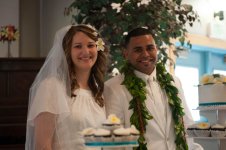
Alright DSLR friends, I need your wisdom. I took this wedding photo last weekend and just want to know what you guys would do to edit? (I'm just gonna informally send it to them or post it on FB, but I think it needs a little touch up first.)

I am definitely an amateur, so all advice is appreciated. Also, any feedback on composition or general is very much appreciated :thumb3:

Sifagaloa (1 of 1).jpg
 

Attachments

  • Sifagaloa (1 of 1).jpg
    Sifagaloa (1 of 1).jpg
    127.5 KB · Views: 438
Two from today.
<a href="http://www.flickr.com/photos/94433651@N02/9163135846/" title="DSC_0287 by 4Running Daily, on Flickr"><img src="http://farm8.staticflickr.com/7416/9163135846_d234996fcd_b.jpg" width="1024" height="680" alt="DSC_0287"></a>

I have a thing for photos from the drivers perspective.
<a href="http://www.flickr.com/photos/94433651@N02/9163131688/" title="DSC_0300 by 4Running Daily, on Flickr"><img src="http://farm4.staticflickr.com/3709/9163131688_9364cb099b_b.jpg" width="1024" height="680" alt="DSC_0300"></a>
 
Alright DSLR friends, I need your wisdom. I took this wedding photo last weekend and just want to know what you guys would do to edit? (I'm just gonna informally send it to them or post it on FB, but I think it needs a little touch up first.)

I am definitely an amateur, so all advice is appreciated. Also, any feedback on composition or general is very much appreciated :thumb3:

View attachment 92225

Maybe a little brightness and contrast tweaking to bring out the faces a little more. This will be easier if you are shooting in RAW and have Photoshop or Lightroom. A bit of sharpening might be good too unless the ISO is up there.
 
Alright DSLR friends, I need your wisdom. I took this wedding photo last weekend and just want to know what you guys would do to edit? (I'm just gonna informally send it to them or post it on FB, but I think it needs a little touch up first.)

I am definitely an amateur, so all advice is appreciated. Also, any feedback on composition or general is very much appreciated :thumb3:

Maybe something like this? Keep in mind that portrait editing is definitely NOT my forte. Didn't do any sort of retouching, so that option is still there.

 
I am definitely an amateur, so all advice is appreciated. Also, any feedback on composition or general is very much appreciated :thumb3:

Oh and it's a good idea when you take portrait photos (or when you're editing them) to not cut people off at their joints. I.E. have the edge of the photo be at their elbows or knees.
 
Maybe something like this? Keep in mind that portrait editing is definitely NOT my forte. Didn't do any sort of retouching, so that option is still there.


Oh and it's a good idea when you take portrait photos (or when you're editing them) to not cut people off at their joints. I.E. have the edge of the photo be at their elbows or knees.

Thanks for the tips! That brightened up pic looks great, btw. I will probably bump this pic up a few stops.
 

Members online

Forum statistics

Threads
278,309
Messages
3,554,066
Members
248,016
Latest member
Advally Service

Trending content

Back
Top