**Photography Talk**

[MENTION=75328]DannyLlama[/MENTION] yeah. i paid $99 for mine with a discount. i wonder if that means theyll be releasing a new version soon. but either way LR5 is a great tool especially at that price
 
I use Adobe's Creative Cloud service. It's $10/month but you get full access to dozens of Adobe's products, including Lightroom 5 and Photoshop CC. Photoshop CC is the newest version of Photoshop and only available through the Creative Cloud. I'd definitely recommend it if you are planning on utilizing most of what Adobe has to offer. A few thousand dollars worth of software for $10/month is worth it to me. :p
 
I use Adobe's Creative Cloud service. It's $10/month but you get full access to dozens of Adobe's products, including Lightroom 5 and Photoshop CC. Photoshop CC is the newest version of Photoshop and only available through the Creative Cloud. I'd definitely recommend it if you are planning on utilizing most of what Adobe has to offer. A few thousand dollars worth of software for $10/month is worth it to me. :p

I have heard mixed reviews about their services. Not a great deal of positive reviews. I can't remember now, but I remember reading about some restrictions or exclusions.

How many computers can you run this service on?
 
got me a new 10 stop ND filter...tested it out on a sunset tonight


Canon 6D
24-105F4L @ 45mm
f/22
ISO 100
300 secs
LR5 conversion from RAW to jpg

12686725863_bf61f430d1_b.jpg
 
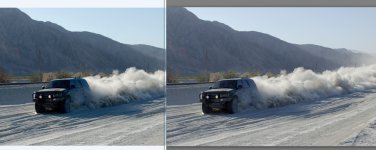
Not sure there's a whole lot that can be done with it. One thing I did was to take the color out of the excavator. You want your eyes to go to the car and not that piece of machinery in the background and since most of the color is the snow, the yellow of it stands out like a sore thumb.
Yeah, even the shovel of the excavator that you can see through the windshield is a bit distracting. It's more of a composition thing I think. I tend to like vehicle pics taken at a bit of an angle if it's static and it doesn't need to be dead centre in the frame (rule of thirds).
 
Hey guys quick question .....

My camera:
Nikon D5100 w/ various lenses
Shoot all photos in RAW and save originals

My Software:
Windows 7 x64
Adobe Lightroom
Adobe Photoshop Elements


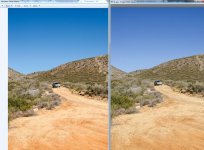
I've noticed that when I edit in Adobe lightroom and then export a JPEG that depending on what color profile I export the JPEG the picture MAY or MAY NOT look the same when browsing pictures using Windows photo viewer, Picasa photo viewer, or an online photo website like Imageshack.us

Of course once I export a file I want it to look the same on all platforms.

Here is what I found:

AdobeRGB: looks different on different applications/platforms
ProPhoto: same
sRGB: a much older profile but the picture will be consistent on any platform and still IMO looks great.


So the question is ..... if I want the picture to look the same across as many applications, websites as possible should I just always use sRGB ?


Thanks


:)


//// EXAMPLE WHEN I SAVED AS AdobeRGB /////

* Left is Windows Picture Viewer (which handles the color profile correctly, matching Lightroom's onscreen visual)
* Right is Picasa (and Imageshack.us .... as well)

When I use sRGB during a JPEG update the picture always looks the same as it did in Lightroom on screen.


:bat:
 

Attachments

  • t4R-example_AdobeRGB-1.jpg
    t4R-example_AdobeRGB-1.jpg
    136.3 KB · Views: 131
  • t4R-example_AdobeRGB-2.JPG
    t4R-example_AdobeRGB-2.JPG
    127.9 KB · Views: 138
Last edited:
[MENTION=65101]BrianSD_42[/MENTION] what do you have your camera settings set to? most default to sRGB i would update to Adobe RGB and IMO save all in Adobe RGB
 
Is the problem the camera settings or how applications view the profiles ?

Most of the time it's how the applications view the profiles. I personally wouldn't change your setting from sRGB unless you do your own printing and you know what you're doing.
 
So the question is ..... if I want the picture to look the same across as many applications, websites as possible should I just always use sRGB ?

Simple answer: yes.

More complicated answer: Yes, because...

...your picture existing as a digital file is just a sequence of numbers. To make an image out of these numbers requires a mapping, a function or a table which tells you which number corresponds to which color. This mapping is known as a color profile or, in some cases, as a color space.

For example, sRGB is one color space. AdobeRGB is a different color space. The same numbers correspond to different colors in these two spaces.

In fact, displaying your picture on a screen is even more complicated. First, some software has to decide which colors do the numbers in the file correspond to. But then, these colors must also be displayed be the screen and it's a separate issue because (a) you need to know which numbers to send to the screen to make it display the colors you want; and (b) the screen is limited in which colors it can display (that's called its gamut) and if you want to show a color the screen is not capable of, something must be done about it.

Generally speaking, sRGB is the right color space to use if you don't know on which device your picture will be seen. That is because it's the most widespread color space and it also the default color profile for most (non-professional) screens.

Do note, that different screens really differ in how they display color. You -- who publishes the image -- cannot control that. On some screens your picture will show up as too blue, on others as too yellow, on yet others as too dark or too bright and washed out... You can't do anything about that. People are not running color-calibrated monitors and that's just a fact of life.

If you want to delve further into this messy subject, google up "color management". Real World Color Management by Bruce Fraser is a good book.

 
Last edited:
Thank you guys for the really great explanations.

Yotta, I was thinking pretty much what you said but less technical! Great explanation though.
 
For anyone with a D600 it looks like Nikon is replacing the shutters on them free of charge. The way I read it you don't even need to be experiencing any issues to get the shutter replacement, though I'm guessing they'll get a flood of them so make sure you can be without your camera for a few weeks before you send it in.

Nikon to offer D600 shutter replacement to address 'dust' issue: Digital Photography Review

I got that notice too, are you going to send yours in?
 
I got that notice too, are you going to send yours in?

Haven't had any issues with mine so I doubt I'll bother with it. My guess is that there's going to be an initial flood of people sending theirs back anyhow, so at first they'll probably be pretty backed up. I might wait a few months then send it since warranty status doesn't matter.
 
Looking for color

in this drab winter. one of the first few shots on my new x100s. still learning it. This is about a 50% crop and re-sized for this website. believe i had it on auto & compensated about 1 stop. like i said, i just needed to see some color after all this white stuff.
 

Attachments

  • DSCF0055-2.jpg
    DSCF0055-2.jpg
    148.7 KB · Views: 159

Members online

Forum statistics

Threads
278,310
Messages
3,554,079
Members
248,016
Latest member
Advally Service

Trending content

Back
Top