**Photography Talk**

The major manufacturers of cameras and lenses are too close in quality to worry about in name only. I sold tons of equipment working at a high end camera store in college. Two pieces of advice.

1. Get two lenses. Wide to moderate range and moderate to long range. The lenses that cover too much range are the poorest quality. Typically the lens will vignette and be very poor quality at the edges. It is just too hard to make all the sets of lenses work.

2. Buy what you can use without fiddling too much. If I placed 5 photos in front of you and asked you to pick the manufacture of lens and camera and you actually did. You should play the lottery that day too. If you have a hard time understanding the equipment you wont take good photos.
 
I don't normally do a lot of b&w but this old train and the background didn't have much color to make it interesting.
5 bracketed hand held shots converted to HDR in LR6. using a Canon 5D MarkIV and f/2.8 16-35 lens at 27mm f/14 ISO100
Location is Strasburg, CO.

33978641141_07ccb49924_b.jpg
 
I've been working on updating my post-processing skills to take advantage of Tony Kuyper's v5 Action Panel.

Initial basic post-processing done in LightRoom CC (chromatic aberration removal, basic image tweaks [if needed]). Then from LR, I'll open the image in PhotoShop CC.

From there, a whole slew of things are done to the raw image, to pull out all the details. I will probably go back and re-process one more time, to change a few layer details (reduce opacity or modify 'blur', etc.).

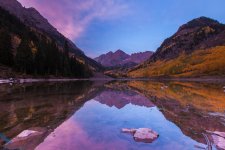
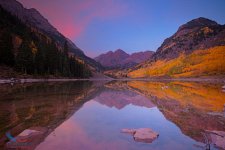
Here is a comparison of my main business card image (Fall Colors 2012). This amazing morning was one to remember. I arrived on-location 90+ minutes ahead of twilight (first person on-location, only car in day-use parking). By the time twilight was upon the day, there was probably 100 photographers lining the shore of Maroon Lake. By Sunrise (when this pic was taken), it was the usual wall-to-wall photographers lining the shore of Maroon Lake.

The light this particular morning was crazy. It was looking like it would be a bust, but then just as sunrise time hits…the light hits the clouds in upper-left and gives it an amazing pink hue!!!

Original LR edit:
FallColors2012-267.jpg

18 April 2017 Edit using v5 Action Panel in PS CC:
Maroon Lake Sunrise Fall Colors 2012.jpg

Thoughts??
 

Attachments

  • FallColors2012-267.jpg
    FallColors2012-267.jpg
    130.5 KB · Views: 241
  • Maroon Lake Sunrise Fall Colors 2012.jpg
    Maroon Lake Sunrise Fall Colors 2012.jpg
    131.9 KB · Views: 256
I've been working on updating my post-processing skills to take advantage of Tony Kuyper's v5 Action Panel.

Initial basic post-processing done in LightRoom CC (chromatic aberration removal, basic image tweaks [if needed]). Then from LR, I'll open the image in PhotoShop CC.

From there, a whole slew of things are done to the raw image, to pull out all the details. I will probably go back and re-process one more time, to change a few layer details (reduce opacity or modify 'blur', etc.).

Here is a comparison of my main business card image (Fall Colors 2012). This amazing morning was one to remember. I arrived on-location 90+ minutes ahead of twilight (first person on-location, only car in day-use parking). By the time twilight was upon the day, there was probably 100 photographers lining the shore of Maroon Lake. By Sunrise (when this pic was taken), it was the usual wall-to-wall photographers lining the shore of Maroon Lake.

The light this particular morning was crazy. It was looking like it would be a bust, but then just as sunrise time hits…the light hits the clouds in upper-left and gives it an amazing pink hue!!!

Original LR edit:
View attachment 248753

18 April 2017 Edit using v5 Action Panel in PS CC:
View attachment 248754

Thoughts??

As is, I think I am more of a fan of the top image for my personal style. I do like some of the aspects of the second but how bright the colors on the right side is throwing me off along with the far mountains I like in the first image more, look more real and detailed... However they are both nice images.
 
Shot a friend of mine's BMW S1000RR last week.

<a data-flickr-embed="true" href="https://www.flickr.com/photos/thomashorner/33986979065/in/album-72157679257413983/" title="DSC_2047_2"><img src="https://c1.staticflickr.com/3/2896/33986979065_b745f0d567_b.jpg" width="1024" height="678" alt="DSC_2047_2"></a><script async src="//embedr.flickr.com/assets/client-code.js" charset="utf-8"></script>

<a data-flickr-embed="true" href="https://www.flickr.com/photos/thomashorner/33174376893/in/album-72157679257413983/" title="DSC_2139"><img src="https://c1.staticflickr.com/3/2842/33174376893_a1a45415e5_b.jpg" width="678" height="1024" alt="DSC_2139"></a><script async src="//embedr.flickr.com/assets/client-code.js" charset="utf-8"></script>

<a data-flickr-embed="true" href="https://www.flickr.com/photos/thomashorner/33988170235/in/album-72157679257413983/" title="DSC_2097"><img src="https://c1.staticflickr.com/3/2950/33988170235_b6464f49d1_b.jpg" width="678" height="1024" alt="DSC_2097"></a><script async src="//embedr.flickr.com/assets/client-code.js" charset="utf-8"></script>

<a data-flickr-embed="true" href="https://www.flickr.com/photos/thomashorner/33175150423/in/album-72157679257413983/" title="DSC_2062"><img src="https://c1.staticflickr.com/3/2805/33175150423_00c11de4a0_b.jpg" width="1024" height="678" alt="DSC_2062"></a><script async src="//embedr.flickr.com/assets/client-code.js" charset="utf-8"></script>
 
As is, I think I am more of a fan of the top image for my personal style. I do like some of the aspects of the second but how bright the colors on the right side is throwing me off along with the far mountains I like in the first image more, look more real and detailed... However they are both nice images.

Your eye picked up on what I saw post-editing yesterday (end of the day; eyes tired…didn't really see 'how' bright the highlights were).

As mentioned, I do plan to go back and re-edit…to bring some portions back to less-obnoxiously bright and other portions more accurately brightened up.

The TKv5 Actions Panel is a totally new tool; no more making an selection and mask. Takes time to get comfortable with the new process, but I definitely like the new v5 Actions Panel…:)
 
Your eye picked up on what I saw post-editing yesterday (end of the day; eyes tired…didn't really see 'how' bright the highlights were).

As mentioned, I do plan to go back and re-edit…to bring some portions back to less-obnoxiously bright and other portions more accurately brightened up.

The TKv5 Actions Panel is a totally new tool; no more making an selection and mask. Takes time to get comfortable with the new process, but I definitely like the new v5 Actions Panel…:)

I know fully what you mean with those tired eyes, some of the stuff that comes out of that gets weird, especially for me editing portraits. I have to make sure I look at them a few times before I send any to the client.

I had never heard of these action panels before, just googled it and it seems really cool, going to have to look into it a bit more. Never been one to do a lot in photoshop, mostly do all my stuff in LR.
 
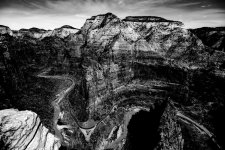
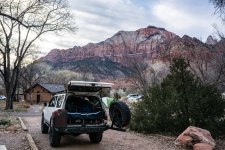
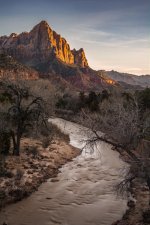
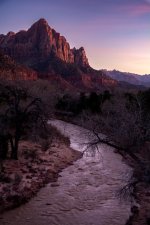
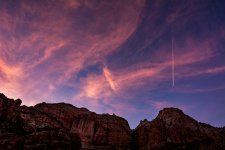
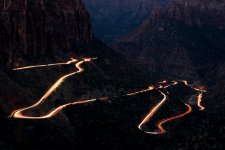
Here are some from my trip to Zion Nat. Park. All from very common areas from getting my tourist on but it was still a great time and like the images I got. I wish there was more clouds when we were there, but sunset and sunrise were amazing. With the obligatory camp spot photo. There are two photos that are just about the same but one is earlier in the sunset and the other is later, I like the first one with the water since I did a long expo on it but I like the color in the second one, just bummed out I didn't have any other ND filter other than my 10 stop so the expo would have been ridiculous and the bridge moved every time a car drove over therefore blurring the photo. Let me know what you think.
 

Attachments

  • DSC_3208-2.jpg
    DSC_3208-2.jpg
    145.9 KB · Views: 177
  • DSC_3301.jpg
    DSC_3301.jpg
    145.9 KB · Views: 170
  • DSC_3635.jpg
    DSC_3635.jpg
    140.3 KB · Views: 180
  • DSC_3677.jpg
    DSC_3677.jpg
    137.9 KB · Views: 171
  • DSC_3662.jpg
    DSC_3662.jpg
    131.1 KB · Views: 173
  • DSC_3758-Edit.jpg
    DSC_3758-Edit.jpg
    136.8 KB · Views: 175
I know fully what you mean with those tired eyes, some of the stuff that comes out of that gets weird, especially for me editing portraits. I have to make sure I look at them a few times before I send any to the client.

I had never heard of these action panels before, just googled it and it seems really cool, going to have to look into it a bit more. Never been one to do a lot in photoshop, mostly do all my stuff in LR.

Sean Bagshaw is an amazing photographer and also an excellent teacher! Check out his tutorials:

Sean Bagshaw Tutorials
 
Videography is my main source of income!

I have taken a break from photos and video. My wife has re-ignited my intrests. Just trying to find some good, basic/beginner software to put our GoPro footage together. She runs lots of time lapse/video combos.

Is there anything you can recommend that will not break the bank to put it all together?
 
Is there anything you can recommend that will not break the bank to put it all together?

i used the GoPro software at first but it quickly became cumbersome and buggy when working with long videos to cut parts out of and splice together.

I use PowerDirector. Namely because it's fairly inexpensive and I haven't found anything that it doesn't do that I want it to do. You just have to figure out how in the software to do it (like any software lol).

I've been using it on and off as needed for a few years (4 versions of it)
 
i used the GoPro software at first but it quickly became cumbersome and buggy when working with long videos to cut parts out of and splice together.

I use PowerDirector. Namely because it's fairly inexpensive and I haven't found anything that it doesn't do that I want it to do. You just have to figure out how in the software to do it (like any software lol).

I've been using it on and off as needed for a few years (4 versions of it)

Is it Mac friendly...lol??
 
Damned hippies...lol

That I do not know.

Here's PC mag's extensive review
CyberLink PowerDirector 15 Ultimate Review & Rating | PCMag.com

I see that Adobe has "Premier Elements". I've had Photo Events for years for basic photo editing so if Premier Elements is anything like that I'd give that a try for $80

It doesn't look like it, I am going to look some more and see if I can find some better info on it. That really looks like a great place to start though.
 
I have taken a break from photos and video. My wife has re-ignited my intrests. Just trying to find some good, basic/beginner software to put our GoPro footage together. She runs lots of time lapse/video combos.

Is there anything you can recommend that will not break the bank to put it all together?

We've somewhat recently made the switch from FCP to Premier. Much easier to use. Post-color corrections (and such) are also much easier. That and Premier can use all different file types.

I see that you're on a Mac. I can get you a copy of FCP 7 if you want. It's not the most basic, but for basic edits, it's pretty easy. Especially with the amount of info on youtube and such.
 
Example of our stuff.


<p><a href="https://vimeo.com/124434255">Sony Xperia | Peek</a> from <a href="https://vimeo.com/lostfoundfilms">Lost&Found</a> on <a href="https://vimeo.com">Vimeo</a>.</p>
 
Last edited:
We've somewhat recently made the switch from FCP to Premier. Much easier to use. Post-color corrections (and such) are also much easier. That and Premier can use all different file types.

I see that you're on a Mac. I can get you a copy of FCP 7 if you want. It's not the most basic, but for basic edits, it's pretty easy. Especially with the amount of info on youtube and such.

If you could slide me that copy of FCP 7 that would be great.....I really would love a place to start learning.
 
Example of our stuff.

<iframe src="https://player.vimeo.com/video/124434255" width="640" height="360" frameborder="0" webkitallowfullscreen mozallowfullscreen allowfullscreen></iframe>
<p><a href="https://vimeo.com/124434255">Sony Xperia | Peek</a> from <a href="https://vimeo.com/lostfoundfilms">Lost&Found</a> on <a href="https://vimeo.com">Vimeo</a>.</p>

That's awesome...the production and the product.
 
If you could slide me that copy of FCP 7 that would be great.....I really would love a place to start learning.

Very cool !! thanks for sharing, I have your website bookmarked and I have yet to watch one of your videos. Glad you posted this.
 

Members online

Forum statistics

Threads
278,310
Messages
3,554,080
Members
248,016
Latest member
Advally Service

Trending content

Back
Top