**Photography Talk**

It comes down to scaling, detail and processing. The information scale difference on a single frame of something shot at a high FPS on a GoPro vs say the cameras we shoot on (Cannon C300's) is immense. It's such a specialized thing that you have to sacrifice something in order to get it.

If you see something done commercially with high-speed shooting (and I mean a FPS well above the 120 range), odds are they are using a very specific camera for that shot.

High quality stuff with the C300's! I've got a friend who does all kinds of commercial work…just bought 3 8K Red's…(yeah…got some $$$? ooof!) last fall. Some of the work I've seen is just stunning!
 
High quality stuff with the C300's! I've got a friend who does all kinds of commercial work…just bought 3 8K Red's…(yeah…got some $$$? ooof!) last fall. Some of the work I've seen is just stunning!

Yeah, they're pretty impressive bodies for sure. And they made dealing with external sound so much easier too.

Here's one of my brothers most recent shorts:


<iframe src="https://player.vimeo.com/video/313853677" width="640" height="320" frameborder="0" allow="autoplay; fullscreen" allowfullscreen></iframe>
 
Last edited:
Hummingbirds in nest, Devil's Canyon near Anza Borrego...I think these are Costa's Hummingbirds:

IMG_1973_1.jpg


IMG_1973_2.jpg


IMG_1973_3.jpg


IMG_1973_4.jpg


IMG_1973_5.jpg


I also saw this female Western Tanager:

IMG_1976_1.jpg


IMG_1978_2.jpg


And this male Wilson's warbler:

IMG_1978_1cx.jpg


Just before I left, I spotted the nest of a Red Tail Hawk, and got this photo of a chick in the nest:

IMG_1980cx.jpg


.
 
I finally got out to use the iOptron skyguider on something worth using it on. I went up to delicate Arch this past weekend in Arches Nat'l Park. it performed fantastically. I was able to capture 4min long exposure of the milky way behind delicate arch at ISO 2500 while others were all having to shoot at ISO 6400+ using the 20-30" exposures. I wanted to run longer at lower ISO but I was getting so many issues with other people light painting (so much for a dark sky) and it was going to blow out my photos. Plus with those really long exposures you start getting those burnt pixels in the image. I decided to do multiple photos and combine the images in PS. The image in link below is total of 9 images. all shot on Canon 5D Mark IV at ISO 2500 f/2.8 4min long exposures. 5 images for sky, 4 for foreground. Stacked in PS for noise reduction and removing the extra lights and dust/speckles.

I am very impressed with this star tracker. being able to capture these images at a much lower ISO gives it more clarity/color/detail. The drawback is the weight. with camera, tripod and the star tracker it is easily 15-20lbs. carrying all of that gear up the to delicate in complete darkness was tiring, especially after hiking 10+ miles during the day in 90 degree heat. set up isn't too bad, took me just a few mins to set up and then that weight I didn't want to carry kept my tripod very steady.

I did not want to attach the image since it will ruin the quality. I haven't updated my flickr account yet so I am not able to host it there and embed it here, so best I can do is link to my IG page for now:

Christopher Locke on Instagram: “I couldn’t have gotten any better of conditions for this bucket list image. I used @photopills and planned everything I could ahead of…”

 
Astrophotography at Lake San Cristobal

Took advantage of good Wx forecast to run down to Lake City last weekend.

While conditions weren't 100% perfect, I will say the 2-1/2 hours I spent on-location were pretty damn good!

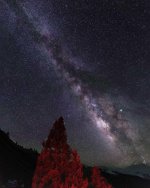
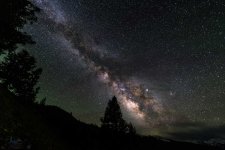
Using a new technique where I shoot 10-12 images, shooting at ISO2000, f/1.8 (Sigma 14mm) and 15 sec exposure.

Import to Lightroom, make minor adjustments as appropriate for astro images, export all frames as .tif. Import to Starry Landscape Stacker, run through the steps and save the final image (.tif). This creates a more intense image with quite a bit less noise!

Last step: import the final .tif image to Photoshop and perform a few final adjustments to bring out the most of the image!

"Light Painting & The Milky Way"
Light Painting & The Milky Way_v3.jpg

"To The Core"
To The Core.jpg
 

Attachments

  • Light Painting & The Milky Way_v3.jpg
    Light Painting & The Milky Way_v3.jpg
    136.6 KB · Views: 252
  • To The Core.jpg
    To The Core.jpg
    91.3 KB · Views: 272
I finally got out to use the iOptron skyguider on something worth using it on. I went up to delicate Arch this past weekend in Arches Nat'l Park. it performed fantastically. I was able to capture 4min long exposure of the milky way behind delicate arch at ISO 2500 while others were all having to shoot at ISO 6400+ using the 20-30" exposures. I wanted to run longer at lower ISO but I was getting so many issues with other people light painting (so much for a dark sky) and it was going to blow out my photos. Plus with those really long exposures you start getting those burnt pixels in the image. I decided to do multiple photos and combine the images in PS. The image in link below is total of 9 images. all shot on Canon 5D Mark IV at ISO 2500 f/2.8 4min long exposures. 5 images for sky, 4 for foreground. Stacked in PS for noise reduction and removing the extra lights and dust/speckles.

I am very impressed with this star tracker. being able to capture these images at a much lower ISO gives it more clarity/color/detail. The drawback is the weight. with camera, tripod and the star tracker it is easily 15-20lbs. carrying all of that gear up the to delicate in complete darkness was tiring, especially after hiking 10+ miles during the day in 90 degree heat. set up isn't too bad, took me just a few mins to set up and then that weight I didn't want to carry kept my tripod very steady.

I did not want to attach the image since it will ruin the quality. I haven't updated my flickr account yet so I am not able to host it there and embed it here, so best I can do is link to my IG page for now:

Christopher Locke on Instagram: “I couldn’t have gotten any better of conditions for this bucket list image. I used @photopills and planned everything I could ahead of…”

Very cool Chris!!
 
Using a new technique where I shoot 10-12 images, shooting at ISO2000, f/1.8 (Sigma 14mm) and 15 sec exposure.

this is similar to how I do it now too. multiple exposures stacked. do you have PS? if so you can load all layers, even as RAW files, and convert to smart object. then use a stack mode to remove the noise. if you want more detailed steps let me know and I can write them out.
 
this is similar to how I do it now too. multiple exposures stacked. do you have PS? if so you can load all layers, even as RAW files, and convert to smart object. then use a stack mode to remove the noise. if you want more detailed steps let me know and I can write them out.

I would be interested in that!
 
stacking images to remove noise

[MENTION=137107]Ray Dunakin[/MENTION]


The way I do it, and I know there are many ways but this gets you the idea.
Edit all of the photos in LR, I select all the photos and turn on the auto sync feature for my basic edits.
Right click with all photos highlighted and open as layers in PS. This is really tough if you have a lot, but works fine if you have 5-10 photos. I have done up to 60 photos before, it def takes time depending on how fast your PC is.
once PS opens all of the layers, I select the layers I want combined. So in in my case I select all the foreground ones. One important step is making sure they are all aligned. Once you have all selected go up to edit > auto align layers. I always choose the auto mode on pop up. With layers still selected > right click in layers panel convert to smart object.
I will do this step again for the sky, select all the sky layers > auto align > right click convert to smart object.
This will convert all layers in to one smart object layer. (if you are unfamiliar with smart objects check out YouTube. I convert all of my layers to smart objects)
Then with layer selected. Go to Layer > Smart Objects > Stack Mode > Median.
Let this run for a bit, again depending on your PC
Background on median stack mode. It will search through each layer (even though you have one layer all layers are hidden in the smart object) and find pixels that are on one layer but not others. In this case we have digital noise on one layer but not present in exact same spot on another. It will then replace the noise pixel with a pixel from the other layer essentially removing all of the noise.
I have used mean before too in stack mode. This one allows to reduce stars in a way if the sky is too star cluttered and you want fewer to focus on the MW.
Median also works great to remove people. I once shot 40 images from a tripod spaced out over 30 mins or so. I did the same steps above and it removed all of the people in the image. I did it once for traffic too, it removed all of the cars making the freeway look completely empty. The important part of this is people/items have to be moving and enough pictures to fill in the dead spaces. With the sky aligned all the stars and stuff are in same spot, it’s the digital noise that moves around in each frame and will get removed
 
this is similar to how I do it now too. multiple exposures stacked. do you have PS? if so you can load all layers, even as RAW files, and convert to smart object. then use a stack mode to remove the noise. if you want more detailed steps let me know and I can write them out.

Hey Chris, I have used PS for many years. That technique works fairly well…but since using Starry Landscape Stacker for these images, I am intrigued by the quality of the output.

I'm heading out again tomorrow (Friday) for a few days and will be capturing more images to push the new application. Will always have the PS stacking option as a backup. ;) (amazing how the tools have changed the workflow over the last 15+ years. LOL)
 
Hey Chris, I have used PS for many years. That technique works fairly well…but since using Starry Landscape Stacker for these images, I am intrigued by the quality of the output.

I have been hearing a lot about starry tracker and similar programs. I have not looked in to them though, is it free or a paid app? I try to limit my post edit process steps if possible. lots of export/importing of files to multiple apps and keeping organized with the extra tiff files.
weather doesn't look too clear here in CO area for the weekend, not sure if ill get out for stars this weekend
 
I have been hearing a lot about starry tracker and similar programs. I have not looked in to them though, is it free or a paid app? I try to limit my post edit process steps if possible. lots of export/importing of files to multiple apps and keeping organized with the extra tiff files.
weather doesn't look too clear here in CO area for the weekend, not sure if ill get out for stars this weekend

Starry Landscape Stacker is a one-time purchase $39.99.

As for the weather…well, yeah, Mother Nature loves to wreak havoc and change forecasts at a moments notice. :( Had forecasted clear skies based on 3 of 5 Wx apps, the other 2 showing <10% chance of clouds. So much for that forecast. I have a few stacks that I'm going to process, but will tinker with but definitely not clear-skies. :(
 
Now that I have my 4Runner pretty much the way I want it, I decided to upgrade my camera to ensure I don't run out of ways to set money on fire.

I'd like to upgrade my Sony A7 to the A7r ii, just finding it hard to pull the trigger on a used body. More importantly, I am in the market for the FE 100-400GM 4.5-5.6 along with the 2.0 teleconverter. If anyone knows where to get a decent deal on any of that, I'd love to know. Sony stuff just is not cheap anywhere it seems. I'd rather pay a bit more and stay native, but full MSRP does sting.
 
Now that I have my 4Runner pretty much the way I want it, I decided to upgrade my camera to ensure I don't run out of ways to set money on fire.

I'd like to upgrade my Sony A7 to the A7r ii, just finding it hard to pull the trigger on a used body. More importantly, I am in the market for the FE 100-400GM 4.5-5.6 along with the 2.0 teleconverter. If anyone knows where to get a decent deal on any of that, I'd love to know. Sony stuff just is not cheap anywhere it seems. I'd rather pay a bit more and stay native, but full MSRP does sting.

A7rII or A7rIII? You would be wise, IMO, to get the A7rIII (r3) as it uses the newer batteries with substantially better battery life!!

As for the FE100-400GM lens, the only advice I have here is the make sure it is a USA market lens, not a gray-market lens. Warranty coverage on gray-market or non-USA lenses is a real PITA, should something need fixing!
 
A7rII or A7rIII? You would be wise, IMO, to get the A7rIII (r3) as it uses the newer batteries with substantially better battery life!!

I've got an a7iii (not r) and love it! Sold all my Nikon stuff on eBay and went all in on Sony. I have the 18-24mm F4 lens and Batis 18mm F2.8 prime lens.
.
 
Been a while

Hey guys! Been awhile since I was on this forum at all, I just moved from Montana to Baltimore for my wife's school. Anyone here around this area, like within city proper? I decided to leave my 4runner back in Montana with my parents for the year, didn't want to deal with theft on it of any kind so I am now a bike commuter.

Anyways, some recent photos!
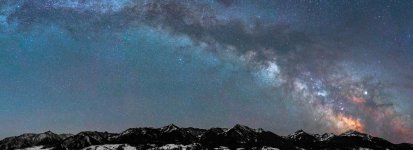
50mm, 20 photo (2 rows of 10) panorama I took back in March. I want to say there was a waning crescent that night to give the mountains some light. So far my favorite milkyway photo even though it doesn't really have a foreground.

DSC_5326-Pano-Edit-Edit-Edit.jpg

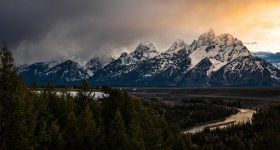
95mm, f8, 1/80, ISO100, 7 photo panorama. From an extremely common place in the Tetons, but I thought the rain showers made it nice and unique. Taken this past memorial day weekend. One of my favorites from the trip and might end up being printed some day.

DSC_7901-Pano.jpg

150mm, f5, 1/1000, ISO640 (Was just shooting wildlife in Yellowstone and forgot to being the ISO down) This is weirdly one of my favorite photos I have taken even though it is very much not my style. I usually like to have a technically correct, all in focus and very sharp image but this one stood out to me. I kinda like how the mountain looks painted in a way. It is obviously heavily edited, and much more than I would normally do but it just seemed to work for me on this photo. Taken this past January just outside of Yellowstone.

DSC_4965-Pano-2.jpg

Thanks for looking and let me know what you think of these shots!
 

Attachments

  • DSC_5326-Pano-Edit-Edit-Edit.jpg
    DSC_5326-Pano-Edit-Edit-Edit.jpg
    124.6 KB · Views: 191
  • DSC_7901-Pano.jpg
    DSC_7901-Pano.jpg
    138.7 KB · Views: 193
  • DSC_4965-Pano-2.jpg
    DSC_4965-Pano-2.jpg
    139.2 KB · Views: 185
Hey guys! Been awhile since I was on this forum at all, I just moved from Montana to Baltimore for my wife's school. Anyone here around this area, like within city proper? I decided to leave my 4runner back in Montana with my parents for the year, didn't want to deal with theft on it of any kind so I am now a bike commuter.

Great shots! I love the Teton photo in particular. I've been to the same lookout, but my photo wasn't nearly as good!

Interestingly enough, my wife also did some postgrad stuff in Baltimore, and we moved from Annapolis to Boise in August. I hope your bike commute isn't too long, and there's a shower at your office. Mid-Atlantic humidity is no joke, as you will discover over the course of the next 90 days or so. Fall can be beautiful, though. Much higher chance of the bike getting lifted in Baltimore than the 4R, but you are definitely saving it from some abuse by leaving it behind. Good luck in your new surroundings!
 
Great shots! I love the Teton photo in particular. I've been to the same lookout, but my photo wasn't nearly as good!

Interestingly enough, my wife also did some postgrad stuff in Baltimore, and we moved from Annapolis to Boise in August. I hope your bike commute isn't too long, and there's a shower at your office. Mid-Atlantic humidity is no joke, as you will discover over the course of the next 90 days or so. Fall can be beautiful, though. Much higher chance of the bike getting lifted in Baltimore than the 4R, but you are definitely saving it from some abuse by leaving it behind. Good luck in your new surroundings!

Thank you! Thankfully I am actually working from home and my wife has a very short walk to her school shuttle. The humidity so far as been about 50/50 split between really nice days and days that are extremely muggy and unpleasant. I have been to the Shenandoah national park in the fall a couple years back and it was spectacular, definitely looking forward to that again. Funny thing is about the bike, I have already had one stolen within the first week of being here. I have now gotten a different beater bike and also much better locks for both of our bikes. Here is to hoping they stay around a bit longer than 1 week.
 
All great shots, but that Milky Way pano is amazing! So much color and detail in it.

Thank you! It is by far my best one I have taken. Something about that one just worked better than any in the past years. I have never been able to get that level of color and detail until this one. Pretty happy with it, just wish I had my 50mm 1.4 at that time, but instead had to use my 24-70 2.8 so it is a bit more noisy that I was hoping.
 

Members online

No members online now.

Forum statistics

Threads
278,310
Messages
3,554,079
Members
248,016
Latest member
Advally Service

Trending content

Back
Top