**Photography Talk**

One small issue I have with my 2016 4Runner is that there is no way to keep the interior lights completely shut off. I like to do a lot of long-exposure night photography, and time-lapse stuff, and it gets annoying having to either set up the camera a long way from my campsite, or else stay outside of the vehicle the entire duration of the shot(s).

Has anyone else had this problem? Anyone come up with a solution?
 
[MENTION=137107]Ray Dunakin[/MENTION] which lights stay on? I always park behind my camera a few yards when shooting at night. I can get in and out with no issues of it interrupting my shot. I turn all of the dome lights off but the door lights still kick on

this is my most recent night shot. it is 122 photos stacked. it was on a popular road so lots of car lights passing by. a sheriff stopped by and talked with me before I started and let me know it was ok to shoot here as long as I wasn't spending the night. I will go back and redo the shot and next time pay attention to my foreground. get rid of the tall weeds

https://flic.kr/p/2iW2pA8 https://www.flickr.com/photos/lockechrisj/
 
Nice shot!

The door lights and the map lights come on every time a door is opened, and they stay on for a bit before shutting off again. It's mainly an issue when I'm shooting time-lapse stuff -- hundreds of individual shots, with long exposures. Then I end up with random frames that have unwanted foreground light.

If it's not windy I could throw a tarp over the vehicle, leaving only the doors that are away from the camera uncovered.
 
you could maybe tape those up or tape a cloth to them to block the light. mine haven't really caused an issue. same with my rock lights. those I am not able to turn off at all and work anytime I am near the car. as the nights get warmer I will be sitting outside instead of in my car.
 
Got out on Friday night to shoot the Milky Way. I had from around 10:30pm until 1am when the moon would rise. I have been trying to perfect my MW pics for awhile and always shot on a 16mm due to the 500 rule. Now that I am using a star tracker though this rule no longer applies, so I shot with my 50mm. I also wanted to mess around with different f/stops instead of always 2.8 so I shot this one at f/3.5. from there I had to figure out exposure times and ISO. wanting to keep the ISO low for noise and get more of the colors in the MW, I started with 1000 but went up to 1250 then found that a shutter time of 212" was good. If I zoom in tight I can see short trails. this could be due to many factors: camera sagging on ball head, wind, not lining up north star correctly. otherwise the detail is pretty good.
I use the iOptron Sky Guider Pro Amazon.com : iOptron SkyGuider Pro Camera Mount with All Accessories : Camera & Photo as my star tracker. The price is on par with others. what I liked about this one is the size and battery life and ease of use.
The location is the back side of an old abandoned dog track in eastern Colorado. It is 2 shots, one for the foreground and one for the sky. Then blended together in Photoshop

<a data-flickr-embed="true" href="https://www.flickr.com/photos/lockechrisj/50007087411/" title=""><img src="https://live.staticflickr.com/65535/50007087411_066823b331_c.jpg" width="800" height="800" alt="Dog Park Milky Way"></a><script async src="//embedr.flickr.com/assets/client-code.js" charset="utf-8"></script>

 
Got out on Friday night to shoot the Milky Way. I had from around 10:30pm until 1am when the moon would rise. I have been trying to perfect my MW pics for awhile and always shot on a 16mm due to the 500 rule. Now that I am using a star tracker though this rule no longer applies, so I shot with my 50mm. I also wanted to mess around with different f/stops instead of always 2.8 so I shot this one at f/3.5. from there I had to figure out exposure times and ISO. wanting to keep the ISO low for noise and get more of the colors in the MW, I started with 1000 but went up to 1250 then found that a shutter time of 212" was good. If I zoom in tight I can see short trails. this could be due to many factors: camera sagging on ball head, wind, not lining up north star correctly. otherwise the detail is pretty good.
I use the iOptron Sky Guider Pro Amazon.com : iOptron SkyGuider Pro Camera Mount with All Accessories : Camera & Photo as my star tracker. The price is on par with others. what I liked about this one is the size and battery life and ease of use.
The location is the back side of an old abandoned dog track in eastern Colorado. It is 2 shots, one for the foreground and one for the sky. Then blended together in Photoshop

<a data-flickr-embed="true" href="https://www.flickr.com/photos/lockechrisj/50007087411/" title=""><img src="https://live.staticflickr.com/65535/50007087411_066823b331_c.jpg" width="800" height="800" alt="Dog Park Milky Way"></a><script async src="//embedr.flickr.com/assets/client-code.js" charset="utf-8"></script>

That's pretty cool. I've never really spent any time on this type of photography but some of the tools to turn the camera with the sky and stuff is very cool.

Nice shot.
 
My T4R

Hopefully this will work...a photo of my 1997 T4R taken about a month ago.

dateposted-public


Ted


Edit - I guess not. How does one get a photo from my Flickr page to here?

Thanks....

1997 Toyota 4Runner | Still looks pretty good after 23 years… | Flickr
 
[MENTION=106445]acr_ted[/MENTION] there should be an arrow type thing bottom right of picture that says "share". Click this, and in the pop up box choose a medium size for places like this and the embed option. copy that link and paste in the reply box

I hiked up to St Mary's Glacier in Idaho Springs Colorado last weekend with the intentions to shoot the Milky Way. unfortunately the clouds did not cooperate. I grabbed what images I could since I was already up there. This is facing north where half of the sky had clouds and half did not, eventually though the clouds spilled in so I counted my losses and hiked back to my car in the dark. I have been using this light WASING 10 Watt 1000 Lumens LED Rechargeable Spotlight - - Amazon.com for awhile and glad I remembered it, otherwise I might have had to stay the night in the woods.


<a data-flickr-embed="true" href="https://www.flickr.com/photos/lockechrisj/50037928441/in/dateposted/" title="St Marys Glacier Star Trails"><img src="https://live.staticflickr.com/65535/50037928441_bcbaa5c88f_c.jpg" width="800" height="533" alt="St Marys Glacier Star Trails"></a><script async src="//embedr.flickr.com/assets/client-code.js" charset="utf-8"></script>
 
Last edited:
Trying again...Looks like it is working sort of....I don't see the on your photos like it does on mine.

Thanks for the help Lefty :)

The photo was taken 23 years to the week after I bought it new here in Mesa AZ. I had just washed and applied Nu-Finish wax and then drove out into the desert by the railroad tracks and got this photo before it got dirty again. Time for another wash job ....

[IMG]<a data-flickr-embed="true" href="https://www.flickr.com/photos/95257499@N04/49940605986/" title="1997 Toyota 4Runner"><img src="https://live.staticflickr.com/65535/49940605986_49e00938fd_b.jpg" width="1024" height="683" alt="1997 Toyota 4Runner"></a><script async src="//embedr.flickr.com/assets/client-code.js" charset="utf-8"></script>
 
Last edited:
it worked [MENTION=106445]acr_ted[/MENTION]

you can also confirm in the preview post before actual post. the img tags might be due to selecting one of the tools above like insert image. for flickr all you need to do is copy and paste the link no need to select any tools. otherwise, as long as it posts you're fine

4Runners looking good!
 
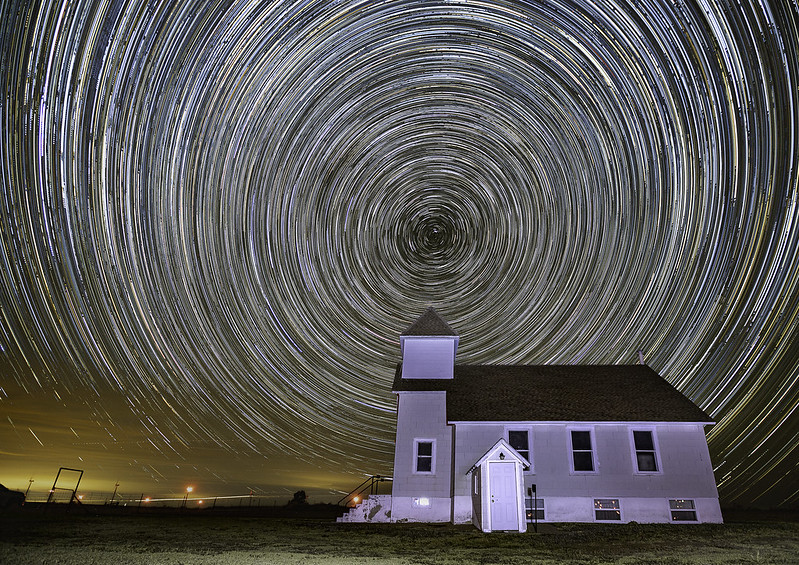
drove out to eastern Colorado couple weeks back on a moonless night. This is an old church about 90 mins east of Denver. This was my 2nd option that night, the first one didn't pan out. This location was great, no houses or anyone within a few miles.

My battery died cause I stupidly forgot to charge it, but I still managed to get in 76mins worth of trails. This is exactly why I always get my foreground image first, just in case something happens during capturing all of the trails. Another thing I started doing that really has changed my trails, weighing down my tripod. I used to just set it up, now I add weight to it so there's no chance of it moving.

In Photoshop I removed all of the airplane trails and some other distractions. The red lights in the background are from giant windmills


Walks Camp Star Trails
by Chris Locke, on Flickr
 
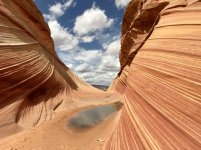
I won a permit to hike to The Wave in Arizona. We hiked up here this past weekend on Mother's Day
This image is 2 stacked ND filters for 2 minute exposure

<a data-flickr-embed="true" href="https://www.flickr.com/photos/lockechrisj/51179797122/in/dateposted/" title="The Wave"><img src="https://live.staticflickr.com/65535/51179797122_2fbf59c0e6_c.jpg" width="800" height="533" alt="The Wave"></a><script async src="//embedr.flickr.com/assets/client-code.js" charset="utf-8"></script>
 
Question to all of the photographers. What's best site to download batch LightRoom presets? Downloaded some from presetpro.com but have to DL individually.

Cheers! hope everyone is staying safe.
 
Haven't posted in this thread in a while. Last month I took the annual trip up to Skagit Valley to get some Eagle shots.
Conditions were tough and they are a bit more grainy than I like but these are a couple of my favorites
script>

script>
 
Question to all of the photographers. What's best site to download batch LightRoom presets? Downloaded some from presetpro.com but have to DL individually.

Cheers! hope everyone is staying safe.

what do you mean batch presets?
you can make your own too, much easier and free
 

Members online

Forum statistics

Threads
278,310
Messages
3,554,079
Members
248,016
Latest member
Advally Service

Trending content

Back
Top