Pioneer 4100 HU Installed with Cameras

Rock Slide

Senior Member
Finally getting around to posting photos of my latest HU install I did about 3 months back…no real wiring photos, just photos of the final result. :D

Opted for the Pioneer AVH-P4100DVD Unit. Paid $399 + shipping. Also purchased the Ipod cable and a couple cameras off ebay.


Before:

9.jpg~original


After:

CIMG3042.jpg~original

CIMG3043.jpg~original


Radio Source selected (BTW, that's a photo of my son I uploaded for my background):

CIMG2853.jpg~original


Of course you can hide the icons too:

CIMG2869.jpg~original


Mounted the ipod here (notice the notch I added in the tray so the cable would not interfere with the top closing):

CIMG2856.jpg~original


View of the ipod screen:

CIMG3030.jpg~original


Shot of the DVD in action:

CIMG2861.jpg~original


And of course I add the "Relay Mod" to allow DVDs to play while the vehicle is moving. :bigok:. Special thanks to GeoffSFAs10 (a forum member of NASIOC) for creating this mod (sorry, no pics of the wiring itself):

On a standard universal relay, you have 4 numbered tabs. On prong 87 and 86, attach a ground wire. Send these 2 wires to ANY ground. Prong 85 gets a tap from the remote wire coming off the Pioneer unit (you typically use this wire for your amp turn on). Take the parking brake wire and tap it into prong 30. After your relay is wired properly, stick it in the far back corner of your dash where you don’t have to see or touch it and enjoy DVD playback in any gear! It works because the remote signal trips the relay, the double grounds trip the relay back and thus pulses the parking brake wire tricking the vehicle into thinking the parking brake is on. Now when you select the source mode for DVD, a blue screen is first displayed and then you just hit the OK button to start watching the movie.


**
 
Register to hide this ad
Baby Cam mounted. No need to hard mount this camera as sometimes we move his car seat from side to side. This is a "Normal View" camera with Night Vision I purchased off ebay for about $20.00:

CIMG2862.jpg~original

CIMG3023.jpg~original


Wiring was run as so:

CIMG3010.jpg~original


Again, I sometimes have to move the camera from side to side, so I made sure I had plenty of slack in the wiring:

CIMG3012.jpg~original


Rear View Cam mounted. It's a "Reverse View" camera with Night Vision I also purchased off ebay for about $20.00. It’s not hard mounted b/c I’m still trying a few different locations for it:

CIMG3014.jpg~original

CIMG3032.jpg~original


To switch between cameras, here’s what I refer to as my own version of BMW's idrive :hillbill::

It’s a 2-Pole, 6-Position Rotary Switch. I cut the shaft down a bit and mounted a black knob on it. Here’s a stock photo of it:


switch.jpg~original


Mounted:
CIMG2857.jpg~original


The white line pointing straight up in the 12 o’clock position is OFF. Turn the dial to 1 o’clock and the rear view cam is activated. Turn the dial to 2 o’clock and the baby cam is activated. All the needed wiring has been run for 2 more cameras at positions 3 and 4, but they are not currently installed…still considering where I want to mount them. One will go under the vehicle, just not sure about the last one. This switch can handle a total of 6 cameras, but 4 are plenty for me.


CIMG2860.jpg~original


One more shot for good measure:

CIMG2867.jpg~original


**
 
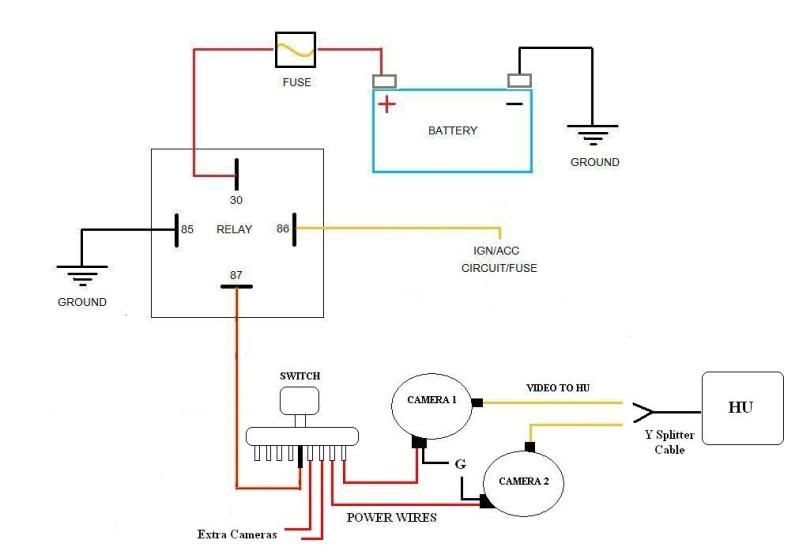
Here's a diagram of how I wired the cameras to the switch. I ran the switch thru a relay, so in the event I leave a camera on when I turn the vehicle off, the camera itself will turn off too. Again, I have already run the wiring for 2 more cameras, just trying to find a place to mount them first:

SwitchWireDiagram.jpg~original


Oh and the way this Pioneer unit is wired, the power antenna will NOT automatically go down when switching between sources. It will only go down if you physically turn the unit off. Of course to get the antenna to go up at all, you have to wire the power antenna wire from the stock harness, to the amp turn-on wire on the pioneer harness (this is even how it’s said to be done in the pioneer installation manual.)

I greatly miss this auto up/down feature for the antenna on our stock HUs. However, to combat this w/ the pioneer, I installed a switch to manually make the antenna go up or down at my choosing. I simply spliced into the power antenna wire and ran both wires thru a simple on/off switch. Works great. Found a use for that pointless pocket under the cigarette lighter and mounted the switch there:

CIMG3016.jpg~original


**
 
im digging that hu, but i would like to have gps incorporated in mine if i get one. but everything looks awesome! and as for the baby cam, pure genius! i know so many people that would kill for that.

and about the switch for the antenna, i just bout one to do the same thing. any suggestions? did you just splice the power wire and run it in line. and are you still using the factory rear window antenna as well?
 
I'm getting a garmin nuvi 255W in the coming weeks, thus the reason to opt for a HU w/o gps. I plan to mount the gps right in front of the xcase shifter too. :D

I'm not using the rear antenna any more...as this pioneer unit does not allow for 2 antenna plug ins. Thus I used the larger antenna plug which is the mast antenna.

As far as the switch for the antenna, I just spliced into the power antenna wire and ran 2 new longer wires to the switch. Of course, I soldered all the wire joints too and then wrapped the exposed wires in heat shrink.
 
Very Nice! The baby cam was a really good idea. I really need to get a rear view cam for my Head unit. Are they fairly simple to hook up?
 
Very Nice! The baby cam was a really good idea. I really need to get a rear view cam for my Head unit. Are they fairly simple to hook up?

Thanks. The baby cam is what sold the idea to my wife of getting this HU. :D

Yeah, they're a breeze to install. One wire is ground, the other is power. The ground wire can be run to any point on the vehicle that accepts ground. The power/video wire on most cameras is a simple RCA plug. You can either cut off the rca plug or use it. I chose to use and then just made my own for it to plug into. RCA plugs are easy to make...even if you've never made them before.

The rearview camera itself is not all that great, but then again it was only $20 or so. I'd like to try out a more expensive review cam at some point to gain better video quality.
 
i will be doing that with my antenna tomorrow!

and i believe that there is some sort of splitter out on the market right now so you can hook up both antennas.

if anyone knows what im talking about or knows where to find it post up a link!
 
I've been eyeing up that same unit. I love how the colors match the stock green in our trucks and the high voltage pre-out.

Tell me what you think about the tilt feature. Do you use it? How far up do you have it tilted and do you find yourself adjusting it a fair bit?

I've been looking at the Pioneer 9100 as well, but it doesn't have the tilt feature. Their top of the line deck does, but I don't like how it looks as much, and it's super expensive.

Nice work on the install as well! Did you use any kit for mounting the unit and did you have to trim the factory surround at all?
 
i will be doing that with my antenna tomorrow!

and i believe that there is some sort of splitter out on the market right now so you can hook up both antennas.

if anyone knows what im talking about or knows where to find it post up a link!

I don't know of a splitter avail, but it'd be nice to have. The factory HU has 2 receivers built in to handle to seperate antennas...most aftermarket units don't.

I have heard of people buying some type of GM antenna adapter at Autozone in order to use the window antenna only. Said it worked great and that reception seemed good. Power antenna is no longer needed.


I've been eyeing up that same unit. I love how the colors match the stock green in our trucks and the high voltage pre-out.

Tell me what you think about the tilt feature. Do you use it? How far up do you have it tilted and do you find yourself adjusting it a fair bit?

I've been looking at the Pioneer 9100 as well, but it doesn't have the tilt feature. Their top of the line deck does, but I don't like how it looks as much, and it's super expensive.

Nice work on the install as well! Did you use any kit for mounting the unit and did you have to trim the factory surround at all?

I use the tilt feature all the time. I think I've set mine to come out to either the 2nd to last point or the very last point before you eject a disc. It makes seeing the unit in daylight much, much easier. Does not hit my tranny shifter either. Almost zero glare w/ the tilt feature. The screen tilts in and out automatically once you've set it to the point you want every time you start or shut off your vehicle. Very nice.

No trimming what so ever. No extra mounting kit required either. Just picked up an aftermarket wiring harness from my local Best Buy store and that's all I needed.
 
Clean install RS. All your mods are tastefully done :artist2:

Thanks Kelly.

Oh and I had already upgraded all my stock speakers some time back. So with the upgrade JBLs, plus the new HU, they sound outstanding. Finally a HU capable of pushing them.
 
I use the tilt feature all the time. I think I've set mine to come out to either the 2nd to last point or the very last point before you eject a disc. It makes seeing the unit in daylight much, much easier. Does not hit my tranny shifter either. Almost zero glare w/ the tilt feature. The screen tilts in and out automatically once you've set it to the point you want every time you start or shut off your vehicle. Very nice.

No trimming what so ever. No extra mounting kit required either. Just picked up an aftermarket wiring harness from my local Best Buy store and that's all I needed.

That's what I figured - I use the tilt of my AVN4430 in the Tundra pretty rarely, but it sits up much higher on the dash than the 4runner radio does. I've been searching for awhile and am pretty convinced that the 4100 is the top choice if you don't need nav.
 
I've got an idea for those other two cameras!

Have you ever seen the new Volvo SUV's with the left and right merge cams mounted under the side mirrors? Do something like that but instead of the switch have the left and right activate when you turn the left and right blinkers on, respectavely. You seem like you're pretty keen on wiring so I'm sure it would be simple for a guy like you.

Keep up the good work...it's good to see someone doing something new on these trucks that are (let's face it) not that new.
 
Wow, that looks sweet!
I'm running into the same problem with the antenna. I am installing a Pioneer HU as well. What wires did you splice to attach to the switch for the antenna? Are they the pink/blue and black/white wires?
 
I've got an idea for those other two cameras!

Have you ever seen the new Volvo SUV's with the left and right merge cams mounted under the side mirrors? Do something like that but instead of the switch have the left and right activate when you turn the left and right blinkers on, respectavely. You seem like you're pretty keen on wiring so I'm sure it would be simple for a guy like you.

Keep up the good work...it's good to see someone doing something new on these trucks that are (let's face it) not that new.

Thanks! I'm always looking to do something new and different to my 4Runner.

About the cameras - That's not a bad idea, but it would be a bit difficult...and here's why:

1. These $20 cameras are big. The lense is an inch in diameter. The reverse view cameras (which is what I would need to use) are at least 2" - 3" long vs the normal view cameras are only an 1" long. So it'd be a bit tricky and inexpensive to mount them and the install still look clean.

2. There's a bit of a delay (only a few seconds at most) when you activate these cameras. So if I turned my blinker on, it'd be a 3 seconds or so before the image comes online and you're able to see it. I do have the small circular mirrors mounted to my exisiting mirrors and they help a ton! Best $2 mod I ever spent on my 4Runner. They completely eliminate all blind spots. :D

I'm considering mounting one reverse view camera underneath the vehicle and one normal view camera under the front bumper near the passenger side wheel pointing straight out. That front right corner of the vehicle seems to be the main blind spot I have when off roading. It'd be nice to see what that front right tire is about to hit before it actually does.

Thanks for the suggestions nonetheless!


found this on the antenna. post number 3

http://www.4runnerforum.com/forum/showthread.php?p=6010

has the part number for the splitter and the adapter you need to run both antennas

Actually it's post # 4. :D I read #3 a couple times before I jumped down to 4 and found it. Thanks! I'll be ordering those parts this week! I had no idea this could be done.


looks awesome. i have the 3100 and i love it.

Thanks. These pioneer units are ultra cool.
 
Wow, that looks sweet!
I'm running into the same problem with the antenna. I am installing a Pioneer HU as well. What wires did you splice to attach to the switch for the antenna? Are they the pink/blue and black/white wires?

The manual states that the power antenna wire from the metra wiring harness is to be attached to the blue amp turn on wire. Thus, that's what I did. It's the only way to get the power antenna up at all.

The blue amp turn on wire is also tapped for use on the relay mod to allow for dvd playback while the vehicle is moving. Thus, I cut the power antenna wire before the tap where of the relay mod so my switch would not interfere w/ the dvd playback ability. Make sense?
 
Just as an update, I had purchased this Pioneer unit with the intent to buy a handheld GPS unit within the coming months. Well, low and behold, my wife surprised me a Garmin Nuvi 255W Sunday afternoon! Do I have a cool wife or what :D.

Now to look into mounting options...I don't care for the windshield mount.
 

Members online

Forum statistics

Threads
278,316
Messages
3,554,106
Members
248,016
Latest member
Advally Service

Trending content

Back
Top