Replacing Stock Stereo. Seeking suggestions.

alaskaman

Senior Member
Here is what I want in features for 2007 Sport

1. Superior real time traffic.
2. Voice activation
3. 5 CD Changer
4. Voice activated trip planning.


any ideas appreciated.
 
Register to hide this ad
Well it's been 4 hours and no one else has chimed in. I don't know much about aftermarket radios/nav and stuff, but I know my buddy put one of those really nice pioneers in his car and it is AWESOME. I just don't know if it does the voice activated trip planning. Do you have any options you're looking at?
 
I chose the Kenwood DNX because it had a lot of features that really were what I wanted, maybe see if KENWOOD has anything that interests you.
 
Your list is a deep pockets one. I went a more conservative route.
Forget the cd changer, invest in an ipod and you'll have thousands of cd's not just 5.

Personally, a little off your ideas but I love my Ipod so I have Alpine CDA-105 head unit- great compatibility with ipod. No traffic/trip planner have a seperate Garmin auto GPS for that. I went the full monty and replaced everything at once, all new speakers, apline components up front, kenwoods in rear and an amp for boost. WOW, I have my own studio, but because there 6 6 1/2 speakers not much bass for thumping- need a box for that.

I used crutchfield online and it was great. They threw in loads of freebues- shipping, amp wiring, ipod wires, spkr wires!

Good luck.
 
all that in one hu, if ya can find it, will cost $. i second the ipod idea, with a HU that controls it. ive always liked pioneer myself but theres lots of good brands. way better than a CD changer.
 
Last edited:
Stereo

Not sure why in 2010 you'd want to mess with a 5 disc changer. :shrug:

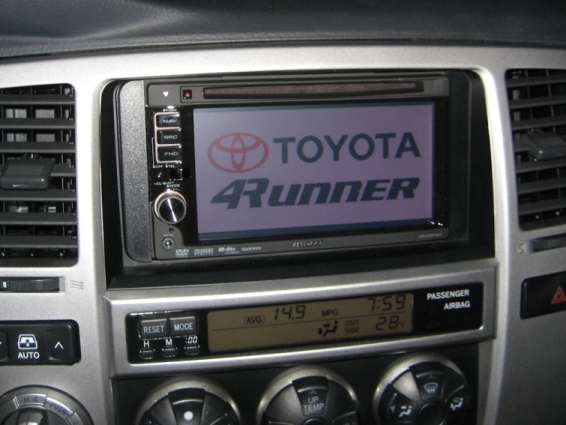
I love my Kenwood and I wired it up so my USB cable goes into the fold out compartment under climate controls. I keep all my music organized on a 16GB thumb drive.

I've got it wired so my wife can watch DVDs on the deck screen while I drive too. :cheers:

When I want more tunes, I just take the usb thumb drive in the house, rip a CD and load the drive up with my computer. Then just open the compartment, plug in the drive and Im good to go.

That and Garmin Nav is about as good as it gets. A real time traffic option and blue tooth are available on some decks (they are an add on option on mine).

18955d1235097126-best-2din-screen-img_0122.jpg
 
Not sure why in 2010 you'd want to mess with a 5 disc changer. :shrug:

I love my Kenwood and I wired it up so my USB cable goes into the fold out compartment under climate controls. I keep all my music organized on a 16GB thumb drive.

I've got it wired so my wife can watch DVDs on the deck screen while I drive too. :cheers:

When I want more tunes, I just take the usb thumb drive in the house, rip a CD and load the drive up with my computer. Then just open the compartment, plug in the drive and Im good to go.

That and Garmin Nav is about as good as it gets. A real time traffic option and blue tooth are available on some decks (they are an add on option on mine).

18955d1235097126-best-2din-screen-img_0122.jpg

Nice looking HU. How is the am reception on that compared to the stock HU?
 
Not sure why in 2010 you'd want to mess with a 5 disc changer. :shrug:

I love my Kenwood and I wired it up so my USB cable goes into the fold out compartment under climate controls. I keep all my music organized on a 16GB thumb drive.

I've got it wired so my wife can watch DVDs on the deck screen while I drive too. :cheers:

When I want more tunes, I just take the usb thumb drive in the house, rip a CD and load the drive up with my computer. Then just open the compartment, plug in the drive and Im good to go.

That and Garmin Nav is about as good as it gets. A real time traffic option and blue tooth are available on some decks (they are an add on option on mine).

18955d1235097126-best-2din-screen-img_0122.jpg


How did you get that pic on your screen? I have the same HU
 
How did you get that pic on your screen? I have the same HU

I made it in photoshop... a long time ago sorry dont remember the exact size.

I did it awhile ago so I am not 100% sure on the steps but I think its something like this:

1) Press SRC+Eject, then Reset, and release once the EJECT light is on.

2) Once the selection page loads, insert the USB with the JPEGS

3) Select the OEM

4) Select the file you want to use.

5) When the image is loaded, press Enter.

From then on anytime you start the truck up, you will see your custom boot screen as the deck boots up. :reddance:
 

Members online

Forum statistics

Threads
278,309
Messages
3,554,075
Members
248,016
Latest member
Advally Service

Trending content

Back
Top