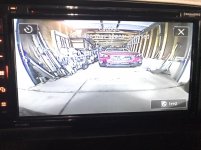
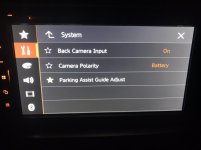
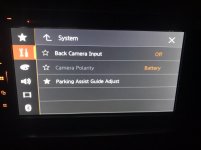
Reverse camera view on Pioneer ND-BC8 back up camera and AVH-2550NEX, any way?

Put in a new Pioneer AVH-2550NEX head unit last week. I previously had an older Kenwood DDX-471HD (from 2014) and had installed a Pioneer Nd-Bc8 back up cam on rear with the Kenwood. I had settings to be able to reverse images on the HU as needed.

My new Pioneer was installed with existing backup camera with proper image for the back up camera. I am happy with the cam so I ordered another for the front. Put it in last night but the image is reversed left to right (mirrored). There is not a setting on the HU I’m seeing to switch nor on the camera. I called Pioneer and they said I’d have to purchase a different brand camera made for the front that doesn’t automatically mirror the images.

Is there a way to reverse the image that anyone knows about? Maybe a setting or something I’m missing? Am I able to modify the camera or wiring somehow? I’d prefer not to have to unphish all the wiring and reinstall/phish new wiring? Any suggestions or help?
 

Attachments
  • 21C8AB1F-1D8F-46AB-ADE8-F759EB00DBF7.jpg
    21C8AB1F-1D8F-46AB-ADE8-F759EB00DBF7.jpg
    129.5 KB · Views: 1,695
  • 53865A03-A2B0-4C40-BC50-BFD3C757593E.jpg
    53865A03-A2B0-4C40-BC50-BFD3C757593E.jpg
    118.4 KB · Views: 2,196
Last edited:
Register to hide this ad
Anybody???

If not, what are you guys running for a front camera where the image is not automatically mirrored? Recommendations?
 
Last edited:
I have a set up similar to what you are trying to do. I have a Pioneer AVH4200NEX and use the same ND-BC8 as my back-up camera, but used a different one for the front. Looking in my stereo user's manual you should be able to reverse the mirrored image (see below) and IIRC I've seen that option screen.

This is what I show in my Pioneer user's manual:
1 Display the “System” setting screen.
Refer to Displaying the “System” setting screen on page 45
2 Touch [Camera settings].
3 Touch [Back Camera: Reverse Video] to switch “On” or “Off”.
I'm thinking you want to select "2nd Camera" here

If you don't see the "Reverse Video" option when selecting the Front Camera I wonder if that's because there is no reverse wire input to that camera so that option isn't enabled?

FYI....this is the camera I use for the front view (NATIKA 720P Backup/Front View Camera)
Amazon.com: NATIKA 720P Backup/Front View Camera, IP69K Waterproof Starlight Night Vision High Definition and Super Wide Angle Reverse Rear View Backup Camera for Cars Jeep Trucks SUV RV Van: Car Electronics

Hope you get it sorted.
 
Last edited:
check page 87 in the manual. im looking through it, something with camera view, or av input.

I’ve scoured through that thing many times but checked again, not an option to reverse the mirrored image unfortunately.

I have a set up similar to what you are trying to do. I have a Pioneer AVH4200NEX and use the same ND-BC8 as my back-up camera, but used a different one for the front. Looking in my stereo user's manual you should be able to reverse the mirrored image (see below) and IIRC I've seen that option screen.

This is what I show in my Pioneer user's manual:
1 Display the “System” setting screen.
Refer to Displaying the “System” setting screen on page 45
2 Touch [Camera settings].
3 Touch [Back Camera: Reverse Video] to switch “On” or “Off”.
I'm thinking you want to select "2nd Camera" here

If you don't see the "Reverse Video" option when selecting the Front Camera I wonder if that's because there is no reverse wire input to that camera so that option isn't enabled?

FYI....this is the camera I use for the front view (NATIKA 720P Backup/Front View Camera)
Amazon.com: NATIKA 720P Backup/Front View Camera, IP69K Waterproof Starlight Night Vision High Definition and Super Wide Angle Reverse Rear View Backup Camera for Cars Jeep Trucks SUV RV Van: Car Electronics

Hope you get it sorted.

I don’t have those options available. It’s either back camera on or off. When on it triggers the reverse cam and automatically pops up on the screen, off it does nothing. I don’t have a second option for front camera really. It asks about the AV for a camera or video source (or something similar to that). Messed with this setting as well. Only thing it does is that when I’m in camera view mode for the rear view I can toggle from camera 1 to camera 2 by pushing the camera toggle button on the lower right side of screen.

I’m wondering even if it did have a “reverse image” option if it would only apply to the rear view anyways and may not work, even with my prior Kenwood?

So on the Nakita, is the image mirrored as a std? Or do you have to reverse the image on your unit to get the orientation proper?


might want to try alpine
Alpine | HCE-C2600FD

but check out youtube for fivestarcarstereo , they have videos of camera installs, im not sure what they use for front cameras tho, but they have done it before.

That camera is certainly a pricey one lol, plus it looks like it will need another control box for it. I may consider another HU if I can’t get this sorted out, thank you for the response though.
 

Attachments

  • 3C35732B-6579-4F19-A9EA-CA17A753AFA4.jpg
    3C35732B-6579-4F19-A9EA-CA17A753AFA4.jpg
    63 KB · Views: 1,891
  • 957166E3-90DD-47E5-8430-9C80D957D98D.jpg
    957166E3-90DD-47E5-8430-9C80D957D98D.jpg
    61.1 KB · Views: 1,799
Last edited:
Last edited:
Another thought...... have you checked the firmware version or checked it there is an firmware update for your HU? Just trying to think of another option that may resolve enabling those camera options.
https://www.pioneerelectronics.com/StaticFiles/PUSA/Car_Electronics/Firmware%20Update%20Files/2019%20DEH%20Main/AVH-2550NEX_CVJ4858-D.zip

For the Nakita camera I don't remember needing to reverse the image.

I do remember cutting one of the wires so that the lane markers did not show.

That’s a good suggestion about the firmware, I figured it was the newest since I just got it. It looks like I have V18.11 but there is a V1812 available now. So 2 questions.

1-I don’t have a computer, is it possible to do with an iPad or another way?
2-does it state anywhere that defines what the newest firmware version update adds?

The Nakita camera has 2 looped wires it says. The blue, which if you cut removes the parking guidelines and talks about if you use it for a front camera to cut the white wire loop. I’m assuming that is what reverses the image by leaving the white wire looped, and cutting it keeps the image the same?
 
if you want to save money, you might need to get the cheap ebay ones, look for the one where you can cut the loop wires to reverse the image.

the good cameras are the cmos ones right?
have you look into kenwood?

I’ve scoured through that thing many times but checked again, not an option to reverse the mirrored image unfortunately.


I don’t have those options available. It’s either back camera on or off. When on it triggers the reverse cam and automatically pops up on the screen, off it does nothing. I don’t have a second option for front camera really. It asks about the AV for a camera or video source (or something similar to that). Messed with this setting as well. Only thing it does is that when I’m in camera view mode for the rear view I can toggle from camera 1 to camera 2 by pushing the camera toggle button on the lower right side of screen.

I’m wondering even if it did have a “reverse image” option if it would only apply to the rear view anyways and may not work, even with my prior Kenwood?

So on the Nakita, is the image mirrored as a std? Or do you have to reverse the image on your unit to get the orientation proper?


That camera is certainly a pricey one lol, plus it looks like it will need another control box for it. I may consider another HU if I can’t get this sorted out, thank you for the response though.
 
Last edited:
That’s a good suggestion about the firmware, I figured it was the newest since I just got it. It looks like I have V18.11 but there is a V1812 available now. So 2 questions.

1-I don’t have a computer, is it possible to do with an iPad or another way?
2-does it state anywhere that defines what the newest firmware version update adds?

The Nakita camera has 2 looped wires it says. The blue, which if you cut removes the parking guidelines and talks about if you use it for a front camera to cut the white wire loop. I’m assuming that is what reverses the image by leaving the white wire looped, and cutting it keeps the image the same?

1. I think you'll need a computer because you need to get the extracted firmware file onto a USB storage device which you plug into your HU. If you can figure out how to do that with an iPad that will work.
https://www.pioneerelectronics.com/StaticFiles/PUSA/Car_Electronics/Firmware%20Update%20Files/2019%20DEH%20Main/AV%20Receiver_Update_Instruction.11-11-19.pdf

2. Yes, on this page https://www.pioneerelectronics.com/PUSA/Support/Downloads, if you select the "Firmware Update Notice" link for the AVH-2550NEX it calls out that it fixes "No sound from rear speakers when resuming music after finishing a call." Here's the notice
https://www.pioneerelectronics.com/StaticFiles/PUSA/Car_Electronics/Firmware%20Update%20Files/2019%20DEH%20Main/AV%20Receiver_Update_Letter.11-11-19.pdf

Regarding the Nakita camera.... I may have cut more than one of the wires and probably did per the instructions, but it's been a while since I did it so don't remember which ones.
 
Last edited:

Members online

Forum statistics

Threads
278,317
Messages
3,554,129
Members
248,016
Latest member
Advally Service

Trending content

Back
Top