

Spinnukur
New member
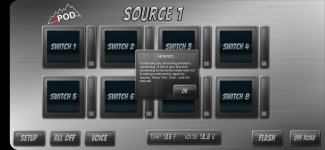
Evening T4R! SPOD HD 8 Switch installed today. Having problems with the Bluetooth connecting (see pic) and have tried the following.
1) Resetting the SPOD per SPOD (holding down button 4 and plugging the SPOD back in until setup is complete for unsecured pairing)
2) Clearing the SPOD Android app cache and data; this seems to be a problem as no matter how many times I clear the cache, app data, delete the app, every time I reinstall the app, it automatically tries to reconnect to the SPOD but ends up giving me the error in the pic attached. It's never once asked me what unit I'd like to connect to (per the SPOD pairing video)
Any advice/help is appreciated. Oh, while I don't intend on using the app that much, it does control the color and intensity of the SPOD control unit, ergo, I would like it to work at least 10% of the time.
Thanks,
Spinn
SOLVED: Apparently, SPOD doesn't like Android. I took my work phone (Apple) out and it connected perfectly. Within a few seconds, a firmware notification popped up. Updated per the instructions and everything seems to be fine so long as I use an Apple. Post-firmware update, Android is still not liked.
1) Resetting the SPOD per SPOD (holding down button 4 and plugging the SPOD back in until setup is complete for unsecured pairing)
2) Clearing the SPOD Android app cache and data; this seems to be a problem as no matter how many times I clear the cache, app data, delete the app, every time I reinstall the app, it automatically tries to reconnect to the SPOD but ends up giving me the error in the pic attached. It's never once asked me what unit I'd like to connect to (per the SPOD pairing video)
Any advice/help is appreciated. Oh, while I don't intend on using the app that much, it does control the color and intensity of the SPOD control unit, ergo, I would like it to work at least 10% of the time.
Thanks,
Spinn
SOLVED: Apparently, SPOD doesn't like Android. I took my work phone (Apple) out and it connected perfectly. Within a few seconds, a firmware notification popped up. Updated per the instructions and everything seems to be fine so long as I use an Apple. Post-firmware update, Android is still not liked.
Attachments
Last edited:
