

GreyhoundGuy
Member
For those of you with Android phones and Android Auto, there's a pretty cool thread going on Reddit (in the AndroidAuto sub). A user (u/Psychological-War795) has created a way to get Torque Pro to work on your display. He's got full directions on his github site... and if I can get it to work, so can you.
Here's the link to the Reddit thread: LINK
I played around with it a short bit last night and tried it this AM. Sorry about the massive size of this pic. I'm hoping it resizes okay.

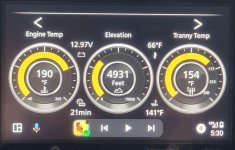
In the image, the left dial is Coolant Temp (I've now figured out how to change to Fahrenheit), the middle dial is Horsepower at the Wheels (I was sitting still, so 0hp), the right dial is Transmission Temp (going to ask him to put in a custom PID based on previous 5th gen post). Between the left and center dials is Battery Voltage, and between the center and left dials is Phone Battery Percentage. I just put those in as samples to try out. You can set it however you'd like. It is highly customizable.
The software is pulling from my Samsung S23Ultra through a Motorola MA-1 wireless adapter. The OBD2 unit I'm using is the one from Carista. So far, no connection issues. I did find that I couldn't connect with Torque Lite, but when I purchased Torque Pro for $4.95, it was able to connect.
Anyway, just wanted to share for those of you with Android Auto that have wanted Torque Pro on your head unit display. So far, I'm impressed!
Here's the link to the Reddit thread: LINK
I played around with it a short bit last night and tried it this AM. Sorry about the massive size of this pic. I'm hoping it resizes okay.
In the image, the left dial is Coolant Temp (I've now figured out how to change to Fahrenheit), the middle dial is Horsepower at the Wheels (I was sitting still, so 0hp), the right dial is Transmission Temp (going to ask him to put in a custom PID based on previous 5th gen post). Between the left and center dials is Battery Voltage, and between the center and left dials is Phone Battery Percentage. I just put those in as samples to try out. You can set it however you'd like. It is highly customizable.
The software is pulling from my Samsung S23Ultra through a Motorola MA-1 wireless adapter. The OBD2 unit I'm using is the one from Carista. So far, no connection issues. I did find that I couldn't connect with Torque Lite, but when I purchased Torque Pro for $4.95, it was able to connect.
Anyway, just wanted to share for those of you with Android Auto that have wanted Torque Pro on your head unit display. So far, I'm impressed!
 (*Don't get me started on why Toyota can't report altitude with a full-functioning GPS on board!)


