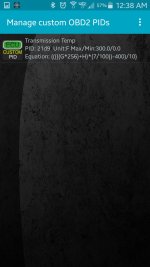
Torque App - working formula for tranny temp

NOVA - in Houston heat mine is generally running in that range. After 15+ miles of stop and go traffic, while sitting in one spot, it has gone as high as 160-170. Once rolling again, it goes down a little. Sounds like you are spot on.

Okay cool, because it seems to be responding correctly to whatever sensor you're pulling from. Thanks again, this will be very useful on the trail!
 
This was from another thread a year ago. Looks pretty similar.

http://www.toyota-4runner.org/4th-gen-t4rs/135580-transmission-temperature-monitoring-obd2.html

"All right guys. Been using it for a while now, got it from 4Runner Club Kazakhstan. You need a bluetooth ELM327 adapter (Ebay) and Torque application installed on your Android-based phone. In Torque, you should create the following two custom PIDs:

PID: 21d9
Long name: Transmission fluid temp 1
Short name: TFT1
Unit type: *C
Max/Min: 220.0/-40.0
Equation: (((E*256)+F)/256)-40

PID: 21d9
Long name: Transmission fluid temp 2
Short name: TFT2
Unit type: *C
Max/Min: 220.0/-40.0
Equation: (((G*256)+H)/256)-40

These work fine on my 2006 T4R V6, and should work with any 750 transmission (V6 2005 to 2013, V8 2003 to 2009). I don't know if it will work with 340 transmission which they installed on 2003 and 2004 v6, but there's a chance it will - someone has to test it.

There are two temp sensors, one in the transmission, another one next to the radiator, the latter's readings are higher - it shows temperature of a liquid yet to be cooled down in the radiator.

I checked accuracy of these PIDs in Torque using another diagnostic tool (MVCI cable) and Toyota Technstream software - it showed diffrenece between Torque and TIS Techstream of around 1 degree Celcius - which I think was due to time it took me to switch between the two tools.

Now, the idea itself and PIDs were originally borrowed from one of Tacoma forums (Tacomaworld I guess), but when we checked their PIDs we found out they showed temperature about 20 degrees higher than the real one. That;s why we had to ask some programmers and Toyota fans from Russia to help us and now we all can use their correct PIDs shown above.

I hope it'll save you some time and money.

P.S. Just don't forget it's all in Celcius.

((((E*256)+F)/256)-40)*1.8+32
((((G*256)+H)/256)-40)*1.8+32
Those will give you outputs in deg F. "

 
Last edited:
Formulas are wildly different, though. Not sure why? I certainly don't understand the inner workings of PID's enough to comment. I gathered my information from four forums and many, many threads in the Torque forums. Once I saw some commonality in the posts stating they had a working formula, that's what I went with.

In any case, I'm sticking with the one at the beginning of this post since I know it works. I may play with the ones you posted just to see how they work.
 
Last edited:
I don't get it either. If you mess with it let me know if there is any advantanges to either.

I have used the formulas I posted and they do work on my 2006.
 
Tested this out today, everything seems to work great! Saw temps around 150ish *F on my way to work, so I trust it's working correctly.

I also thought the 2 differing formulas was strange, but if you work through the math it turns out they're both the same equation. So I guess you can't go wrong with either!
 
Last edited:
This was from another thread a year ago. Looks pretty similar.

http://www.toyota-4runner.org/4th-gen-t4rs/135580-transmission-temperature-monitoring-obd2.html

"All right guys. Been using it for a while now, got it from 4Runner Club Kazakhstan. You need a bluetooth ELM327 adapter (Ebay) and Torque application installed on your Android-based phone. In Torque, you should create the following two custom PIDs:

PID: 21d9
Long name: Transmission fluid temp 1
Short name: TFT1
Unit type: *C
Max/Min: 220.0/-40.0
Equation: (((E*256)+F)/256)-40

PID: 21d9
Long name: Transmission fluid temp 2
Short name: TFT2
Unit type: *C
Max/Min: 220.0/-40.0
Equation: (((G*256)+H)/256)-40

These work fine on my 2006 T4R V6, and should work with any 750 transmission (V6 2005 to 2013, V8 2003 to 2009). I don't know if it will work with 340 transmission which they installed on 2003 and 2004 v6, but there's a chance it will - someone has to test it.

There are two temp sensors, one in the transmission, another one next to the radiator, the latter's readings are higher - it shows temperature of a liquid yet to be cooled down in the radiator.

I checked accuracy of these PIDs in Torque using another diagnostic tool (MVCI cable) and Toyota Technstream software - it showed diffrenece between Torque and TIS Techstream of around 1 degree Celcius - which I think was due to time it took me to switch between the two tools.

Now, the idea itself and PIDs were originally borrowed from one of Tacoma forums (Tacomaworld I guess), but when we checked their PIDs we found out they showed temperature about 20 degrees higher than the real one. That;s why we had to ask some programmers and Toyota fans from Russia to help us and now we all can use their correct PIDs shown above.

I hope it'll save you some time and money.

P.S. Just don't forget it's all in Celcius.

((((E*256)+F)/256)-40)*1.8+32
((((G*256)+H)/256)-40)*1.8+32
Those will give you outputs in deg F. "


I have a 2004 v6.I input the above forumula in my torque app and it did not work. The display I added for it in Farenheight only has a dash. I can use a pre-installed pid called trans temp method 2 and I do get a trans temp reading in Celsius anyway. Just thought I would let you guys know I do not think it works on the 340 tranny. Maybe with some research we can find a pid to work with this. This will be extremely helpful when I tow my camper so I can see if I do indeed need to install a tranny cooler.
 
Last edited:
Just to add to the confusion I thought I'd report that today my Torque app no longer shows tranny temp in the list of sensors (while connected), even though one of the screens has a working readout of tranny temp from when I added it previously. All the other sensors I put on screens still show up in the list, except for tranny temp. Huh??? Here's the kicker... Launching the Torque app with no OBDII link, all kinds of sensors show up in the list including Trans Temp - Method 1 and Trans Temp - Method 2. I added them both to a display and connected to the OBDII link. Method 1 showed no value but Method 2 showed the exact same temp as the sensor I had added previously.
 
My torque app has always shown the tranny temp of my 2003 V8 Limited. It's in the real time info of course and it's listed right after the Long Term Fuel Trim. I think it shows up after the truck is warmed up and running closed loop.
 
There's obviously some kind of change in the model years that determines whether Method 2 will work or not. Only thing I've noticed is that the guys saying it works right off the bat have older trucks. Newer ones can't use the predefined tranny temp PID and have to do a custom one.
 
Now when you want to add a gauge to the display, you should see "Trans custom" or "Trans" or whatever you named it at the beginning. The darn thing works!!!!!

For reference, I have a 2008 V6, but I will assume the PID's are the same for others in this generation of 4Runners.
ok I got the equations handled, I think...

but, I don't see any options to "add gauge to display"

im sure im just not seeing it, but any help?
 
ok I got the equations handled, I think...

but, I don't see any options to "add gauge to display"

im sure im just not seeing it, but any help?

Get to the screen with live monitoring - it's called "realtime information". Long press on the screen and you will see "add display" - press that. Choose the type of display (gauge) you want (needle sweep, digital, etc.), then the list of PID's will come up. Choose the one that bears the custom name you gave it.
 
Get to the screen with live monitoring - it's called "realtime information". Long press on the screen and you will see "add display" - press that. Choose the type of display (gauge) you want (needle sweep, digital, etc.), then the list of PID's will come up. Choose the one that bears the custom name you gave it.
got it. thanks.
 
I finally got the adapter paired to my tablet...im a tard with these things.

anyway, all seems to be working correctly. I haven't had a chance to drive with it yet, I just got it working after I parked at work this morning.
but the gauges matched the dash, and the transmission temp was reading, what I would expect to be a normal temp. i'll check it again on the drive home.
 
I have a 2003 v6. I just ordered a little dangling plug in. I will be figuring out if the transmission temp comes up or not by Friday afternoon. I'll let you guys know.
 
I have a 2003 v6. I just ordered a little dangling plug in. I will be figuring out if the transmission temp comes up or not by Friday afternoon. I'll let you guys know.

I know I am raising the dead, but you guys have the best info I could find. I have been shopping for a mini OBDII to replace my bulky handheld, and the options out their are like hookers on the Las Vegas strip, they all look good, some even look like wholesome small town girls, but you never know what is inside, or whether they are going to rob you or leave you with a special gift.

So, anyone have ideas on which is best, most durable and accurate and not just a Vegas poser looking to dose me, take my wallet?

PS: they all have negative, but this one is the most reviewed I can find on Amazon and it has the most positive...but even that can be faked: http://www.amazon.com/BAFX-Products...82178&sr=8-11&keywords=wireless+obdii+readers
 
Last edited:
I know I am raising the dead, but you guys have the best info I could find. I have been shopping for a mini OBDII to replace my bulky handheld, and the options out their are like hookers on the Las Vegas strip, they all look good, some even look like wholesome small town girls, but you never know what is inside, or whether they are going to rob you or leave you with a special gift.

So, anyone have ideas on which is best, most durable and accurate and not just a Vegas poser looking to dose me, take my wallet?

PS: they all have negative, but this one is the most reviewed I can find on Amazon and it has the most positive...but even that can be faked: http://www.amazon.com/BAFX-Products...82178&sr=8-11&keywords=wireless+obdii+readers

thats the one I use, does everything I need it to do.. including the trans temp. for 20 bucks plus 5 dollars for the torque app.. its really the best deal out there. If you wanted to take it one step further you can get a dedicated android tablet and run the app on that so it doesn't use your phone.
 
thats the one I use, does everything I need it to do.. including the trans temp. for 20 bucks plus 5 dollars for the torque app.. its really the best deal out there. If you wanted to take it one step further you can get a dedicated android tablet and run the app on that so it doesn't use your phone.

I am actually thinking about a tablet, for a better view...old eyes...:)
 
thats the one I use, does everything I need it to do.. including the trans temp. for 20 bucks plus 5 dollars for the torque app.. its really the best deal out there. If you wanted to take it one step further you can get a dedicated android tablet and run the app on that so it doesn't use your phone.

+1 I've had the same one for just over a year. I just leave it plugged in and 9/10 times it will reconnect. Once in while I have to pull the adapter and plug it back in to make it connect to my phone.
 
I know I am raising the dead, but you guys have the best info I could find. I have been shopping for a mini OBDII to replace my bulky handheld, and the options out their are like hookers on the Las Vegas strip, they all look good, some even look like wholesome small town girls, but you never know what is inside, or whether they are going to rob you or leave you with a special gift.

So, anyone have ideas on which is best, most durable and accurate and not just a Vegas poser looking to dose me, take my wallet?

PS: they all have negative, but this one is the most reviewed I can find on Amazon and it has the most positive...but even that can be faked: Amazon.com: BAFX Products - Bluetooth OBD2 scan tool - For check engine light & diagnostics - Android ONLY: Automotive
i use the one that's linked in the 1st post. its cheap and works well. I have no complaints.
 
Pretty sure I entered everything correct but I get a "No Data" response when I test or use the custom PID on real time info
 

Attachments

  • Screenshot_2015-10-23-00-38-52.jpg
    Screenshot_2015-10-23-00-38-52.jpg
    119.7 KB · Views: 1,323
Last edited:

Members online

No members online now.

Forum statistics

Threads
278,306
Messages
3,554,045
Members
248,016
Latest member
Advally Service

Trending content

Back
Top