
Quick Reference Guide For Off Road Controls

Lexington

Member
Hi All

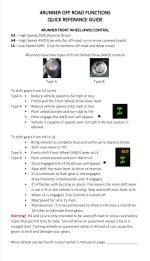
I got the cooties for Christmas so I have been spending my off time familiarizing myself with my off-road controls. But if you don’t have a chance to use or practice a skill you tend to forget things over time. Also when I was a new 4Runner owner there were a lot of new off-road functions that I have never seen before. The biggest challenge for me was trying to understand which function was the best one to use under what condition. The owners manual doesn’t do the best job in explaining all of it. So I did a lot of research and watched a lot of video and wrote a brief description of each function and when to use them so I would have a better understanding on how to use them. So I wouldn’t forget, I decided to create off Off-Road Quick Reference Guide to keep in my truck in case I ever need a quick refresher. I figure there are a lot of other 4Runner owners who are new owners or infrequent off-roaders who might find these helpful.

I plan on laminating it and sized it to fit in that useless tissue box holder. It’s not designed to fit all the info from the owners manual, just the most important stuff. At the bottom there is a space to write or use a label maker to put the page where the information can be found in your manual.

Anyway, this is just a draft. I wanted to get some community feedback for improvements before I make the final version. I already see where there are a few spots that need to be fixed. Once I’m done I will update these photos for anyone who wants to use them.
 

Attachments
  • D90004D5-715A-4AB5-862C-BE271C70638A.jpg
    D90004D5-715A-4AB5-862C-BE271C70638A.jpg
    138 KB · Views: 1,393
Last edited:
Register to hide this ad
Whats with the constant mention of front wheel drive? lol. Also, no way its a good thing to change the truck to 4H while still moving. Nevermind up to 50MPH!! that sounds like a catastrophe waiting to happen!
 
Whats with the constant mention of front wheel drive? lol. Also, no way its a good thing to change the truck to 4H while still moving. Nevermind up to 50MPH!! that sounds like a catastrophe waiting to happen!

Do you own a t4r? I suggest reading the owners manual. There is a lot of new first time owners that would be well served with this info. Don't pollute the thread please.
 
Whats with the constant mention of front wheel drive? lol. Also, no way its a good thing to change the truck to 4H while still moving. Nevermind up to 50MPH!! that sounds like a catastrophe waiting to happen!
I’m not a fan of the term either. That why I added 4WD but I used it because that’s the term in the manual. Maybe I’ll change it.

As for shifting from H2 to H4 That’s what the manual says.
 
Last edited:
Thank you.

Its hard to find documentation about going from 2wd to 4H while moving. Let alone others confirming the details of it.
 
Do you own a t4r? I suggest reading the owners manual. There is a lot of new first time owners that would be well served with this info. Don't pollute the thread please.

So asking a question on a public forum is now "polluting"? No wonder car forums, and this forum especially are dying a slow death, a guy cant even ask a question without getting hassled.

excuse me for thinking shifting a manual transfer case between 2H and 4H could be a bad idea. i guess banning me is the only way forward from here, since im such a burden to the forum...
 
Anyway, this is just a draft. I wanted to get some community feedback for improvements before I make the final version. I already see where there are a few spots that need to be fixed. Once I’m done I will update these photos for anyone who wants to use them.

Good stuff! I would suggest also providing a brief blurb about the other buttons (A-trac, traction control, downhill assist, crawl, etc.) and under what conditions each of those is appropriate and how to enable them.

For instance, I read the manual but didn't understand until getting on this forum that A-trac was only available when you had 2LO engaged. Stuff like that on a 'quick guide' type thing would be immensely valuable rather than digging through a 400 page manual looking for something you need at that exact moment.

In the old days it was 4H and 4L and that was the end of it..well except the part about jumping out in the mud and locking the hubs. :)

Thanks for taking this on. :cheers:
 
So asking a question on a public forum is now "polluting"? No wonder car forums, and this forum especially are dying a slow death, a guy cant even ask a question without getting hassled.

excuse me for thinking shifting a manual transfer case between 2H and 4H could be a bad idea. i guess banning me is the only way forward from here, since im such a burden to the forum...

My bad, I thought you were being disgenous. Most if not all 4x4 systems can be shifted from 2hi to 4hi while moving.
 
PDF created a few years back, that's done in a tri-fold format:

[MENTION=50362]jayhat[/MENTION] did it first, but a quick, users guide for the different systems. How to engage, and conditions used for:

Things you did not know about your 4runner - Page 48 - Toyota 4Runner Forum - Largest 4Runner Forum (unfortunately, my location doesn't let me get into google docs, so can't see if it's still up, but Jay definitely deserves uber credit for this).

If not, there's a pdf version from [MENTION=137310]MasonCO[/MENTION]

Things you did not know about your 4runner - Page 51 - Toyota 4Runner Forum - Largest 4Runner Forum

This is a quick guide only. This is not a substitute for the classes, going out and trying the stuff in controlled situations, or going out with seasoned/experienced people. The best system is still between the ears.
 
PDF created a few years back, that's done in a tri-fold format:

[MENTION=50362]jayhat[/MENTION] did it first, but a quick, users guide for the different systems. How to engage, and conditions used for:

Things you did not know about your 4runner - Page 48 - Toyota 4Runner Forum - Largest 4Runner Forum (unfortunately, my location doesn't let me get into google docs, so can't see if it's still up, but Jay definitely deserves uber credit for this).

If not, there's a pdf version from [MENTION=137310]MasonCO[/MENTION]

Things you did not know about your 4runner - Page 51 - Toyota 4Runner Forum - Largest 4Runner Forum

This is a quick guide only. This is not a substitute for the classes, going out and trying the stuff in controlled situations, or going out with seasoned/experienced people. The best system is still between the ears.


Funny how long this thing has stuck around. Several have complained about link not working anymore, so here is an updated one. It was created fairly quickly and there are typos. I haven't wanted to go back in and change them. I have the original MS publisher document somewhere.

4wheel systems.pdf - Google Drive
 
Last edited:
Awesome! shrank to 50%, printed on both sides of paper, cut out and inserted into my manual in the glovebox! :cheers: thank you
 
Last edited:
Good stuff! I would suggest also providing a brief blurb about the other buttons (A-trac, traction control, downhill assist, crawl, etc.) and under what conditions each of those is appropriate and how to enable them.

Thanks for taking this on. :cheers:

I did do this. I posted 5 pictures. I posted them separately so you need to scroll down to see the other 4. After each title I wrote a short paragraph giving a brief explanation of the button and when is the best time to use them.


Thanks
 
Awesome! shrank to 50%, printed on both sides of paper, cut out and inserted into my manual in the glovebox! :cheers: thank you
You’re welcome but that’s the draft. I need to clean it up a bit. I’ll let you know when I finish. I hope to have it done by tomorrow. Just waiting on feed back.
 
Funny how long this thing has stuck around. Several have complained about link not working anymore, so here is an updated one. It was created fairly quickly and there are typos. I haven't wanted to go back in and change them. I have the original MS publisher document somewhere.

4wheel systems.pdf - Google Drive

Very nice. I like the fonts. Looks very clean and professional!
 
Last edited:
I did do this. I posted 5 pictures. I posted them separately so you need to scroll down to see the other 4. After each title I wrote a short paragraph giving a brief explanation of the button and when is the best time to use them.


Thanks

Oh my bad. The only pic that is showing up for me is the first. All the other posts are blank so I thought you were reserving space for future updates. Must be my browser. I'll try something besides Edge.
 
Oh my bad. The only pic that is showing up for me is the first. All the other posts are blank so I thought you were reserving space for future updates. Must be my browser. I'll try something besides Edge.

Oh strange. I just tested the link on several different browsers on my iPad and I can only see them on Safari. Try using another browser.

It’s strange though. I used the same method for all the pictures. I uploaded them on them on a page on this website from my profile. I wonder why the first one is ok but not the others. Maybe there is a tech person here that can help.
 

Members online

Forum statistics

Threads
278,305
Messages
3,554,042
Members
248,016
Latest member
Advally Service

Trending content

Back
Top