2013 4Runner limited add output audio jack

sweaty

Member
Hi,

I have a 2013 4Runner Limited. I want to add an audio output jack so I can plug in a headphone and listen to what is playing in the head unit. I have the factory head unit and I don't think I have the JBL sound system. Which means I don't think the wireless headphone works in this car(I might be wrong but I don't want to spend $50 on a wireless headphone to find out)

so my questions are:

1. how do I remove the head unit?
2. once removed, how do I make the extra connection from the head unit? I can drill some hole I suppose. But is there empty port on the head unit?

Thanks!
 
Register to hide this ad
you can only use the headphone when driving at high speeds in lots of traffic.... if you agree to these terms I will tell you!
:spy:
 
Hi,

I have a 2013 4Runner Limited. I want to add an audio output jack so I can plug in a headphone and listen to what is playing in the head unit. I have the factory head unit and I don't think I have the JBL sound system. Which means I don't think the wireless headphone works in this car(I might be wrong but I don't want to spend $50 on a wireless headphone to find out)

so my questions are:

1. how do I remove the head unit?
2. once removed, how do I make the extra connection from the head unit? I can drill some hole I suppose. But is there empty port on the head unit?

Thanks!

Are headphones while driving even legal? that's the first question that needs to be answered before finding out how to implement wired ones.. I didn't mean to come rant your thread, but even if it's legal I can only imagine how dangerous that would be.

BTW, there are several threads if you "Search" that show how you can remove the head-unit..

and #2) I think you'd need to do some custom drilling and wiring.
 
Are headphones while driving even legal? that's the first question that needs to be answered before finding out how to implement wired ones.. I didn't mean to come rant your thread, but even if it's legal I can only imagine how dangerous that would be.

Nah....only depends on the 'hood your driving through...or if you're on the 405.
 
OK. I admit: I am married with kid. I don't sell women's shoes for a living though if you know where the joke comes from.

The headphone is for the kid in the back. The 2013 4Runner is pretty quiet but here in the Midwest driving on interstate, a cross wind can be really loud when it hits the car.

And I promise the driver will never use such headphone under any circumstances, except using it as a weapon to hit a minivan driver.

LOL.
 
Psa

Perfectly legal. For passengers. Hopefully this is what you're trying to achieve, OP.

I see dumbasses listening to their ipods WITH BOTH EAR BUDS while driving. Yup, that's the same idiot that doesn't pull over for the paramedics and fire trucks. Hope people read this thread and learn something.
 
Wouldn't it be cheaper and easier just to get some kind of portable player?

Unless the kid likes Howard Stern?
 
Last edited:
I have a lot of portable devices.

the 4runner factory head unit has a line-in jack. I can plug in anything to the head unit and play it through the speakers. but nothing beats the sound quality of good headphones.

the head unit also plays CDs. Now tell me you still have a CD Walkman, so something like that and I will shut up. and don't you tell me to rip my CDs to the portable devices--I have done more than my share ripping CDs.

so two reasons I am doing this: the sound quality of good headphones, and to use the CD player in the factory head unit.

Wouldn't it be cheaper and easier just to get some kind of portable player?
 
I searched the forum and found a thread that shows how to remove the head unit from an SR5. Not exactly the same set up because my truck has a navigation system with touch screen. But I think I can figure out how to remove the unit.

so the main question is: will I have to cut/split wiring on the head unit in order to add an output jack, or is there already an open port?

I have a drill and I am not afraid to use it. :)
 
Hmmmmm. Let's see now: Sound quality, eh? For the kid, eh?

Riiiiiight.

unbranded-cozy-coupe-ii-car-little-tikes.jpg
 
[MENTION=102590]sweaty[/MENTION] Like yer screen name ..... you know this guy?

schweddy-balls-snl[1].jpg
 

Attachments

  • schweddy-balls-snl[1].jpg
    schweddy-balls-snl[1].jpg
    52.4 KB · Views: 681
Last edited:
Wouldn't it be cheaper and easier just to get some kind of portable player?

Unless the kid likes Howard Stern?

I've got three boys and they would rather have this or an iPad with headphones any day of the week over music. This way I get to also listen to something else - instead of the wind and bumps.

Trust me...works EVERY time, all the time. Though if your trying to get to the head unit to do the work, there is always a way.
 
back with more info

http://www.toyota-4runner.org/5th-gen-t4rs/90970-removing-stock-head-unit-5th-gen-4runner.html

I followed abouve link and was able to remove the head unit. Limited is not the same as SR5 but this link worked for the most part.

Now looking at the back of the unit, I didn't see a spare port(not sure of the correct term?) so does this mean I will have to cut and splice the wiring? if so, which one? All I want is an output to run headphones.

Thanks,
 
http://www.toyota-4runner.org/5th-gen-t4rs/90970-removing-stock-head-unit-5th-gen-4runner.html

I followed abouve link and was able to remove the head unit. Limited is not the same as SR5 but this link worked for the most part.

Now looking at the back of the unit, I didn't see a spare port(not sure of the correct term?) so does this mean I will have to cut and splice the wiring? if so, which one? All I want is an output to run headphones.

Thanks,

The problem I see with this is if you have the Nav system, the output levels from the HU are very low. I tried to use them as line level for an aftermarket amp, no go. The signal goes from the HU to an external factory amp, which I believe is back by the sub on the side.

The only way I see this working is if you tap off one of the rear door speakers fully amped signal, then reduce it to a proper level for headphones. Tapping in post amp is pretty easy, the issue is downconverting it to proper level. Of course it wouldn't be stereo and you'd have to split it to go to both L/R.

Looks like it's possible:

converting car speaker wires to headphone jack - diyAudio

Shouldn't affect the oem stereo much, I currently tapped off the rear door speakers to take line level and feed a 5 channel amp, so resistance concerns are probably nill. The speaker lines are easily accessible once you remove the pillar plastic cover.

*Im in no way an audio professional, and don't even play one on tv*
 
:bounce:Thanks a lot for this tip! Probably saved me more than just a few hours.

When I was a poor college kid, I once put two extra speakers in my rusty Toyota. I just tapped the extra speakers to whatever lines I found that went into the factory speakers and the new speakers made noise. Looks like I can try something similar
Not sure if this will work, but it sure makes me feel young again:jump:
The problem I see with this is if you have the Nav system, the output levels from the HU are very low. I tried to use them as line level for an aftermarket amp, http://im.toyota-4runner.org/images/icons/icon12.gifno go. The signal goes from the HU to an external factory amp, which I believe is back by the sub on the side.

The only way I see this working is if you tap off one of the rear door speakers fully amped signal, then reduce it to a proper level for headphones. Tapping in post amp is pretty easy, the issue is downconverting it to proper level. Of course it wouldn't be stereo and you'd have to split it to go to both L/R.

*
 
reporting back.

Happy New Year!

I got this working yesterday and thought I'd post it back here in case it helps someone else.

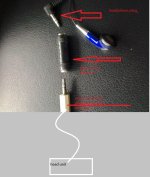
See the attached picture. This is my pathetic attempt to keep a diagram :p
 

Attachments

  • output.jpg
    output.jpg
    136.5 KB · Views: 716
more detail

Happy New Year!

I got this working yesterday and thought I'd post it back here in case it helps someone else.

See the attached picture. This is my pathetic attempt to keep a diagram :p

basically, this works very well for 2013 Limited without the factory subwoofer. I don't know if this will work of other trims.

1. remove the head unit following this thread:
http://www.toyota-4runner.org/5th-gen-t4rs/90970-removing-stock-head-unit-5th-gen-4runner.html The trickest part is to get the two trim pieces off.
2. read ANTMAN's thread here: http://www.toyota-4runner.org/5th-gen-t4rs/92013-antmans-thread-18.html#post989173
This section he tells you how to put in a subwoofer. One of the step is to find a white plug with five wires at the back of the head unit. Find that plug and cut just FOUR wires, leave the thinner white wire alone.
3. I used a T1 network cable to make the connection, the same type that you use at the back of a computer. It has 8 thin wires in it and I put two of those together and formed 4 fatter wires.
4. strip and expose wires. then I used some but connectors to connect the T1 wires and the white plug wires. Since I didn't cut the thin white wire from the plug, I had to work in the car with the plug attached--not a fun thing to do.
5. at the end of the T1 cable, I had 4 exposed wires. Then I found a stereo cable ( the white plug at the bottom of the snap shot) I cut that and exposed THREE wires. TWO of them are insulated. RED is for the tip, WHITE is for the ring, and the non-insulated wires are for the sleeve. In case you don't know what tip/ring/sleeve are, here is a link http://www.buzzillions.com/image.dox?R=317707&i=15020384.
6. Out of the FOUR wires at the end of the T1 line, I twisted the two negative wires into one wire. Then I connected it to the sleeve. Then I connected the other two positive wires to the RED and the WHITE wires.
7. I found a RadioShack adaptor in my pile of junk so the headphone and the stereo output plugs into both ends of this thing.

That is it. Turn on the head unit and plug in the headphone and it worked perfectly. You can tell from the picture that the headphone is a cheap one. I think it is 32 OHM. I ordered a much better headphone and it is on its way.
 
Last edited:

Members online

Forum statistics

Threads
278,312
Messages
3,554,089
Members
248,016
Latest member
Advally Service

Trending content

Back
Top