2015 SR5 4Runner Radio Replacement

Kove32

New member
Hello, I have a 4runner, 2015 SR5. I was wondering if anyone would tell me what exactly I would need from Amazon to install this device!

It is the Atoto A6 (A6Y2710S 1G/16G)

I want to mainly retain backup camera and steering wheel controls. This is the information that I obtained from the support:

② If your car does not have a factory amplifier, you may need to buy this wiring harness Metra 70-1761.
Metra Part # 70-1761 | Toyota wire harness | Metra Online

③ If your car has a factory amplifier, you may need to buy this amplifier interface Metra TYTO-01 or Metra AX-TYAMP2-SWC. Please kindly check with Metra which one you may need to buy.
Metra TYTO-01: Metra Online
Metra AX-TYAMP2-SWC: Metra Online

3) Do I need any special connections to hook it up to my stock back up camera?
----I checked your car information on Metra website ( Metra Online | Welcome to Metra Auto Parts Online Warehouse ). You may need to buy this interface Metra AX-TOYCAM3-6V to retain the factory backup camera.

Link for Metra AX-TOYCAM3-6V: Metra Online

Can anyone provide any information? Does my car have a factory amplifier? Also, does anyone else have any advice on what I would need? I mainly want to get more out of my car radio and this seems like it'd be an excellent fit!

Thanks so much for your help!
 
Register to hide this ad
spend extra and get the Maestro kit with Toyota 4runner plugs. it will work with the backup camera, Steering wheel controls, etc and give you extra stuff like tpms , door ajar and gauges etc

http://maestro.idatalink.com/ <-- go on their site and add yr/model and they will tell you what you need.
 
Last edited:
Maestro will not pull up compatibility when flashing it with that radio and would cost more than the radio itself, LOL.

You get what you pay for with that radio.

You will need the 70-1761 harness
Metra AX-TOYUSB to retain OEM USB plug

Scosche TA21065B dash mounting kit

Metra 40-LX11 antenna adapter

ASWC-1 for steering wheel control, after programming manually set radio type to Metra OE. Hook up brown to key A wire, Brown/wht to Key B
 
Last edited:
Hello, I have a 4runner, 2015 SR5. I was wondering if anyone would tell me what exactly I would need from Amazon to install this device!

It is the Atoto A6 (A6Y2710S 1G/16G)

I want to mainly retain backup camera and steering wheel controls. This is the information that I obtained from the support:

② If your car does not have a factory amplifier, you may need to buy this wiring harness Metra 70-1761.
Metra Part # 70-1761 | Toyota wire harness | Metra Online

③ If your car has a factory amplifier, you may need to buy this amplifier interface Metra TYTO-01 or Metra AX-TYAMP2-SWC. Please kindly check with Metra which one you may need to buy.
Metra TYTO-01: Metra Online
Metra AX-TYAMP2-SWC: Metra Online

3) Do I need any special connections to hook it up to my stock back up camera?
----I checked your car information on Metra website ( Metra Online | Welcome to Metra Auto Parts Online Warehouse ). You may need to buy this interface Metra AX-TOYCAM3-6V to retain the factory backup camera.

Link for Metra AX-TOYCAM3-6V: Metra Online

Can anyone provide any information? Does my car have a factory amplifier? Also, does anyone else have any advice on what I would need? I mainly want to get more out of my car radio and this seems like it'd be an excellent fit!

Thanks so much for your help!

I wired up one of those in my 4runner.

Are you going to run an aftermarket amp? That will tell you which harness. The 87 and up 10? pin is probably wrong. Now it should be a 28 pin connector.

You don't need the SWC kit. It should wire up directly (2 wires).

Either way Axxess sells the 6 volt camera adapter that you need. Call them. They are very nice and helpful.
 
Thanks for the responses. I will not be hooking up an after market amplifier anytime soon! Now I do have some limited knowledge of technical work, but based on what I'm seeing, this isn't going to be such an easy job, is it?
 
I actually just upgraded the stereo in my 2018 TRD OR. This is my first time doing a stereo upgrade so feel free to correct me if I'm wrong, always open to learn. HMU if you have specific questions, I love doing this kind of stuff.

The whole thing will take you a couple hours if you're somewhat skilled, otherwise an afternoon if this is your first time. I used youtube and a lot of googling to learn what to do.

Note you can just go to Crutchfield and plug in your car details, they'll tell you what radio's are compatible + what accessories you need. Now what I did was take the list from Crutchfield and bought everything on Amazon to save a cool $130 (always good to shop around).

Ended up getting:

1x Pioneer AVH-W4400NEX in Dash Multimedia Receiver with 7" WVGA Clear Resistive Touchscreen Display
(Stereo)

1x SCOSCHE TA2106B 2010-Up Toyota 4-Runner Double DIN or DIN w/pocket Install Dash Kit
(Dash kit to replace existing)

1x ADS-MRR Maestro RR - Universal Radio Replacement & SWI
(This is to retain steering wheel controls and get more data from car's OBD such as tire pressure and various gauges, I'm not a car expert)

1x 2010 2011 2012 2013 Lexus RX350 RX450h RX Antenna Adapter 40-LX11
(This is to power the antenna, note the blue wire needs to be hooked to +12V from what I read, so when hooking up the harness between the Maestro and Stereo make sure to add this wire to the Yellow +12V)

1x ADS-HRN-RR-TO2 TO2 Plug & Play T-Harness for Toyota Vehicles
(This harness is specific to Toyota's. It's mostly plug n play, but you need to do some wire stripping/soldering. I used wirenuts to connect between the stereo harness and this. Check iDatalink's Maestro site to pull up specific vehicle wiring instructions.)

1x PAC USB-TY1 toyota/Lexus OEM USB Port Retention Cable
(This just plugs in to the existing USB port green connector from car to the back USB port of the stereo. Note this stereo has 2 ports, port 1 is for iPhone, port 2 is Android. I plugged into port 2 because I primarily use Android, and Android Auto is only avaialble wirelessly on Google phones. So I needed wired for my Samsung S9.)

Idk your interior color but my dash is blackish, not the silver that the Scosche dash kit comes in. There's another kit made by Metra that has a black option, but reviews on fit weren't good. What I ended up doing was buying matching paint. Took a while googling it, but landed on these:

1x Dupli-Color BTY1600 Graphite Gray Pearl
1x Dupli-Color EBCL01257 Clear

Just sand down the kit w/600grit paper, apply a coat of the graphite gray, repeat till good coverage. Let dry. Then spray it with coats of the clear. Follow instructions on bottle.

Check this for more info on the looks of dash:
http://www.toyota-4runner.org/5th-g...-kit-head-unit-install-trail-trd-trd-pro.html

Check this for info on how to remove stereo:
https://www.youtube.com/watch?v=xoW5nm8iriU

Go to the iDatalink Maestro site to pull up installation directions for your specific Car/Harness combo.

I'd recommend buying a good stereo to future proof, so that's why I went with the Pioneer, I wanted wireless A-Auto & Carplay along with the other features. All in I spent around $850 on the upgrade. It was worth it imo and a great way to learn about the car/stereo communication.
 
Last edited:
I actually just upgraded the stereo in my 2018 TRD OR. This is my first time doing a stereo upgrade so feel free to correct me if I'm wrong, always open to learn. HMU if you have specific questions, I love doing this kind of stuff.

The whole thing will take you a couple hours if you're somewhat skilled, otherwise an afternoon if this is your first time. I used youtube and a lot of googling to learn what to do.

Note you can just go to Crutchfield and plug in your car details, they'll tell you what radio's are compatible + what accessories you need. Now what I did was take the list from Crutchfield and bought everything on Amazon to save a cool $130 (always good to shop around).

Ended up getting:

1x Pioneer AVH-W4400NEX in Dash Multimedia Receiver with 7" WVGA Clear Resistive Touchscreen Display
(Stereo)

1x SCOSCHE TA2106B 2010-Up Toyota 4-Runner Double DIN or DIN w/pocket Install Dash Kit
(Dash kit to replace existing)

1x ADS-MRR Maestro RR - Universal Radio Replacement & SWI
(This is to retain steering wheel controls and get more data from car's OBD such as tire pressure and various gauges, I'm not a car expert)

1x 2010 2011 2012 2013 Lexus RX350 RX450h RX Antenna Adapter 40-LX11
(This is to power the antenna, note the blue wire needs to be hooked to +12V from what I read, so when hooking up the harness between the Maestro and Stereo make sure to add this wire to the Yellow +12V)

1x ADS-HRN-RR-TO2 TO2 Plug & Play T-Harness for Toyota Vehicles
(This harness is specific to Toyota's. It's mostly plug n play, but you need to do some wire stripping/soldering. I used wirenuts to connect between the stereo harness and this. Check iDatalink's Maestro site to pull up specific vehicle wiring instructions.)

1x PAC USB-TY1 toyota/Lexus OEM USB Port Retention Cable
(This just plugs in to the existing USB port green connector from car to the back USB port of the stereo. Note this stereo has 2 ports, port 1 is for iPhone, port 2 is Android. I plugged into port 2 because I primarily use Android, and Android Auto is only avaialble wirelessly on Google phones. So I needed wired for my Samsung S9.)

Idk your interior color but my dash is blackish, not the silver that the Scosche dash kit comes in. There's another kit made by Metra that has a black option, but reviews on fit weren't good. What I ended up doing was buying matching paint. Took a while googling it, but landed on these:

1x Dupli-Color BTY1600 Graphite Gray Pearl
1x Dupli-Color EBCL01257 Clear

Just sand down the kit w/600grit paper, apply a coat of the graphite gray, repeat till good coverage. Let dry. Then spray it with coats of the clear. Follow instructions on bottle.

Check this for more info on the looks of dash:
http://www.toyota-4runner.org/5th-g...-kit-head-unit-install-trail-trd-trd-pro.html

Check this for info on how to remove stereo:
https://www.youtube.com/watch?v=xoW5nm8iriU

Go to the iDatalink Maestro site to pull up installation directions for your specific Car/Harness combo.

I'd recommend buying a good stereo to future proof, so that's why I went with the Pioneer, I wanted wireless A-Auto & Carplay along with the other features. All in I spent around $850 on the upgrade. It was worth it imo and a great way to learn about the car/stereo communication.


I also decided to go for the Pioneer AVH-W4400NEX for my 2017 TRD OR through crutchfield and plan to install it with the iDatalink Maestro. I would like to know if you were able to retain the factory backup camera and factory microphone instead of using the aftermarket one that comes with the new head unit/stereo. And how well the steering wheel functions work. I Just want to get an idea after your experience with yours and how well its been working out for you. Thanks in advance.
 
Last edited:
I also decided to go for the Pioneer AVH-W4400NEX for my 2017 TRD OR through crutchfield and plan to install it with the iDatalink Maestro. I would like to know if you were able to retain the factory backup camera and factory microphone instead of using the aftermarket one that comes with the new head unit/stereo. And how well the steering wheel functions work. I Just want to get an idea after your experience with yours and how well its been working out for you. Thanks in advance.


The exact stereo is $345 on Newegg right now, so better deal than Crutchfields $600 range. I've been running this for over 2 months now. I retained the factory backup camera, but can't retain factory microphone. But the provided one is setup by the dash/odometer and is pretty discrete. The steering wheel function didn't work at first, but just had to double check my connections and they've been working great for almost 2 months now. The radio itself honestly is as I expect, no major issues.
 
The exact stereo is $345 on Newegg right now, so better deal than Crutchfields $600 range. I've been running this for over 2 months now. I retained the factory backup camera, but can't retain factory microphone. But the provided one is setup by the dash/odometer and is pretty discrete. The steering wheel function didn't work at first, but just had to double check my connections and they've been working great for almost 2 months now. The radio itself honestly is as I expect, no major issues.

Thanks for answering my questions about the backup camera and microphone. I just finished installing my AVH-W4400NEX. And like you said, The factory microphone did not work. So I went ahead and just used the provided one with the new unit. One thing I did notice after the install though, is that my compass on the steering dash/odometer no longer works. Is yours working? I wonder if it has to do with the factory GPS being disconnected.
 
Last edited:
Thanks for answering my questions about the backup camera and microphone. I just finished installing my AVH-W4400NEX. And like you said, The factory microphone did not work. So I went ahead and just used the provided one with the new unit. One thing I did notice after the install though, is that my compass on the steering dash/odometer no longer works. Is yours working? I wonder if it has to do with the factory GPS being disconnected.

I actually didn't notice that but you're right, I don't think my compass is there anymore. Wonder if there's a workaround to get it back? I know the W4400NEX comes with a GPS antenna, may need to do some digging/googling.
 
I actually just upgraded the stereo in my 2018 TRD OR. This is my first time doing a stereo upgrade so feel free to correct me if I'm wrong, always open to learn. HMU if you have specific questions, I love doing this kind of stuff.

The whole thing will take you a couple hours if you're somewhat skilled, otherwise an afternoon if this is your first time. I used youtube and a lot of googling to learn what to do.

Note you can just go to Crutchfield and plug in your car details, they'll tell you what radio's are compatible + what accessories you need. Now what I did was take the list from Crutchfield and bought everything on Amazon to save a cool $130 (always good to shop around).

Ended up getting:

1x Pioneer AVH-W4400NEX in Dash Multimedia Receiver with 7" WVGA Clear Resistive Touchscreen Display
(Stereo)

1x SCOSCHE TA2106B 2010-Up Toyota 4-Runner Double DIN or DIN w/pocket Install Dash Kit
(Dash kit to replace existing)

1x ADS-MRR Maestro RR - Universal Radio Replacement & SWI
(This is to retain steering wheel controls and get more data from car's OBD such as tire pressure and various gauges, I'm not a car expert)

1x 2010 2011 2012 2013 Lexus RX350 RX450h RX Antenna Adapter 40-LX11
(This is to power the antenna, note the blue wire needs to be hooked to +12V from what I read, so when hooking up the harness between the Maestro and Stereo make sure to add this wire to the Yellow +12V)

1x ADS-HRN-RR-TO2 TO2 Plug & Play T-Harness for Toyota Vehicles
(This harness is specific to Toyota's. It's mostly plug n play, but you need to do some wire stripping/soldering. I used wirenuts to connect between the stereo harness and this. Check iDatalink's Maestro site to pull up specific vehicle wiring instructions.)

1x PAC USB-TY1 toyota/Lexus OEM USB Port Retention Cable
(This just plugs in to the existing USB port green connector from car to the back USB port of the stereo. Note this stereo has 2 ports, port 1 is for iPhone, port 2 is Android. I plugged into port 2 because I primarily use Android, and Android Auto is only avaialble wirelessly on Google phones. So I needed wired for my Samsung S9.)

Idk your interior color but my dash is blackish, not the silver that the Scosche dash kit comes in. There's another kit made by Metra that has a black option, but reviews on fit weren't good. What I ended up doing was buying matching paint. Took a while googling it, but landed on these:

1x Dupli-Color BTY1600 Graphite Gray Pearl
1x Dupli-Color EBCL01257 Clear

Just sand down the kit w/600grit paper, apply a coat of the graphite gray, repeat till good coverage. Let dry. Then spray it with coats of the clear. Follow instructions on bottle.

Check this for more info on the looks of dash:
Painting aftermarket dash kit for head unit install in Trail, TRD OR, TRD Pro - Toyota 4Runner Forum - Largest 4Runner Forum

Check this for info on how to remove stereo:
YouTube

Go to the iDatalink Maestro site to pull up installation directions for your specific Car/Harness combo.

I'd recommend buying a good stereo to future proof, so that's why I went with the Pioneer, I wanted wireless A-Auto & Carplay along with the other features. All in I spent around $850 on the upgrade. It was worth it imo and a great way to learn about the car/stereo communication.

tommy... what is the purpose of this item?
1x 2010 2011 2012 2013 Lexus RX350 RX450h RX Antenna Adapter 40-LX11
(This is to power the antenna, note the blue wire needs to be hooked to +12V from what I read, so when hooking up the harness between the Maestro and Stereo make sure to add this wire to the Yellow +12V)

reason im asking is i dont have this item when i upgrade to a avic 8400nex. would that be why i get no am and fm stations?

thnks
 
2013 SR5 aftermarket Sony AX-5000 radio install

So, I was following your thread, thanks for the post.

I have a 2013 SR5, no factory GPS, amp or sub, just the base model red-backlit blue-tooth CD guy.

Ordered my whole set-up, Maestro (for steering wheel controls), Scosche dash replacement, radio, harnesses from Crutchfield which has never failed me in 20ish years of radio installs..wondering has anyone else done this?

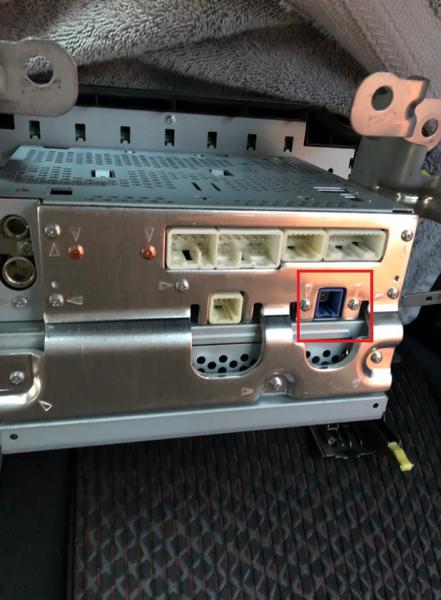
Reason being, there are only 4 factory plugs on the back of the radio. One square blue connector, which I assume has to be the USB connection, has been the most perplexing of the bunch. Have everything else wired up, have ordered BOTH available "USB adapter" harnesses available for "this model year" and neither works?? I even stopped into my local radio car install shop and they said, has to be one of the two, yet here I am with two useless adapters.

Anyone else run into this problem?
Here a pic of my factory unit, the blue connection in the back is what I have to think is the USB connection from the center console..however there's also one in the glove compartment but I don't see the second connection?

rmbertoldi-albums-dear-santa-picture54218-factory-radio-replacement-fun-4-plugs-old-many-many-more-new.jpg
 
Here a pic of my factory unit, the blue connection in the back is what I have to think is the USB connection from the center console..however there's also one in the glove compartment but I don't see the second connection?

I'm assuming you answered this question by now, but for others that run into this.

The blue connector, single wire is to the antenna for satellite radio.
 
I'm in the middle of a reset installation. Got half way there and there enough things that I was wishing I had prefinished, paint the Scosche, get the little felt pieces on the stock panel, etc. And 2 items I wanted to think out before tearing into the dash.

1. The USB connector at the bottom of the console. (No. 1 Stereo Jack Adapter Assembly). Looks l like you have to tap in at the Multi-Media Interface ECU*1. This looks like it is under the dash to the right of the glove box. At least when I look up.
Do I have to remove the dash to get to it? Just the glove box? Any tips to get to it???

2. The after marker microphone for the new radio. I saw a few comments of routing it up to the Map Light Assembly next to the stock microphone. Ideally, I like the idea. Taking apart the car, not so much...
Any tips on taking the car apart to route the wire up to the Map Light?
 
Last edited:
I'm assuming you answered this question by now, but for others that run into this.

The blue connector, single wire is to the antenna for satellite radio.

HA I WISH I answered this question already, I've had the bottom part of my dash off for months now..and have yet to use my headunits ApplePlay once, or get the Maestro to work with the steering controls, Bluetooth works great..but that's all I've progressed.

I also have the aftermarket stereo's microphone for phone calls, but there's NO way I'm running it up to the dome light. I'll probably end up sticking it in a vent or making a custom piece to hold it somewhere in the center console. I also haven't gotten around to installing my rear back-up camera either..dreading the rear deck and interior removal to run the wire....hoohumm..4Runner projects.
 
I'm in the middle of a reset installation. Got half way there and there enough things that I was wishing I had prefinished, paint the Scosche, get the little felt pieces on the stock panel, etc. And 2 items I wanted to think out before tearing into the dash.

1. The USB connector at the bottom of the console. (No. 1 Stereo Jack Adapter Assembly). Looks l like you have to tap in at the Multi-Media Interface ECU*1. This looks like it is under the dash to the right of the glove box. At least when I look up.
Do I have to remove the dash to get to it? Just the glove box? Any tips to get to it???

2. The after marker microphone for the new radio. I saw a few comments of routing it up to the Map Light Assembly next to the stock microphone. Ideally, I like the idea. Taking apart the car, not so much...
Any tips on taking the car apart to route the wire up to the Map Light?


I'm wondering now if I need to tap into that multi-media box on the passenger side to pull those connections..maybe that's where my phantom USB cables are hiding. I would think that once you go aftermarket stereo that multi-media interface loses all it's use..whether for the "Party Mode" button, steering wheel controls, or as multi-channel controller for the factory component system?
 
I'm wondering now if I need to tap into that multi-media box on the passenger side to pull those connections..maybe that's where my phantom USB cables are hiding. I would think that once you go aftermarket stereo that multi-media interface loses all it's use..whether for the "Party Mode" button, steering wheel controls, or as multi-channel controller for the factory component system?

The Metra AX-USB-35EXT fits perfectly into the squared spot on the lower part of the console (NO. 1 Stereo Jack Adapter Assembly in your diagram), so if you are having issues, you can plug this adapter directly from the aftermarket radio into the spot used by the OEM one.

As for the microphone, I suggest installing the aftermarket one behind the steering wheel (under the instrument cluster) and check how it goes. It takes only 5 minutes to install it there and you can't see it. Mine is working fine and I don't have any issues with calls nor using the Google Assistant. If it doesn't work, then try routing the cable to the OEM location.
 
Last edited:

Members online

Forum statistics

Threads
278,310
Messages
3,554,079
Members
248,016
Latest member
Advally Service

Trending content

Back
Top