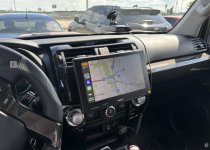
Aftermarket Stereo Upgrade: Alpine Halo iLX-F509 or Sony XAV-9500ES?

I was able to update my 15 Trail to the 2020 4Runner stock radio.

Overall it does work and you can dim it so that it doesn’t blind you at night. The stock navigation is passable but I ended up getting a wireless carplay dongle and use that for navigation 90% of the time. It’s leaps and bounds ahead of the previous radio though. However I might eventually try the Sony XAVIER-9500ES since Trail Grid Pro has a kit for it. However if that blinds me at night then I’ll be back to the stock 2020 radio unfortunately


which wireless car play dongle did you purchase? Review of it?
 
which wireless car play dongle did you purchase? Review of it?
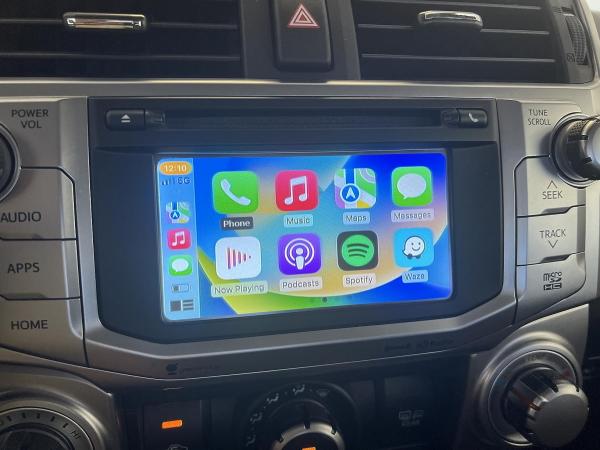
Teeran CarPlay Wireless Adapter but I’m not sure that it’s still the version being sold on Amazon. It works about 80% of the time. If it ever doesn’t I just unplug it and plug it back in and it’s good to go.
 
Halo9 Install

Hey guys, trying to install the Halo9 in at 2017 Limited, my factory head unit died multiple times, and the toyota dealership replaced it with a factory refresh unit. I was on my third one, so i decided to stop the insanity and try something new. Picked up the Halo9 from crutchfield, install went smoothly until i turned on the car for the first time. The Halo9 will enter the boot sequence and make it 3-5 seconds in before turning off. If i press the microphone button on the bottom left of the Halo9 it will start turning on again but will shut down at about the same point. I've started to troubleshoot the electrical harnesses but can't figure out where the issue is since it's clearly getting some power. Any help would be great.
 
Hey guys, trying to install the Halo9 in at 2017 Limited, my factory head unit died multiple times, and the toyota dealership replaced it with a factory refresh unit. I was on my third one, so i decided to stop the insanity and try something new. Picked up the Halo9 from crutchfield, install went smoothly until i turned on the car for the first time. The Halo9 will enter the boot sequence and make it 3-5 seconds in before turning off. If i press the microphone button on the bottom left of the Halo9 it will start turning on again but will shut down at about the same point. I've started to troubleshoot the electrical harnesses but can't figure out where the issue is since it's clearly getting some power. Any help would be great.

google search:

does it have a power plate installed between the screen and head unit ? there is a micro switch on the PCB and it won't power up properly without that peice of plastic Installed
 
... However I might eventually try the Sony XAVIER-9500ES since Trail Grid Pro has a kit for it. However if that blinds me at night then I’ll be back to the stock 2020 radio unfortunately

I ended up with the xav9500es from trailgridpro and it is fantastic. The screen brightness is highly customizable and easy to change. I have it set to dim when my headlights are on. Works great. Only complaint is no screen mirroring. I think you might be able to with android but I use ios. Feels a bit wasteful to have such a nice looking screen and not be able to "watch" anything on it.
 
I went with the CarTrimHome T10 and couldn’t be happier. Only took a few days to arrive. Looks OEM and wireless CarPlay is awesome. Install took an hour, then another 30 minutes or so to get the software setup exactly how i wanted. It’s extremely customizable, uses all the OEM type functions like steering wheel buttons, headlight dimmer, you can even customize the inputs

ff16a7d42a2a1166fdb6a0bbab20a9ae.jpg


Sent from my iPhone using Tapatalk

Does the head unit have any AM/FM radio capability? I rarely use AM radio but sometimes road conditions/weather alerts are on AM for certain highways and sports occasionally.

I just ordered mine and waiting for it to arrive...

UPDATE: Received and installed my unit, it does have AM/FM radio function in the andriod interface and operates like any other head unit.
 
Last edited:
This week I installed the Carplay/Android Auto adapter. I have a 2018 4Runner and use it for CarPlay.

I have to say it is an impressive upgrade that works flawlessly with the existing features of the vehicle including the reverse camera, and existing speakers and microphone. I tested wired and wireless and all work well. Just like vehicles with factory CarPlay.

DISCOUNT CODE"COUPON40" Save $40/
link :Wireless Apple Carplay/Android Auto Module For TOYOTA Touch2 Entune2.0 Highlander Tundra Sienna Prius Yaris Camry CHR
– Carlinkit


andy11-albums-carplay-picture62825-71rhbfrlail.jpg
 
Put in an iLX-F509 yesterday. Has anyone been able to turn off Alpine's rear view camera grid lines? Or, alternatively, been able turn off the OEM grid lines from the rear camera? Right now two sets are displaying which isn't all that pretty.

Bonus question: has anyone performed the parking break bypass? If so, how easy was it? Not too much of an inconvenience for me at the moment but if it is something that takes less than 30 minutes I'll probably do it.
 
I installed the XAV-9500ES from TrailGridPro.

Feels a lot more modern and overall it's a nice update from the Entune 3.0. Here's a picture of it.
 

Attachments

  • Screenshot 2024-06-29 at 2.14.47 PM.jpg
    Screenshot 2024-06-29 at 2.14.47 PM.jpg
    61 KB · Views: 692
Put in an iLX-F509 yesterday. Has anyone been able to turn off Alpine's rear view camera grid lines? Or, alternatively, been able turn off the OEM grid lines from the rear camera? Right now two sets are displaying which isn't all that pretty.

Bonus question: has anyone performed the parking break bypass? If so, how easy was it? Not too much of an inconvenience for me at the moment but if it is something that takes less than 30 minutes I'll probably do it.
For anyone looking for a quick solution: adjust the overlay to match the OEM overlay. It isn't perfect, but it is close enough for me until a proper solution comes out!
 
Solution to turning off Alpine's grid lines

For anyone looking for a quick solution: adjust the overlay to match the OEM overlay. It isn't perfect, but it is close enough for me until a proper solution comes out!

Ok I found the "proper" solution:

1. Press the button to turn on the rear camera at the bottom of the touchscreen
2. With the rear camera pulled up, touch the screen anywhere. A menu should pop up with a few different options
3. One of the options is for "guides" -- press it to turn it off!
4. (Optional) you can put the warning message at the bottom of the screen
 

Members online

No members online now.

Forum statistics

Threads
278,315
Messages
3,554,131
Members
248,016
Latest member
Advally Service

Trending content

Back
Top