anyone having touch screen problems?

haha well a big thank you to everyone and your input. i tried disconnecting the battery again and still no luck. the truck has 51k miles on it, so I don't think that this issue will be covered under warranty. I guess it's worth a shot, so I'll give it a try.

I tried calling a couple car stereo places and described the problem to them. They both said it would be around 700 bucks to fix. I asked if that was the price to replace the screen and they said "No, that's the price for everything. We'd have to replace the NAV system, the bluetooth, everything."

Does that sound odd to anyone else? I'm not an audio visual genius here but I find it kind of hard to believe that they couldn't simply find an aftermarket monitor that fits in that spot and just replace the screen. Everything else works perfectly. Display, back-up camera, buttons. Everything but the touch screen.

I sure hope you're right and it just needs a good cleaning. I'll try that tomorrow.
 
haha well a big thank you to everyone and your input. i tried disconnecting the battery again and still no luck. the truck has 51k miles on it, so I don't think that this issue will be covered under warranty. I guess it's worth a shot, so I'll give it a try.

I tried calling a couple car stereo places and described the problem to them. They both said it would be around 700 bucks to fix. I asked if that was the price to replace the screen and they said "No, that's the price for everything. We'd have to replace the NAV system, the bluetooth, everything."

Does that sound odd to anyone else? I'm not an audio visual genius here but I find it kind of hard to believe that they couldn't simply find an aftermarket monitor that fits in that spot and just replace the screen. Everything else works perfectly. Display, back-up camera, buttons. Everything but the touch screen.

I sure hope you're right and it just needs a good cleaning. I'll try that tomorrow.

No. That sounds spot on. No car stereo dealer can or wants to deal with a factory nav screen unit. Not totally a bad thing. Aftermarket units are so much better than the stock unit. If you need to replace the stock unit, the Toyota unit will be more than double the $700 for an aftermarket one. The downside is you lose the factory look and maybe some of the steering wheel controls.

My Toyota Nav was replaced under warranty (2010 Trail) for a phone book erasing issue. Apparently these units are sourced from multiple manufacturers. When my replacement unit came in, parts manager unboxed it in front of me and was very pleased and said that I was very lucky that I got the Denso unit. I have not had any problems since.
 
Update

what's the update to how this turned out? I am having this same issue with my 2011 Limited. Has the JBL in dash factory unit and touch screen is unresponsive. the kicker is that I just bought it less than a week ago from a small one owner "dealer" and didn't realize until afterwards. the truck is in mint condition otherwise and I can purchase an extended warranty, but didn't want to have to do that. I have succumbed to taking it to a dealer today for a $50 diagnostic and ordered a $40 2015 update DVD for the nav system but concerned once I do this, I'll void my chance to get the additional warranty. we had a 2004 toyota for 8 years and no issues with very little maintenance... Any insights?
 
what's the update to how this turned out? I am having this same issue with my 2011 Limited. Has the JBL in dash factory unit and touch screen is unresponsive. the kicker is that I just bought it less than a week ago from a small one owner "dealer" and didn't realize until afterwards. the truck is in mint condition otherwise and I can purchase an extended warranty, but didn't want to have to do that. I have succumbed to taking it to a dealer today for a $50 diagnostic and ordered a $40 2015 update DVD for the nav system but concerned once I do this, I'll void my chance to get the additional warranty. we had a 2004 toyota for 8 years and no issues with very little maintenance... Any insights?
My 2012 4Runner Limited JBL touchscreen stopped working as well. It's out of warranty and the dealership wants $2300 to replace the unit. Aftermarket is the only real option but I really didn't want to have to spend a bunch of time or money on it.
 
My 2012 4Runner Limited JBL touchscreen stopped working as well. It's out of warranty and the dealership wants $2300 to replace the unit. Aftermarket is the only real option but I really didn't want to have to spend a bunch of time or money on it.

Post in the FS thread and look for a used one. They pop up here and there.
 
Same problem here. ..possible fix. (Untested)

Hello, I am brand new to forums but I was looking for the long lost non-$2500 answer to this question also. My screen would register but in a different place than was touched. ...then it became unresponsive all together. So in my searching online, I came across a post about a reoccurring problem with Lexus touch screens. As far as I understand, they are made by toyota. Correct? ? Anyway thought this may be a possible fix before shelling out $2500 for a new unit. I understand it will be a little different process but I'm sure it will be fairly similar in the disassemble. Maybe someone with some experience (and guts ) might try it and do a write up for the rest of us chickens. If I tackle it and am successful, I'll definitely do a write up. ....if I fail...I'll let you know that too. Anyway here's the link https://snapguide.com/guides/fix-the-touchscreen-in-a-lexus-is350/ I hope its the answer!
 
Fixed!!!

I just found this thread and joined the forum. hopefully I can help others save some $$$$. I had the same problem 2 days after my 3 year warranty expired :mad2: Toyota did not even consider giving a 2 day grace period and wanted $2300 to replace it. It looks like you have the same unit I have (2012 Limited). Unfortunately, I didn't take pictures so I'll have to go by memory here.

You will want to flip the display unit open and disconnect your battery while the display is lying horizontal. You can remove the display unit without taking the entire system out but it will be easier with the system off the truck so you can easily flip the whole thing over and see what's going on.

Remove the 2 pivot screws on the bottom of the display unit. They are thread locked so it will be a little hard to remove it at first.
Move the display unit around so you can disconnect the ribbon from the main unit

Once you got the display unit off, work your way to the bare LCD screen. (I can't recall where or how many screws you need to remove but basically remove the back plate and then the PCB board. Just take note where the everything goes so it all goes back the same way.

The LCD is very similar to the Lexus units (see post mentioned by Cddj77). The only difference is that ours have 8 pins instead of 4 but are basically the same.
Our pins 1 and 2 = pin 1 on the Lexus
3,4 = pin 2
5,6 = pin 3
7,8 = pin 4.

Check continuity between the pin pairs one of them will be open (no connection). Also check the resistance values as per the Lexus post. In my case pin 1 was broken in the ribbon so I just soldered a jumper between pins 1 and 2 on the pcb where the ribbon connects instead of trying to fix the ribbon. My unit has been working fine since.
 
I jinxed myself when I said "My unit has been working fine since." Now my backlight does not go on full bright unless I restart the car. I have replaced the LCD panel which has the CCFL in it and the logic board which has the CCFL inverter with no luck. I guess it's really time for me to shell out the $$ and get the whole unit replaced. Maybe someone here took off their old unit with a broken screen that is willing to sell it to me?

Anyway, since I had to remove my screen again I took pictures. Here's the steps to removing the screen and the fix I did for my touch screen problem:

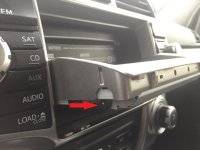
Flip the display unit open and disconnect your battery while the display is lying horizontal. Remove the 2 pivot screws on the bottom of the display unit. They are thread locked so it will be a little hard to remove it at first.
1.jpg

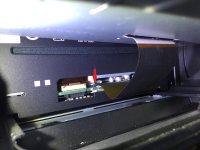
Slide the display unit up so you can disconnect the ribbon from the main unit. Disconnect the ribbon by pulling the black tab towards you.
2.jpg

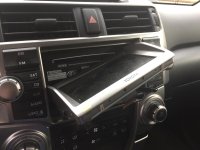
Tilt the display diagonally so you can take it off it's rails
3.jpg

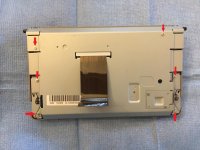
Remove 6 screws (PH#0) and slowly separate the metal back plate from the plastic face plate. The face plate clips in on the top and bottom.
4.jpg

Lift the bottom of the back plate up and disconnect the ribbon by lifting the silver bar up and sliding the ribbon out. You can see I bridged (soldered) pin1 and pin 2 since the trace for my pin 1 is severed on the touch screen ribbon
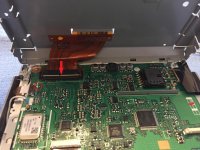
5.jpg

Use a multimeter and check continuity between pin 1&2, 3&4, 5&6, 7&8. If one or more of the pairs are open then you can bridge those pair on the logic board.
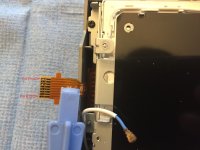
6.jpg

Follow the same steps backwards for reassembly. Hopefully your touch screen works!

 

Attachments

  • 1.jpg
    1.jpg
    119.6 KB · Views: 2,687
  • 2.jpg
    2.jpg
    129.5 KB · Views: 2,313
  • 3.jpg
    3.jpg
    124.7 KB · Views: 2,693
  • 4.jpg
    4.jpg
    132.3 KB · Views: 2,234
  • 5.jpg
    5.jpg
    135 KB · Views: 2,315
  • 6.jpg
    6.jpg
    121 KB · Views: 2,382
Last edited:
It works!

Have a 2011 Limited that had this same issue, I tried everything I could find and the only thing that worked was the above directions to jump pin 1 and 2. Now working perfect! Hope it lasts! Thanks for posting Flyin4r!
 
I also run with the touchscreen in the disabled (off) position because it bugs me at night and it only comes on when the rear camera does, but if you touched any of the shoulder buttons, it should have turned it back on.

HI, I have the same issue with the touchscreen in the disabled mode until you click a shoulder button... And if the last time before I shut engine down the touch screen was used in an Audio mode, the issue does not come back. If it was in "Home" mode, then yes, after showing Toyota logo and safety caution message it turns off until you click a side button...
Is it possible to fix this one somehow?
 
Screen problems

My '14 4Runner had 3 radio systems in 3 yrs. when I went in to have the 4th one put in they wanted $1400. I was fed up and bought a new 2017 Ltd 4 runner. Yeah, I know,stupid! Anyway, it's 10 months now and the same thing is happening. It starts with the down arrow to change channels not working. Then the "destination" button on the nav screen won't work.
I'm going in next week to see what they will do with it this time. 5 radios in 4 years, must be a record!
Think I'll just buy a Jeep next time.
 
2018 Four Runner Problems Nav screen

I have 7100 miles on my 2018 Four Runner and I'm waiting for the third radio/navigation system to be installed. The source button and return arrow stopped working. The Bluetooth phone doesn't do the same thing twice in a row which can be very frustrating.
 

Members online

No members online now.

Forum statistics

Threads
278,306
Messages
3,554,045
Members
248,016
Latest member
Advally Service

Trending content

Back
Top





