AOB Switch Illumination Issue QUESTION/Trouble With Switch Fully Engaging FIX

mbumpus11

Member
I hadn't hooked up my lightbar switch for backlight illumination/illumination while in use until today, but I've run into an issue with it being illuminated while in use when my headlights are on.

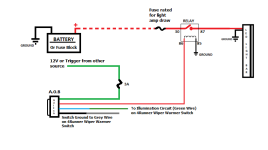
The "in use" portion of the switch's backlighting has no problem lighting up while my headlights are off, but as soon as I turn them on to the parking lights/DRL setting the switch apparently no longer receives power to remain illuminated. I have installed the "Add-A-Circuit" to get this power as a prior user had suggested and that was successful in getting the power to backlight the switch. As it sits currently:
6de9c29eb090172cc59a82d9f488868f.jpg


I also had an issue where the switch would act as a momentary switch and wouldn't hold the switch ON unless I really gave it a good mashing. I fixed that during this process, so maybe it will help someone with a similar problem. That fix is as follows:


First I pulled the switch panel off to reach the back of my AOB switch.
53dba48edfc4a27638bc746ca5b67535.jpg


Then I noticed the spot where the switch is notched (as part of the switch design) wasn't properly seated.
51011abdf24e19152074ff11b9aad97d.jpg


Another angle of it not in the right spot. Notice the small gap towards the top, right corner of the switch.
14939c3a42efd66c5f3419649bcbfa25.jpg


Here is how it should look when properly fastened
3cb8b9991e9bdc28b5db558ad431f561.jpg

444b92a7ee1c57d1e7d5db6bae34baa2.jpg


To ensure this doesn't happen again, I wrapped some electrical tape around it after confirming it wouldn't interfere with operation
a3b7de6c249357764ec4a84242f8e910.jpg


I have had no issues while testing the switch since the wrapping of the tape, and installed it back for normal operation.

If anyone can help with why the AOB backlight/"in use" illumination turns OFF when I turn my headlights ON, that would be appreciated.

Thank you!
 
Register to hide this ad
if no one chimes in before I get home to look at the wiring diagram I used I'll post what I did.

Though my wiring led to a different problem and my backlit portion of the switch stays illuminated 24/7. But I wired a little different than what the supplied wiring diagrams use. I pulled a constant 12v through a secondary fuse box to power the switch, and only tied into the vehicles harness to get the dimmer function to work.
 
I hadn't hooked up my lightbar switch for backlight illumination/illumination while in use until today, but I've run into an issue with it being illuminated while in use when my headlights are on.

The "in use" portion of the switch's backlighting has no problem lighting up while my headlights are off, but as soon as I turn them on to the parking lights/DRL setting the switch apparently no longer receives power to remain illuminated. I have installed the "Add-A-Circuit" to get this power as a prior user had suggested and that was successful in getting the power to backlight the switch.

Try this..
And read this..
http://www.toyota-4runner.org/5th-gen-t4rs/164966-led-light-bar-install-2014-toyota-4runner.html
 

Attachments

  • IMG_0052.PNG
    IMG_0052.PNG
    20.7 KB · Views: 2,167
I hadn't hooked up my lightbar switch for backlight illumination/illumination while in use until today, but I've run into an issue with it being illuminated while in use when my headlights are on.

The "in use" portion of the switch's backlighting has no problem lighting up while my headlights are off, but as soon as I turn them on to the parking lights/DRL setting the switch apparently no longer receives power to remain illuminated. I have installed the "Add-A-Circuit" to get this power as a prior user had suggested and that was successful in getting the power to backlight the switch. As it sits currently:
6de9c29eb090172cc59a82d9f488868f.jpg


I also had an issue where the switch would act as a momentary switch and wouldn't hold the switch ON unless I really gave it a good mashing. I fixed that during this process, so maybe it will help someone with a similar problem. That fix is as follows:


First I pulled the switch panel off to reach the back of my AOB switch.
53dba48edfc4a27638bc746ca5b67535.jpg


Then I noticed the spot where the switch is notched (as part of the switch design) wasn't properly seated.
51011abdf24e19152074ff11b9aad97d.jpg


Another angle of it not in the right spot. Notice the small gap towards the top, right corner of the switch.
14939c3a42efd66c5f3419649bcbfa25.jpg


Here is how it should look when properly fastened
3cb8b9991e9bdc28b5db558ad431f561.jpg

444b92a7ee1c57d1e7d5db6bae34baa2.jpg


To ensure this doesn't happen again, I wrapped some electrical tape around it after confirming it wouldn't interfere with operation
a3b7de6c249357764ec4a84242f8e910.jpg


I have had no issues while testing the switch since the wrapping of the tape, and installed it back for normal operation.

If anyone can help with why the AOB backlight/"in use" illumination turns OFF when I turn my headlights ON, that would be appreciated.

Thank you!

One thing to check out is the wireing harness. On one of my AOB switches, the illumination (+) and ground were switched.. I was having the same issues as you. If the wires are switched in the harness, as soon as the headlights get turned on, there wouldn't be an actual gound, and so the switch lights would turn off..
 
One thing to check out is the wireing harness. On one of my AOB switches, the illumination (+) and ground were switched.. I was having the same issues as you. If the wires are switched in the harness, as soon as the headlights get turned on, there wouldn't be an actual gound, and so the switch lights would turn off..


This hit the nail on the head! I had switched the black and green AOB wires and it did precisely what you explained. When I switched them they now light at the proper times in the proper capacity. THANK YOU for bringing that to my attention!

Low beams on, lightbar off, backlights illuminated
c02205f81e2af406653ec82c102f422a.jpg


Low beams on, lightbar on, backlights illuminated AND power lights illuminated.
4e7bf4f495294a1930992576fc404d42.jpg


Genius!
 
Hi [MENTION=123822]mbumpus11[/MENTION],

Okay, just a couple of things for you to clarify... By "In use Portion" I'll assume you mean The ON Indicator... that makes sense! And you say that as long as the parking lights/DRL are turned off the "In use portion" works as it should; which I'm finding odd(?)! Anyway, sounds like you're using a component from your parking/headlights as a ground... which explains why the indicator is cancelled when you turn the parking lights on!

Okay, forget about all of that! Choose a dash light that glows when the parking lights are on. Connect your Black wire from the AOB switch to the Gray wire on the courtesy light (this provides the dimmer function from your dimmer dial on the dash. If you choose not to use the dimmer, that's fine, just ground it to any suitable body ground in the dash! Now connect your BLUE wire from the AOB switch to tap (connect) to the GREEN wire on the dash board accessory to complete your Back-light circuit.

Now that takes care of the etched face back-lit AOB switch; it will glow with the others when using the parking/headlights. On the AOB switch connect the GREEN wire to an interrupted (intermittent) power source like your cigarette lighter; on that will deliver no power when the vehicle is turned off; this is for a Fail-safe operation so no chance of leaving the aftermarket accessory on when shut the truck off!

And lastly... the red wire on the AOB switch device connects to (#85 or #86) on the relay harness, whichever is still un-used; if there were a picture of the harness I could tell you what to connect the GREEN wire to. Hope this helps, 'Best to you'

rig
 
Last edited:
Opps...

Sorry! I started writing my post at around 9:30 pm , then went and had a snack. When I finally got finished with my paper, I see that you've gotten it all straightened out!

Cheers!
 
Opps...

Sorry! I started writing my post at around 9:30 pm , then went and had a snack. When I finally got finished with my paper, I see that you've gotten it all straightened out!

Cheers!

No worries! Thank you for that detailed response, though. I'll probably have to revisit that explanation in the future to remind myself.

I'm sure it will help someone, though!!
 
This hit the nail on the head! I had switched the black and green AOB wires and it did precisely what you explained. When I switched them they now light at the proper times in the proper capacity. THANK YOU for bringing that to my attention!


Genius!

Glad it worked out for you... Question though... did you have the colored wires mixed up (user error), or were your colors right but placed in the harness wrong (AOB error).

I have about 5 switches and harnesses with that one screwed up one that gave me fits (especially cause the colors were connected correctly)... lol
 
Glad it worked out for you... Question though... did you have the colored wires mixed up (user error), or were your colors right but placed in the harness wrong (AOB error).


I have about 5 switches and harnesses with that one screwed up one that gave me fits (especially cause the colors were connected correctly)... lol


Hmm...I'd have to look at the switch to make sure I understand what is right and what is wrong before I can comment on that. Can you tell from my pics at all?
 
Reviving this old thread. I have a 2020 TRDORP.

So I followed the wiring install based upon the AOB comments above by Rigtec to wire my ARB dual compressor.

Everything works but, when I go to the dimmer, the AOB is reversed… it brightens as I dim the other lights. I may just ground this feature.

And speaking of brightens… When I activate my ARB via the switch my instrument panel lights brighten very slightly… Concerns?


Sent from my iPhone using Tapatalk
 
Last edited:

Members online

No members online now.

Forum statistics

Threads
278,310
Messages
3,554,080
Members
248,016
Latest member
Advally Service

Trending content

Back
Top