Digital Odometer Not Working

JustinNAL

New member
Hey all, I just bought a 2002 SR5 with a not working digital odometer. The speedometer is working fine and all other gauges seem to work too. I don't really need it to work, but it would be nice to have a tripmeter and just have it working like it should.

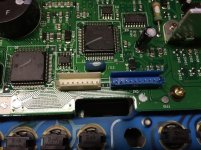
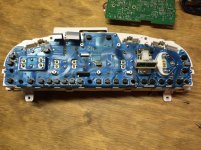
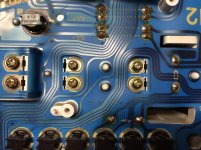
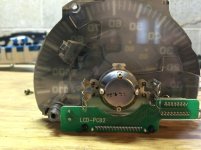
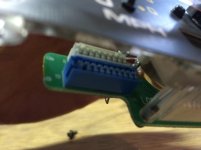
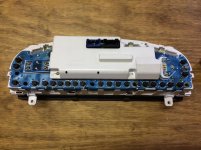
I pulled the cluster to see what I could find out and discovered what looks like missing cables to the speedometer/odometer assembly.

I took pictures so maybe someone with more experience can verify that cables are missing between blue connectors and white connectors. And maybe, tell me where I could get cables if that is the case?
 

Attachments

  • IMG_2824.jpg
    IMG_2824.jpg
    110.2 KB · Views: 3,413
  • IMG_2825.jpg
    IMG_2825.jpg
    92.7 KB · Views: 3,611
  • IMG_2830.jpg
    IMG_2830.jpg
    136.6 KB · Views: 3,644
  • IMG_2832.jpg
    IMG_2832.jpg
    133.5 KB · Views: 3,354
  • IMG_2834.jpg
    IMG_2834.jpg
    125.4 KB · Views: 3,309
  • IMG_2835.jpg
    IMG_2835.jpg
    55.5 KB · Views: 3,333
Register to hide this ad
I just happen to have one taken apart on my bench and there should be 2 cables going from the odo screen board to the main board. Seems shady they would be missing. Does the mileage show?

20150222_180748_1.jpg
 
I just got the truck a week ago and I have never seen the odometer work. I thought I was getting a good deal but I've noticed a couple things about the truck that the previous wasn't totally truthful about. The truck does run well but I am curious about the mileage now.

Do your cables happen to have a part number or any identifier printed on them?
 
What was the listed mileage on the title? Did you happen to get a Carfax? You wont find those cables separately. Find a used cluster and swap over the cables. I guess without the cables it wouldn't have recorded the mileage. I wondered if you'll end up with a low mileage cream puff.
 
I just got the truck a week ago and I have never seen the odometer work. I thought I was getting a good deal but I've noticed a couple things about the truck that the previous wasn't totally truthful about. The truck does run well but I am curious about the mileage now.

Do your cables happen to have a part number or any identifier printed on them?

How did you transfer the title without an odo reading?
 
What was the listed mileage on the title? Did you happen to get a Carfax? You wont find those cables separately. Find a used cluster and swap over the cables. I guess without the cables it wouldn't have recorded the mileage. I wondered if you'll end up with a low mileage cream puff.

The mileage is stored on a eeprom chip on the main circuit board. Pretty sure those cables are just to display it on the LCD.
 
The mileage is stored on a eeprom chip on the main circuit board. Pretty sure those cables are just to display it on the LCD.

Ok cool, then find out if the PO committed felony fraud and blackmail them for the price of the used cluster and whatever else you think is appropriate :police:
 
I did get a car history report and the mileage was listed as "Exempt" since the second sale in 2011. In the bill of sale I listed the miles the same way it has them on the title, "Exempt" and the transfer seemed to go through fine.

The guy I got it from said it had about 175k. Now, I'm not sure how he would know that. Unless he was the one who removed the cables.

Anyhow, I will keep my eyes out for a cheap used cluster to get the cables from. Thanks for the pic repo. Thats what I was looking for.
 
I know this is an older topic, but I need some help on the subject as well.

I have a 2003 4Runner SR5, and the other day the odometer quit counting, but both trips are still working. The rest of the dash cluster works fine and I do not have any known electrical issues or check engine lights. Does anyone have any suggestions?
 
I know this is an older topic, but I need some help on the subject as well.

I have a 2003 4Runner SR5, and the other day the odometer quit counting, but both trips are still working. The rest of the dash cluster works fine and I do not have any known electrical issues or check engine lights. Does anyone have any suggestions?

---------------------------------------------
I have the same issue with a 2007 4Runner. all guages work, speedometer, tac, tripometer A&B. But, the odometer doesn't spin or advance forward. Does anyone have a solution short of a new instrument cluster?
 
---------------------------------------------
I have the same issue with a 2007 4Runner. all guages work, speedometer, tac, tripometer A&B. But, the odometer doesn't spin or advance forward. Does anyone have a solution short of a new instrument cluster?

this is the 3rd gen forum
 
I know this is an older topic, but I need some help on the subject as well.

I have a 2003 4Runner SR5, and the other day the odometer quit counting, but both trips are still working. The rest of the dash cluster works fine and I do not have any known electrical issues or check engine lights. Does anyone have any suggestions?

Sadly the 2003 is a 4th gen 4 Runner Being this 3rd gen 4 runner forum. You probably have better success on the 4th gen section with this question. :-)
 
Hey, is this the 3rd gen section? I seem to be a bit lost here...

Sent from my SM-S908U using Tapatalk
 
The mileage is stored on a eeprom chip on the main circuit board. Pretty sure those cables are just to display it on the LCD.


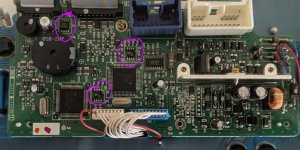
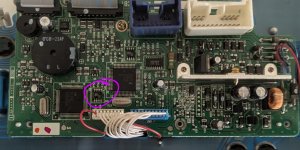
I don't suppose you know which chip specifically? I need to swap the board in my cluster due to two burned out resistors, and I'd like to transfer my odometer reading over to the replacement board.
 

Attachments

  • PXL_20241117_190258031.RAW-01.MP.COVER~2.jpg
    PXL_20241117_190258031.RAW-01.MP.COVER~2.jpg
    147.2 KB · Views: 493
I don't suppose you know which chip specifically? I need to swap the board in my cluster due to two burned out resistors, and I'd like to transfer my odometer reading over to the replacement board.
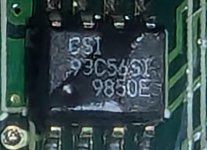
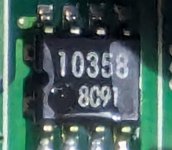
What are the markings on each of those chips?

-Charlie
 
Check with your state smog bureau and see if they can give you the last mileage/date it was tested.....long shot but that may work.
 
What are the markings on each of those chips?

-Charlie

Thank you for the reply. I'm having a hell of a time finding any info on this.

-Richard
 

Attachments

  • PXL_20241120_001553139.RAW-01.MP.COVER.jpg
    PXL_20241120_001553139.RAW-01.MP.COVER.jpg
    91.1 KB · Views: 176
  • PXL_20241120_001605514.RAW-01.MP.COVER.jpg
    PXL_20241120_001605514.RAW-01.MP.COVER.jpg
    104.4 KB · Views: 173
  • PXL_20241120_001621901.RAW-01.MP.COVER.jpg
    PXL_20241120_001621901.RAW-01.MP.COVER.jpg
    112.4 KB · Views: 171
Thank you for the reply. I'm having a hell of a time finding any info on this.

-Richard
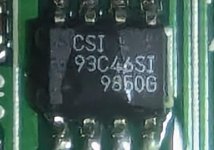
The 93C56 and 93C46 are both EEPROMs, so no help there. The 10358 *might* be a dual opamp, I'd have to check pinout...

I was hoping only one of them would be an EEPROM...

Since you have to guess here, I'd go with the one closest to the IC driving the ODO LCD...

-Charlie
 
The 93C56 and 93C46 are both EEPROMs, so no help there. The 10358 *might* be a dual opamp, I'd have to check pinout...

I was hoping only one of them would be an EEPROM...

Since you have to guess here, I'd go with the one closest to the IC driving the ODO LCD...

-Charlie


I'm guessing this is what you are referring to. I'm pretty sure those cables, or at least one of them, goes to the LCD.
 

Attachments

  • PXL_20241117_190258031.RAW-01.MP.COVER~3.jpg
    PXL_20241117_190258031.RAW-01.MP.COVER~3.jpg
    146.6 KB · Views: 173

Members online

Forum statistics

Threads
278,305
Messages
3,554,043
Members
248,016
Latest member
Advally Service

Trending content

Back
Top